
15 Minute YouTube Shorts Ads Playbook for Performance Marketers
A marketer-first playbook to launch YouTube Shorts ads: 15-minute setup steps, official 9:16 asset specs, high-velocity creative workflows, and an AI...
You can run YouTube Shorts ads through Google Ads by uploading a vertical Short and choosing a Shorts-capable campaign type. Video Reach, Performance Max, Demand Gen, and App campaigns all serve into the Shorts feed. These ads run as mobile-first vertical assets, usually under 60 seconds, and viewers can swipe past them the same way they swipe past organic content, so your first three seconds carry the entire burden of the ad.
TL;DR:
- Use vertical 9:16 format for Shorts ads, focusing on the first 60 seconds, with minimal editing needed for horizontal assets.
- Prioritize campaign types such as Video Reach, Performance Max, Demand Gen, or App campaigns that support Shorts placements.
- Track key metrics like watch-through rate, unique reach, CTA click-through rate, conversions, and cost per view or action specific to Shorts.
- Rotate creative frequently, especially hooks, and expand your audience to combat rapid ad fatigue unique to short-form video.
- Develop a steady pipeline of vertical content by repurposing product photos or app screenshots into quick, native Shorts to maximize testing and performance.
Table of Contents
- How Do You Set Up a YouTube Shorts Ads Campaign?
- What Are the Asset Specs and Creative Rules for Shorts Ads?
- Which Campaign Type Actually Delivers Shorts Placements?
- What KPIs Should You Track for Shorts Ads?
- What Creative Formats and Hooks Work Best on Shorts?
- What Content Policies Apply Specifically to Shorts Ads?
- How Do You Avoid Ad Fatigue on Shorts?
- Where Do Shorts Fit in a Full-Funnel Strategy?
- Produce Shorts Creative Without the Production Bottleneck
- Sources
How Do You Set Up a YouTube Shorts Ads Campaign?
Setting up Shorts ads inside Google Ads takes about fifteen minutes once your video exists. The workflow overlaps with standard YouTube video campaigns, but a few steps are specific to Shorts and easy to miss on your first pass.
- Pick your objective, then choose a Shorts-eligible campaign type. Video Reach campaigns with “Efficient reach,” Performance Max, Demand Gen, and App campaigns all support Shorts placements.
- Upload your Short to YouTube first, either public or unlisted, then paste that URL into the Google Ads creative field. Google Ads pulls the asset directly from YouTube rather than accepting a raw file upload.
- Turn on multi-format settings so the Shorts placement toggle is active, then set device targeting to prioritize mobile, since that’s where the vast majority of Shorts viewing happens.
- Set your budget and bidding, then double-check your headline and description fields, since these populate the CTA overlay viewers see mid-video.
The most common setup mistake is skipping the format toggle entirely and assuming a standard video campaign will auto-serve into Shorts. It won’t. The second most common mistake: submitting only horizontal creative and hoping Google crops it well. It rarely does. The third: writing a CTA that gets truncated because nobody checked the character limit before launch.
What Are the Asset Specs and Creative Rules for Shorts Ads?
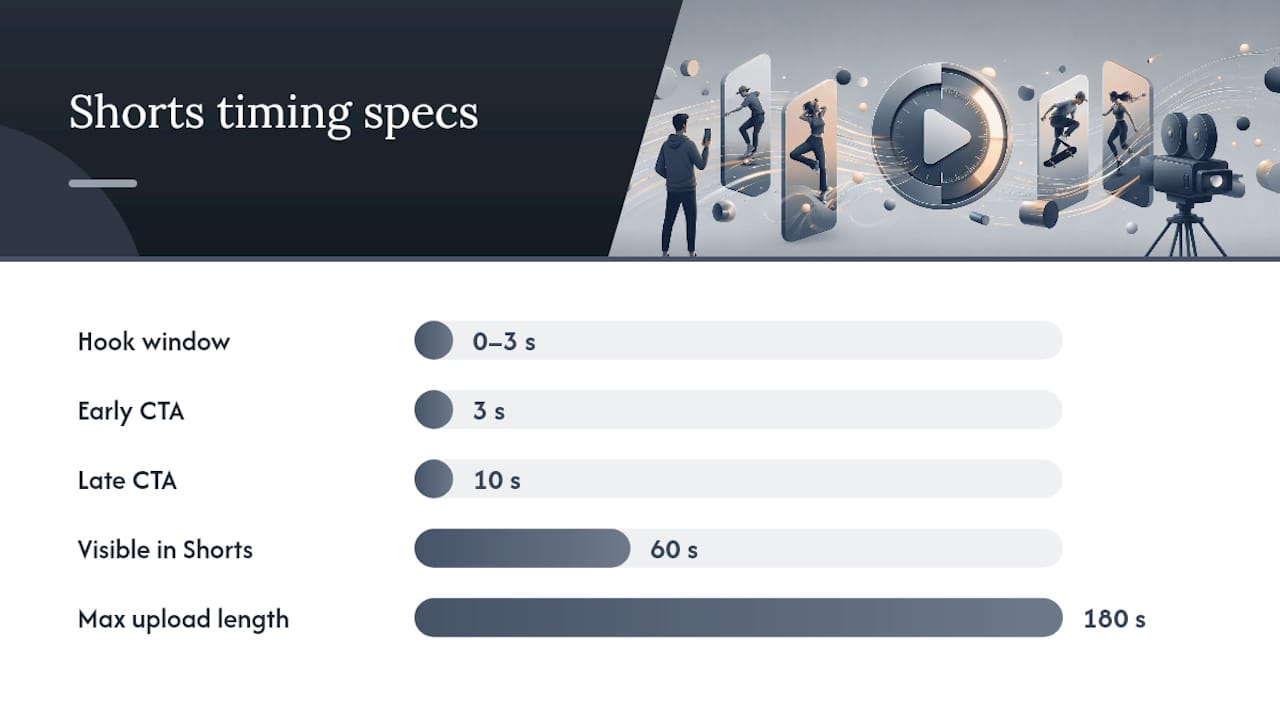
Google’s own guidance is specific here, and ignoring it is the fastest way to waste a media budget. Vertical 9:16 is the recommended format, and while you can technically upload a video up to three minutes long, only the first 60 seconds ever play inside the Shorts feed. Anything past that mark is invisible to the viewer, so editing for the first minute isn’t optional. It’s the whole ad.
- Design for sound-on viewing; Shorts audiences rarely mute, unlike Feed or Stories placements on other platforms.
- Front-load your hook in the first 0 to 3 seconds, before any skip-swipe decision gets made.
- Match the native Shorts aesthetic rather than dropping in a polished commercial that reads as an interruption.
- Use text overlays for anyone watching without sound, and keep your brand visible without turning the frame into a logo slide.
- Keep your headline near 40 characters and your description near 90, since Google enforces limits on the CTA overlay text.
CTA overlay timing also varies by campaign type. Some formats show the CTA around the 3 second mark, others hold it until closer to 10 seconds, so test both if your campaign type gives you the option. If your existing assets are horizontal, Google Ads’ Video Enhancement and trimming tools can reformat them into vertical, but a purpose-shot vertical asset almost always outperforms a stretched or cropped one.
Pro Tip: Shoot every new creative in vertical from the start, even if you also need a horizontal cut for YouTube in-stream. Reformatting after the fact is a workaround, not a strategy.
Which Campaign Type Actually Delivers Shorts Placements?
Not every YouTube campaign type reaches the Shorts feed, and picking the wrong one means your creative never gets the placement you built it for. Match the campaign type to what you’re actually trying to achieve.
- Brand reach and awareness: Video Reach campaigns with “Efficient reach” are built for this, and Shorts is one of the placements included by default.
- Conversions and sales: Performance Max pulls Shorts inventory into its automated mix alongside Search, Display, and Discover.
- App installs: App campaigns route creative into Shorts as part of their broader inventory pool.
- Community and product discovery: Demand Gen leans on visual, feed-style placements, with Shorts as a natural fit.
Charging models differ by setup. Some Video Reach buys are priced on views or impressions, while Performance Max and Demand Gen weight toward the action you’re optimizing for, whether that’s a click, an install, or a conversion. Inside any of these, the “YouTube Shorts” toggle in Creative Preferences controls whether your multi-format assets are eligible to serve there at all. Run a forecast in Reach Planner before you commit budget, so you’re not guessing at scale.
What KPIs Should You Track for Shorts Ads?
Shorts performance data can mislead you if you judge it by the same yardstick as long-form YouTube ads. Watch-through rate matters more here than average view duration, because Shorts are short by design and a completed view signals something a partial 30-second watch on a two-minute video doesn’t.
Track these five metrics as your baseline:
- Watch-through rate (WTR): the percentage of viewers who watch to completion.
- Unique reach: how many distinct people your Short actually hit, not just impressions.
- CTR on the CTA overlay: the truest signal that your offer, not just your hook, is landing.
- Conversions or installs: the bottom-line number your budget answers to.
- Cost per view or cost per action: varies by campaign type, so compare within the same format only.
Advertiser sentiment data on short-form platforms, tracked by Statista, shows how unevenly brands are still adapting their measurement habits to short-form formats, which is part of why so many teams default to long-form benchmarks that don’t translate cleanly.
Run experiments in tight cycles: swap only the hook and hold everything else constant, then test CTA wording separately. Widen your audience if frequency is climbing faster than conversions, narrow it if CTR is strong but volume is thin. If a campaign type stalls after two or three creative refreshes, that’s your signal to pivot budget rather than keep iterating on the same format. For teams building out reporting workflows around this, a structured approach to monitoring campaign results helps keep Shorts data from getting lost inside broader video reporting.
What Creative Formats and Hooks Work Best on Shorts?
Four formats consistently outperform generic product spots on Shorts, and each one maps to a different stage of viewer attention.
- UGC-style testimonial (10 to 20 seconds): a person talking directly to camera about a real result, styled like organic content rather than an ad.
- Micro demo (15 to 30 seconds): the product doing the one thing it does best, no narration required.
- Creator POV series (3 to 5 episodes): a running character or voice that rewards repeat viewing across a campaign.
- Value bomb how-to (30 to 60 seconds): a genuinely useful tip that happens to feature the product.
Structure each one around a simple script frame: hook, then value, then CTA. Shoot in mobile framing from the start, caption everything on screen, and if you’re working from product photography rather than video, a quick product reveal cut can substitute for a full shoot. Blending ad creative with the native Shorts feel consistently outperforms polished commercial styling, according to Google’s own case study data.
Pro Tip: Generate 10 to 20 short variants at once instead of perfecting one. Run them head-to-head, kill the losers within 48 hours, and build a long-form follow-up only for the Shorts that actually win.
What Content Policies Apply Specifically to Shorts Ads?
Shorts ads follow the same core YouTube advertising policies as standard video campaigns, but the feed’s format introduces a few wrinkles worth flagging before you submit creative.
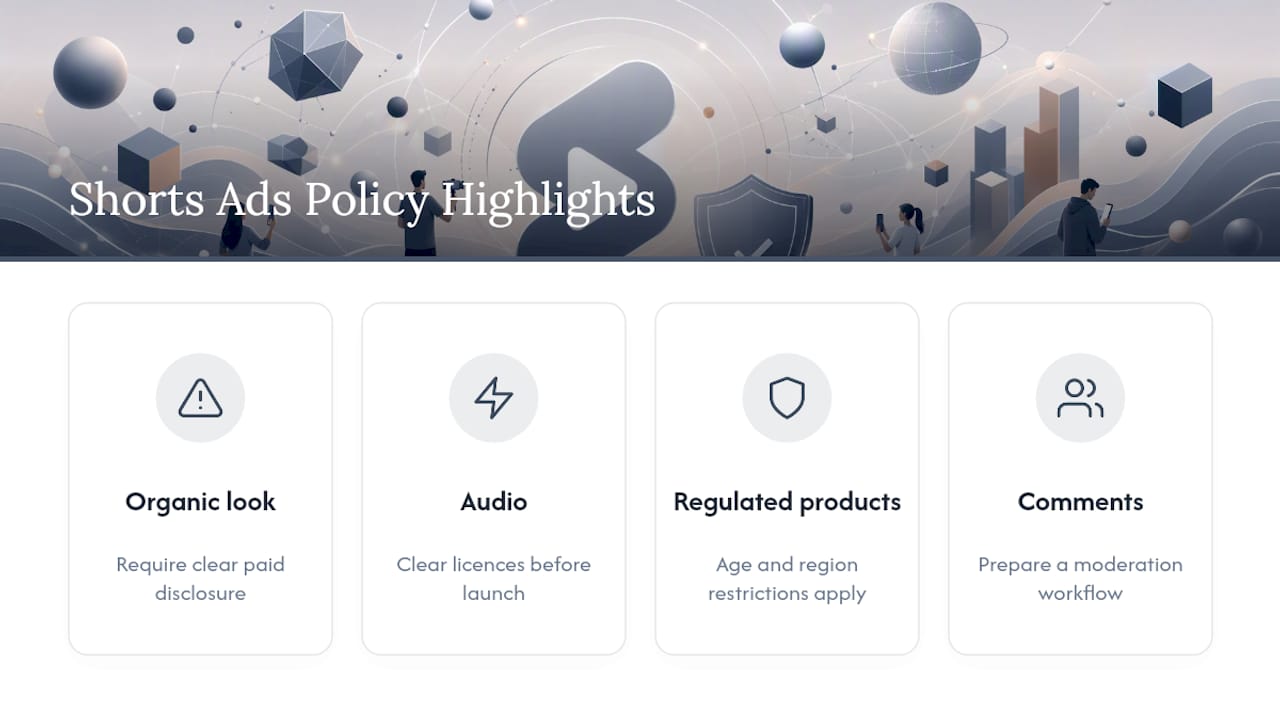
Because Shorts sit in a rapid-swipe environment next to organic content, Google applies extra scrutiny to anything that could be mistaken for organic video, including misleading framing, clickbait thumbnails carried over from other platforms, or claims that aren’t substantiated in the video itself. Ads that look deceptively like a regular creator’s Short, without adequate disclosure, risk disapproval even if the underlying product claim is accurate.
Audio matters more here than in horizontal formats. Music, sound effects, and voiceover all fall under the same copyright and licensing rules as any YouTube upload, and a rejected audio track can hold up an entire campaign launch. Clear your licensing before you’re ready to spend, not after.
Product-specific restrictions still apply in full: regulated categories like alcohol, gambling, and healthcare face the same age-gating and regional restrictions in Shorts as they do in-stream. The vertical format doesn’t loosen any of that.
Google also recently expanded comment functionality and creator linking on eligible Shorts ads, which means brands now need a plan for moderating public comments on paid creative, something that wasn’t a consideration for most in-stream formats. If you don’t have a comment moderation workflow, build one before you scale spend.
How Do You Avoid Ad Fatigue on Shorts?
Ad fatigue hits faster on Shorts than on any other YouTube format, mainly because the feed rewards novelty and viewers are already primed to swipe away from anything that feels repetitive. A creative that performs well in week one can flatten out within days if it’s the only asset in rotation.
The fix is rotation cadence, not just rotation. Plan to refresh creative on a schedule measured in days, not weeks, especially for campaigns running at meaningful spend. Watch frequency alongside watch-through rate. If frequency climbs while WTR drops, that’s fatigue setting in, and it usually shows up before conversions visibly decline, giving you a window to act early.
A few concrete levers help:
- Rotate hooks, not just endings. The first three seconds fatigue faster than the CTA, so refreshing the opening alone can extend a creative’s life.
- Widen your audience when frequency outpaces reach growth, since that usually means you’re recycling the same viewers too often.
- Stagger launch timing across a batch of variants instead of pushing them all live simultaneously, so you always have fresh creative entering rotation as older ones decline.
- Set a hard frequency cap per campaign rather than letting the algorithm run unchecked, particularly on Video Reach buys optimized for volume.
Treat creative production as an ongoing pipeline rather than a one-time asset drop. Campaigns that reserve a steady stream of new variants rarely hit the fatigue wall that stalls campaigns built around two or three “hero” ads stretched across an entire quarter.
Where Do Shorts Fit in a Full-Funnel Strategy?
Shorts are a discovery tool, not a closing tool, and treating them as your only conversion lever is where most budgets underperform. Use them to introduce a product to cold audiences, then pair that reach with long-form content or a landing page built for actual conversion.
Creative velocity beats a single polished spot almost every time on this format. Shorts reward volume and iteration, not perfection, so the teams winning here are the ones publishing constantly and letting performance data pick the survivors. Treat every Short as a doorway into something deeper, whether that’s a product page, a longer video, or your next campaign.
— Syno
Produce Shorts Creative Without the Production Bottleneck
Every tactic above assumes you have a steady supply of fresh vertical creative, and that’s usually where Shorts campaigns actually break down. This platform removes that bottleneck by turning product photos or app screenshots into 9:16 UGC-style videos in minutes instead of the weeks a traditional creator turnaround requires.

The platform generates scripts automatically, offers customizable AI avatars, and supports multiple languages, enabling production of testimonial-style Shorts creative for various markets without booking a single shoot. If you’re building a Shorts testing pipeline, start with adaptive video formats built for Shorts placements and see how many creative variants you can get in front of an audience before your next budget review.
Sources
For specs, campaign setup, and CTA behavior, go straight to YouTube Shorts ads asset specs, Video reach campaign buying guidance, and getting started with Shorts ads. For performance context, see Google’s Shorts ads case studies and Statista’s short-form advertising survey data.
- How to buy YouTube Shorts ads with Video reach campaigns - Google Ads Help
- YouTube Shorts Ads
- How brands can get the most out of YouTube Shorts ads
- Statista chart on short-form video advertising
