
UGC Ad Cost for B2B: Convert Credits to Final $/Video, $4–$500+
Convert AI platform credits into real per-video costs, model a 3–5 retry margin, and see when AI UGC ($4–$500+) outperforms $500+ human-created videos.
AI-generated UGC ad cost breaks down to a per-video price, not a flat rate: expect roughly $4 to $30 for quick social-test clips, $30 to $150 for standard short-form UGC ads depending on credit usage, and $500 or more for heavier, localized product videos. The math that matters most is simple. Multiply the credits a finished video actually consumes by your per-credit dollar rate, then pad that number for retries, because rejected generations still burn credits.
TL;DR:
- The typical cost for an AI-generated UGC ad ranges from $4 to $30 for quick social videos and can exceed $500 for heavily localized or customized projects, depending on complexity and retries.
- Credit consumption varies based on model choice, resolution, and the number of generation attempts, with rejected clips still incurring costs that increase the final expenditure.
- Monthly budgets should factor in an average of 3 to 5 retries per usable video, significantly impacting overall costs beyond initial estimates.
- Choosing the right purchasing plan—credit packs, subscriptions, or metered billing—depends on volume, with larger, predictable needs benefiting from enterprise agreements that lower per-second or per-video rates.
- AI UGC is most cost-effective for rapid testing and scaling variations, while human creators are better suited for high-trust, flagship campaigns requiring nuance.
Table of Contents
- What Does “UGC Ad Cost” Actually Mean Here?
- How Do AI Platforms Actually Price Video Output?
- Subscription, Metered, or Credit Packs: Which Fits Your Use Case?
- What Actually Drives Your Per-Video Spend Up or Down?
- How Do You Budget and Forecast Monthly AI UGC Spend?
- Where Does the ROI Actually Show Up?
- What Hidden Fees Should You Budget For?
- How Do You Negotiate Better UGC Pricing at Scale?
- Where AI UGC Fits Against Human Creators
- Get Started: Turning This Budget Math Into Real Ads
- Sources
- FAQ
What Does “UGC Ad Cost” Actually Mean Here?
Before going further, it helps to separate two things that get conflated constantly in this space. This article covers what it costs to generate UGC-style video ads through an AI platform, priced by credits, per-second billing, or subscription tiers. It is not about day rates charged by independent content creators who film testimonials for a fee. Those are two different budgets, two different vendor relationships, and two different procurement conversations.
The industry term for what you’re actually buying is AI-generated UGC-style video advertising, sometimes shortened to “AI UGC” inside marketing teams. Once you understand that the cost driver is credits or compute time, not a freelancer’s invoice, the entire pricing model starts to make sense.
How Do AI Platforms Actually Price Video Output?
Most AI video platforms sell you access through one of two mechanics: a credit pool tied to your subscription, or per-second metered billing tied to a pay-as-you-go rate. Either way, the sticker price on the pricing page rarely tells you what a finished, usable ad actually costs.
Here’s where the gap shows up. A documented production run tracked by InVideo’s pricing breakdown found that a typical AI UGC ad consumes about 500 credits, which works out to roughly $125 at an implied 21 cent per credit anchor. A simpler product-swap video, where you’re just replacing an object in an existing scene, ran closer to 115 credits, or about $30. Those totals include the generations that got rejected and rerun, which is the detail most buyers miss when they’re comparing platforms on price alone.
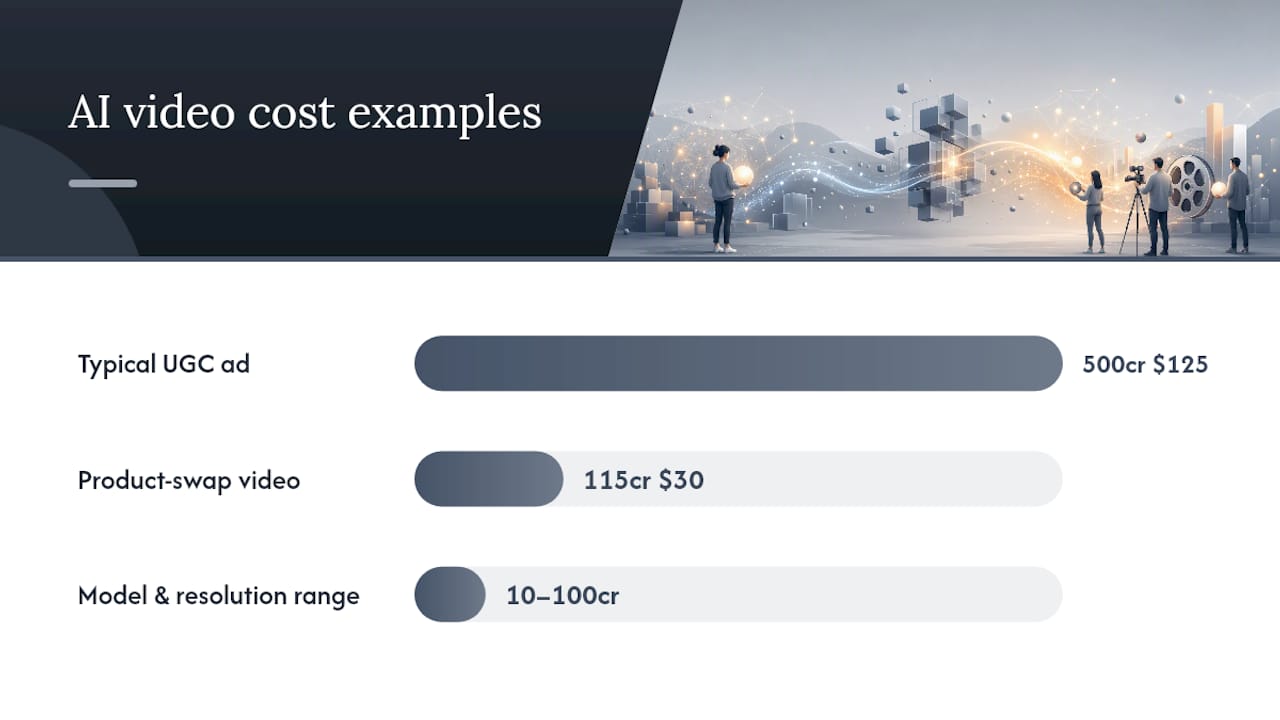
Credit consumption also swings hard based on model choice and output resolution. Artlist’s AI Toolkit documentation shows credit costs per generation varying from the tens into the hundreds depending on which model family you select and what resolution you’re rendering at.
Statistic Callout: A 500-credit UGC ad at a 21 cent per credit rate lands near $125 per finished video, before you factor in any regenerations.
Three things drive that final number:
- The credit weight of the specific model and resolution you choose
- How many attempts it takes before a generation is usable
- Whether the platform charges full price for a regeneration (most do)
That last point is the one that quietly inflates budgets. A rejected clip isn’t a freebie. It’s a sunk cost that gets added to whatever the eventual keeper costs, which is why “cost per generation” and “cost per usable video” are two very different figures.
Subscription, Metered, or Credit Packs: Which Fits Your Use Case?
Three buying patterns dominate this market, and picking the wrong one for your volume is the fastest way to overpay.
- Tester or occasional buyer: A one-off credit pack or the entry subscription tier works fine if you’re producing a handful of ads a month to validate a concept.
- Steady creator: A mid-tier subscription with a pooled monthly credit allowance suits teams shipping weekly ad variations for ongoing testing.
- Programmatic, high-volume shop: Agencies and catalog-heavy e-commerce brands generating dozens of ads weekly need top-tier or enterprise plans, where the implied per-second rate drops the most.
The trick to comparing plans fairly is converting the sticker price into an implied per-second rate, as explained by this AI Video Generator: Short Video From a Script guide. Testing by reAPI found that an entry-level plan priced around $12 a month implied roughly $0.231 per second of output, while a top tier at $76 a month implied about $0.096 per second, meaning the cheaper plan actually cost more than double per second of finished video.
Watch for caps hiding behind “unlimited” language, too: model substitutions on lower tiers, resolution ceilings, duration limits, and concurrency restrictions that slow your queue during peak production windows.
Pro Tip: Before comparing any two plans, divide the monthly price by the total seconds of output you’re realistically allowed to generate. That single number cuts through marketing language faster than any feature list.
What Actually Drives Your Per-Video Spend Up or Down?
Credit consumption isn’t fixed. It responds directly to choices you make before you hit generate, and most teams are burning budget on defaults they never questioned.
- Shorten the clip. A 15-second ad costs meaningfully less than a 30-second one across nearly every credit-based platform, and shorter cuts often perform just as well in feed placements.
- Lock your keyframes. Generating a strong still image once, then animating it, avoids paying full generation cost every time you want a variation.
- Draft in a cheaper model tier. Save the premium, higher-resolution model for the version you’re actually going to run as a paid ad.
- Batch your brand setup. Uploading brand assets, product photos, and script parameters once and reusing that setup across multiple ads amortizes a fixed cost across many outputs, similar to the setup-then-scale workflow InVideo documented, where an initial 15 to 20 minute setup preceded faster, cheaper subsequent generations.
- Localize smart, not full. Swapping the avatar’s spoken language or voice track usually costs far less in credits than re-rendering an entire scene from scratch for each market.
Pro Tip: Build a two-step QA habit: approve the script and keyframe before you spend credits on full video generation. Catching a bad hook at the still-image stage is nearly free compared to catching it after a full render.
How Do You Budget and Forecast Monthly AI UGC Spend?
The formula finance teams actually need is this: Budget = target usable videos × average credits per finished video × price per credit × (1 + retry margin).
The retry margin matters more than most procurement plans account for. reAPI’s testing found operators commonly see 3 to 10 attempts per keeper, with 3 to 5 used as a conservative planning anchor.
Reading a plan page correctly means finding two numbers: the total monthly credit pool, and the implied per-second or per-video rate once you divide the plan price by realistic output. Skip that math and you’re comparing headline prices instead of actual production capacity.
- Always model your retry factor using your own historical approval rate, not a vendor’s best-case example.
- Recalculate quarterly. Credit efficiency improves as your team learns which prompts and settings produce first-pass approvals.
Where Does the ROI Actually Show Up?
Instant-UGC reports generating finished videos in 2 to 5 minutes, with 9:16 delivery ready in 90 to 120 seconds, per-video pricing as low as $4 to $7 in some workflows, support across 17 languages, and access to 10 or more customizable AI avatars, according to its own product and proof pages.
Compare that against the third-party cost anchors already established: an average AI UGC ad running near $125 in credits, and a simpler product-swap ad closer to $30. The scope differs. Instant-UGC’s low end reflects streamlined, template-driven output for physical products or app screenshots, while the higher third-party figures often include more iteration and custom scene work.
Statistic Callout: Documented production costs range from roughly $30 for a simple product swap up to $500 or more for a heavily customized, localized ad, according to InVideo’s cost comparison.
- Volume testing across ad variations tends to show the fastest ROAS payoff, since low per-video cost lets you test more hooks per dollar.
- Catalog refreshes benefit from the same batch-setup economics described earlier.
- Localization campaigns realize outsized returns because swapping language costs far less than commissioning region-specific creator content.
What Hidden Fees Should You Budget For?
The headline per-video or per-credit price rarely covers everything you’ll actually be billed for. Licensing terms are the first thing to check: some platforms grant full commercial usage rights by default, while others restrict how long you can run an ad or which channels you can run it on without an upgraded tier.
Revisions are the second cost trap. A “revision” often isn’t a lightweight edit. On credit-based platforms, changing the script, swapping the avatar, or adjusting pacing frequently triggers a full regeneration at full credit cost, not a discounted patch fee. Ask specifically whether a platform offers cheap partial edits (swap a caption, adjust a caption card) versus full re-renders, because that distinction alone can double your effective per-video cost if you assumed lightweight edits were included.
Watch for these additional line items before you commit to a plan:
- Stock footage or music licensing fees layered on top of generation credits
- Rush or priority-queue fees for faster turnaround during high-demand periods
- Export or format fees for delivering the same ad in multiple aspect ratios
- Overage charges once you exceed a subscription’s monthly credit pool
- White-label or multi-seat fees for agencies managing several client brands on one account
None of these appear on a pricing page’s headline number, which is exactly why they catch procurement teams off guard mid-quarter.
How Do You Negotiate Better UGC Pricing at Scale?
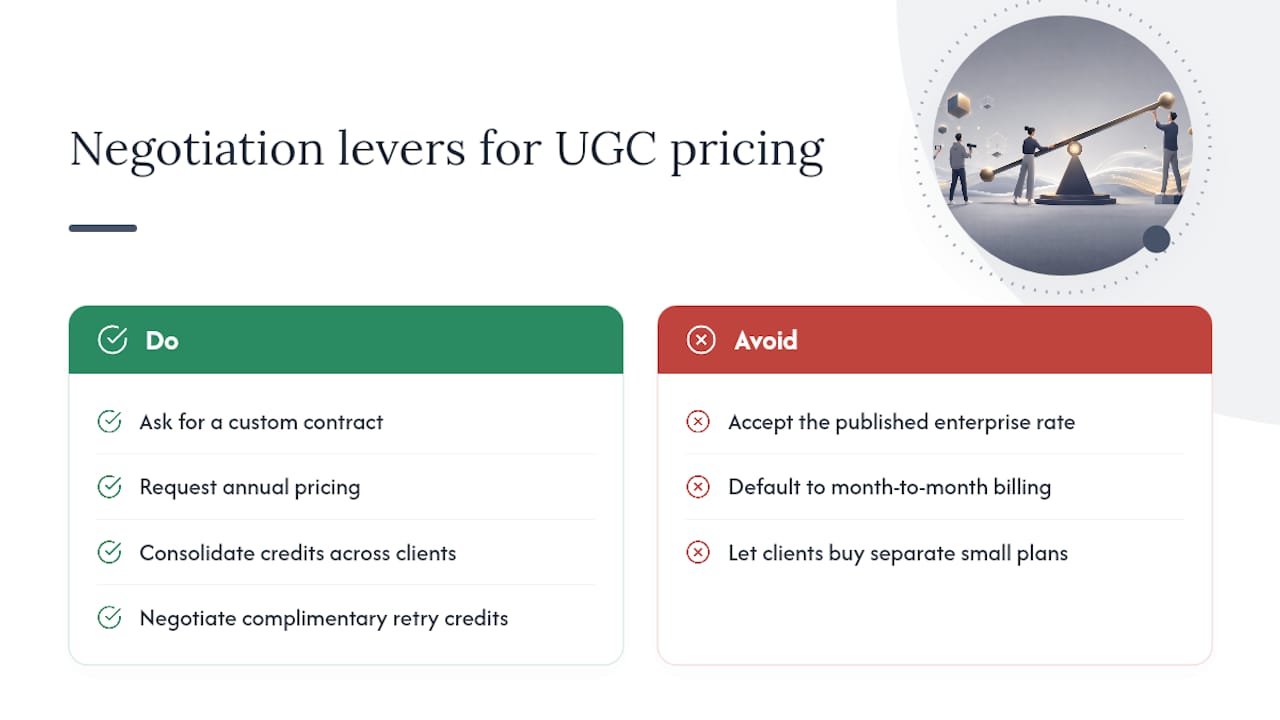
Volume is your leverage, and most AI video platforms have unpublished tiers above their listed enterprise plan. If your monthly credit consumption is predictable and growing, ask directly for a custom contract rather than accepting the published enterprise rate. Vendors would rather lock in a large account at a modest discount than lose it to a rate-shopping competitor.
Annual commitments typically unlock a meaningfully lower per-credit rate than month-to-month billing, since the vendor is trading price for predictable revenue. If your ad calendar is stable enough to commit for a year, ask specifically about annual pricing before assuming the monthly rate is your only option.
Bundling matters too. Agencies managing several client accounts often get better terms consolidating credit purchases under one enterprise contract rather than letting each client buy separate small plans. Ask whether white-label or multi-brand credit pooling is available.
Finally, negotiate around retry costs specifically. Some vendors will grant a batch of complimentary regeneration credits for new accounts or large onboarding commitments, which directly offsets the retry margin built into your budgeting formula. It costs the vendor little to grant and saves you real money in the first few months while your team learns the platform’s prompt patterns.
Where AI UGC Fits Against Human Creators
AI-generated UGC wins on scale, speed, and iterative testing, where you need dozens of hook variations this week, not one polished asset next month. Human creators still earn their higher cost on hero campaigns and sensitive categories where nuance and trust carry more weight than volume. The smartest roadmap treats these as sequential, not competing: test cheaply with AI-generated variants, identify what actually converts, then reinvest human production budget into scaling the winners rather than guessing upfront which concept deserves it.
— Syno
Get Started: Turning This Budget Math Into Real Ads
Every calculation above assumes you can actually hit those per-video numbers, and that’s the gap Instant-ugc is built to close. Instead of estimating credits against an unfamiliar model, you get a platform designed around the two workflows most buyers in this article actually need: physical product ads for Shopify, Amazon FBA, and dropshipping catalogs, and testimonial-style videos built for app and SaaS marketing.

Instant-UGC’s reported numbers map directly onto the budgeting framework covered above:
- Finished videos generated in a few minutes, with 9:16 output ready quickly
- Per-video pricing as low as a few dollars in supported workflows, below some industry averages
- Support for multiple languages and numerous customizable AI avatars
- Some brands report return on ad spend (ROAS) improvements using such platforms
If you’re running the scale-program math from the worked example, that per-video range changes the entire retry-margin equation in your favor. Start by exploring the AI video generator for advertising to see how the physical-product and app-screenshot workflows differ, or head straight to a credit pack if you already know your monthly volume.
Sources
A handful of independent references back up the numbers in this article and are worth checking directly if you’re building a formal budget proposal.
- What AI Video Ads Actually Cost: A Full Pricing Breakdown — InVideo
- AI Toolkit — Understanding credits for AI Image and Video — Artlist Help
- Unlimited AI video generator cost test — reAPI
FAQ
How Much Does an AI-Generated UGC Ad Cost?
Typical AI UGC ad costs run from $4 to $30 for quick social-test videos, $30 to $150 for standard short-form ads, and $500 or more for heavily customized, localized productions. Instant-ugc reports per-video pricing as low as $4 to $7 in supported workflows.
What Is a Credit in AI Video Pricing?
A credit is a unit of compute that platforms deduct per generation, with the exact cost varying by model, resolution, and video length. Converting your credit price to a dollar figure per finished video is the only reliable way to compare platforms.
Why Do Regenerations Make AI UGC More Expensive Than Expected?
Most credit-based platforms charge full price for a rejected generation, so your real cost per usable video is your base credit cost multiplied by however many attempts it takes to get a keeper, often 3 to 5 attempts.
How Does AI UGC Cost Compare to Hiring a Human Creator?
Traditional creator-produced UGC videos commonly run $500 or more per video and take two to three weeks to deliver, while AI-generated equivalents can cost a fraction of that and deliver in minutes.
What’s the Best Way to Budget for a Month of AI UGC Ads?
Multiply your target number of usable videos by the average credits per finished video and your per-credit price, then add a retry margin of roughly 3 to 5 attempts per keeper to get a realistic monthly figure.
