
TikTok Ad Specs: The 2026 Guide for Marketers
Discover the essential TikTok ad specifications for 2026. Get tips on format, resolution, and file size to enhance your marketing strategy.
For most TikTok placements, export 1080×1920 pixels, 9:16 aspect ratio, MP4 container (H.264), AAC audio, 30 fps, under 500 MB. That single prescription covers In-Feed, Spark, and most Reservation buys. Keep critical text and CTAs inside the center 60% of the frame to clear TikTok’s UI overlays. According to AdRate’s placement spec summary, the platform minimum for 9:16 is 540×960, but that resolution looks noticeably soft on modern phones, so 1080×1920 is the only export worth handing to an upload team.
Quick production checklist — paste this into your asset brief:
- Aspect ratio: 9:16 (vertical) for all primary placements; 1:1 or 16:9 only when repurposing
- Resolution: 1080×1920 recommended; minimums are 540×960 (9:16), 640×640 (1:1), 960×540 (16:9)
- File format: MP4 or MOV; H.264 codec; AAC audio
- Max file size: 500 MB hard cap; aim for under 100 MB in practice
- Safe zone: Keep all key text, logos, and CTAs inside the center 60% of the frame
Note: The TikTok Ads Manager Preview Tool and the account upload prompt are the final authority on specs. Published summaries, including this one, reflect general guidance. Always preview in-account before launch, because Ads Manager can surface stricter or more current limits than any third-party reference.
Key Takeaways
For most TikTok placements, the correct export is 1080×1920 pixels, 9:16 aspect ratio, MP4, AAC audio, 30 fps, under 500 MB, with all critical text inside the center 60% of the frame.
| Point | Details |
|---|---|
| Default export recipe | 1080×1920, 9:16, MP4, AAC audio, 30 fps; aim under 100 MB for fastest uploads. |
| Bitrate by placement | In-Feed Auction needs ≥516 kbps; TopView and Reservation need ≥2,500 kbps. |
| Safe-zone rule | Keep critical text, logos, and CTAs inside the center 60% of the frame to clear all UI overlays. |
| Duration guidance | In-Feed Auction allows up to 10 minutes; TopView and Reservation cap at 5–60s, with 9–15s recommended for performance. |
| Instant-ugc workflow | Instant-ugc generates 9:16 TikTok-ready videos in under two minutes, with safe-zone templates and multi-language support built in. |
Table of Contents
- What are the TikTok ad specs for each placement?
- How do TikTok’s safe zones and UI overlays affect your creative?
- What are TikTok’s ad text, caption, and profile image limits?
- Recommended export presets for TikTok ads
- Why do TikTok ads get rejected, and how do you QA before upload?
- Where should you verify TikTok ad specs before launch?
- The specs that matter most are the ones you keep getting wrong
- TikTok-ready UGC videos without the production wait
- Sources
What are the TikTok ad specs for each placement?
TikTok’s placement ecosystem has grown well beyond In-Feed. Each format carries its own duration, bitrate, and file-size expectations. The table below covers the placements most teams run.
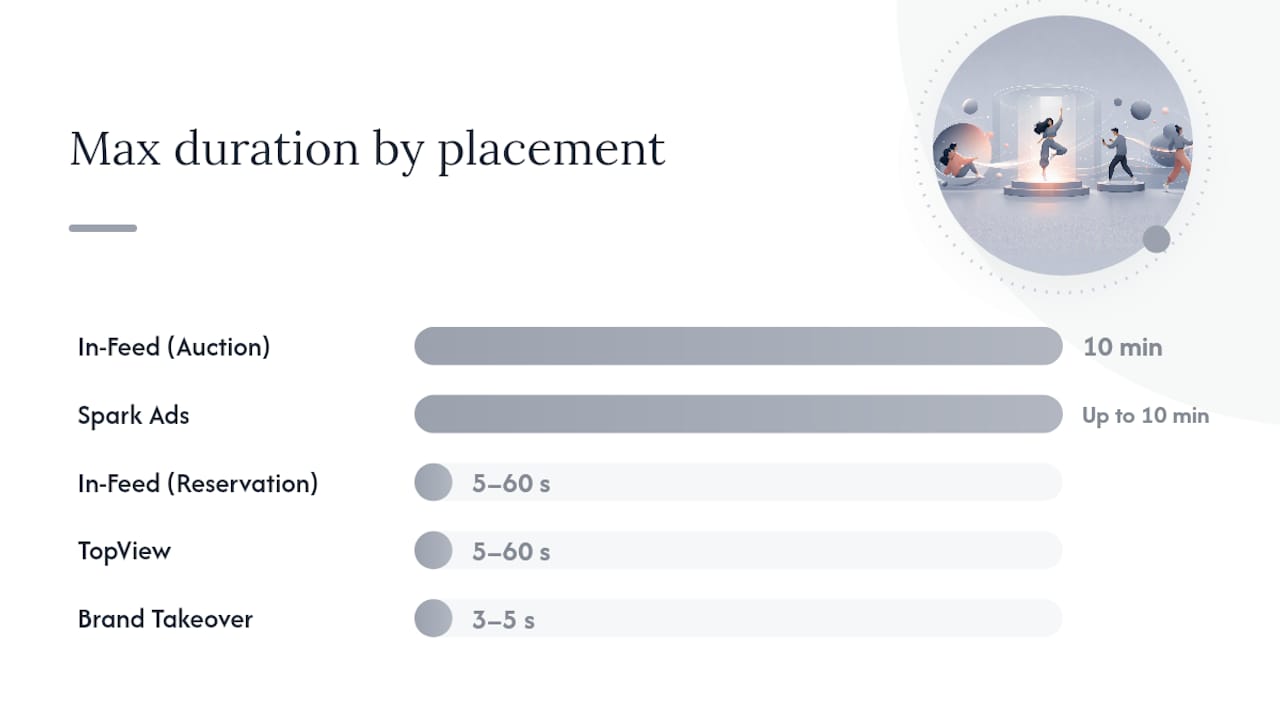
| Placement | Aspect Ratio | Min Resolution | Recommended Export | Max Duration | Max File Size | Accepted Formats | Bitrate |
|—|—|—|—|—|—|—|—| | In-Feed (Auction) | 9:16, 1:1, 16:9 | 540×960 / 640×640 / 960×540 | 1080×1920 | 10 min | 500 MB | MP4, MOV | ≥516 kbps | | In-Feed (Reservation) | 9:16 | 540×960 | 1080×1920 | 5–60s | 500 MB | MP4, MOV | ≥2,500 kbps | | Spark Ads | Inherits organic post | Inherits organic post | N/A (no upload) | Up to 10 min | N/A | N/A | Inherits original | | TopView | 9:16 | 540×960 | 1080×1920 | 5–60s | 500 MB | MP4, MOV | ≥2,500 kbps | | Brand Takeover | 9:16 | 540×960 | 1080×1920 | 3–5s | 500 MB | MP4, MOV | ≥2,500 kbps | | Carousel (Image) | 9:16 or 1:1 | 720×1280 or 640×640 | 720×1280 | N/A (image) | ≤100 KB/image | JPG, PNG | N/A | | Catalog / Shop | 9:16 or 1:1 | Feed-defined | 1080×1920 | Varies by feed | Feed-defined | MP4, JPG | Feed-defined |
Rule1’s placement reference documents that Auction In-Feed supports up to 10 minutes, while Reservation and TopView are typically capped at 5–60 seconds, with a relatively short duration recommended for performance campaigns. Statista’s engagement data by video duration supports that recommendation: completion rates tend to decline as runtime grows, which is why most performance teams default to short cuts even when the placement technically allows longer content.
Placement-specific production notes:
- In-Feed Auction: The most flexible placement. Accepts all three aspect ratios, but 9:16 fills the full screen and typically outperforms horizontal repurposes. If you must run a 16:9 asset, add vertical padding rather than letterboxing.
- Spark Ads: Vizup confirms that Spark pulls the organic post directly, inheriting its resolution, aspect ratio, and caption. No separate upload is needed. Verify the caption is compliant and the account is authorized before running.
- TopView and Brand Takeover: These play at app open, so visual quality is non-negotiable. Both require strict 9:16 framing and a bitrate of at least 2,500 kbps. Brand Takeover runs only a few seconds, so the hook must land in the first frame.
- Carousel: AdRate notes that standard carousels support 2–35 images, with vertical 720×1280 recommended and a per-image file size target of ≤100 KB.
- Catalog and Shop: Feed fields in the TikTok catalog override generic limits. Always check the catalog field requirements in Ads Manager, not just the general spec page, because product-card overlays reduce the usable bottom area of the frame.
Pro Tip: For Brand Takeover and TopView, render a separate master at ≥2,500 kbps even if your In-Feed master looks fine at a lower bitrate. The quality difference is visible on large screens and at app open.
How do TikTok’s safe zones and UI overlays affect your creative?
TikTok’s UI is not a passive frame around your video. The profile name, caption text, CTA button, like/comment/share stack, and music ticker all sit on top of your creative, and their exact position shifts depending on caption length, whether a product card is active, and the device’s screen size. There is no single universal pixel box that defines “safe.”
InfluencerDB’s safe-zone guidance recommends treating the center 60% of the frame as the priority area for critical text, logos, and product shots. When a Shop product card or CTA add-on is active, the bottom usable space shrinks by roughly 80–100 pixels, pushing safe content even higher. That means a CTA burned into the lower third of your video may be completely hidden in a shopping placement.
Common overlay locations to design around:
-
Bottom 20–25% of frame: Caption text, CTA button, profile handle, and music ticker all compete here. Keep this zone clear of critical copy.
-
Left edge: Profile image and engagement icons (like, comment, share) stack vertically on the right side; the left edge is generally cleaner but still not fully safe on all devices.
-
Top 10%: Usually clear, but avoid placing legal disclosures here because they can be cropped on some screen sizes.
The TikTok Ads Manager safe-zone templates and the Preview Tool are the definitive check. Download the official templates from the TikTok Business Help Center and overlay them on your creative before export. The Preview Tool inside Ads Manager shows exactly how your asset renders in each placement, including with captions and CTA buttons active.
Pre-handoff QA checklist for designers:
- Open the safe-zone template and confirm no critical text or logo sits outside the center 60%
- Preview with a long caption (80+ characters) to see how much bottom space is consumed
- Check the frame with a product card or CTA button active if running Shop or catalog
- View the preview on at least two device sizes (a standard phone and a larger screen)
- Confirm text is at least 24pt equivalent so it remains legible after compression
Pro Tip: Test your creative in the Ads Manager Preview Tool with the longest caption you plan to run, not the shortest. The worst-case caption is what your audience will actually see.
What are TikTok’s ad text, caption, and profile image limits?
Caption and copy limits vary by placement and ad type, and the differences matter more than most teams realize.
Caption and copy limits:
- Non-Spark In-Feed: Up to 100 characters visible in the caption area. Keep the first line punchy because TikTok truncates longer captions with a “more” tap.
- Spark Ads: Caption is pulled directly from the organic post. Up to approximately 4 lines display before truncation. Review the organic caption before authorizing the Spark boost.
- TopView: Caption limit is approximately 100 characters, consistent with In-Feed.
- @handles and links in captions: These are not clickable in most ad flows. Do not rely on a caption URL or handle as your primary CTA mechanism.
Profile name and image requirements:
- Brand/account name: typically 2–20 characters, though Ads Manager enforces the limit at upload.
- Profile image: square format, with the subject centered. TikTok crops the image to a circle in the UI, so keep logos and faces away from the edges.
- Profile image file size: generally under 50 KB for clean rendering.
CTA button behavior:
The CTA button in TikTok ads is a platform-level element, not a burned-in graphic. You configure it in Ads Manager, and TikTok renders it over your creative. This means your video does not need a burned-in “Swipe Up” or “Shop Now” graphic for the CTA to function. Burning a redundant CTA into the video can actually clutter the frame and compete visually with the platform’s own button.
Pro Tip: Keep your first caption line under 50 characters. That’s what shows before truncation on most devices, and it’s your only guaranteed visible copy in the feed.
Recommended export presets for TikTok ads
These presets are production-ready. Hand them directly to your editor or paste them into Adobe Media Encoder, Premiere Pro, or an FFmpeg command.
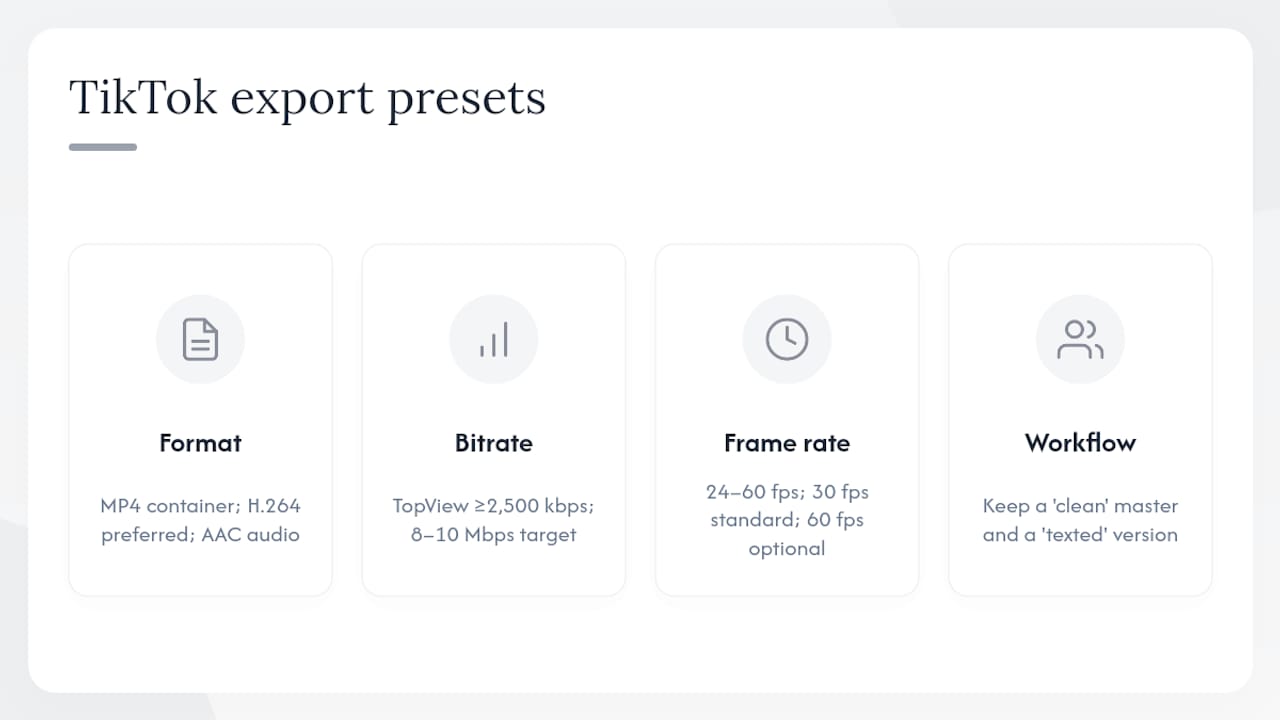
AdSights’ export guidance recommends MP4 with AAC audio at 30 fps as the standard preset because H.264 balances visual quality with fast platform processing. H.265/HEVC produces smaller files at equivalent quality, but TikTok’s transcoding pipeline can introduce artifacts with HEVC inputs, so H.264 remains the safer choice unless you have confirmed HEVC support for your account.
Variable bitrate (VBR) encoding is preferable to constant bitrate (CBR) for most exports because it allocates more data to complex motion frames and less to static ones, keeping file sizes manageable without sacrificing quality where it matters. For TopView and Reservation, AdRate’s bitrate guidance recommends a minimum of 2,500 kbps, though 8–10 Mbps is a more practical target for premium placements that play at app open.
Frame rate can range from 24–60 fps. Thirty fps is the standard for most social content. Use 60 fps only for fast-motion product demos where smoothness is a selling point, and confirm your file stays under the size cap.
Two-version workflow: InfluencerDB recommends keeping a “clean” master with no burned-in captions or CTAs, and a separate “texted” version with on-screen copy locked for the specific language and CTA. The clean master speeds up localization and A/B testing because editors can apply new text layers without re-cutting the underlying footage.
Pro Tip: Aim for under 100 MB even though the platform cap is 500 MB. Vizup’s upload guidance notes that files under 100 MB upload faster and avoid transcoding delays that can delay campaign launch.
Why do TikTok ads get rejected, and how do you QA before upload?
Most rejections fall into a small set of repeatable categories. Knowing them in advance saves the back-and-forth with the platform’s review team.
Common rejection and underperformance triggers:
- Wrong aspect ratio for the placement (especially sending 16:9 to a TopView or Brand Takeover buy)
- File size over 500 MB or an unsupported codec (AVI and MPEG can trigger processing errors)
- Bitrate too low for premium placements, causing blurry text or motion artifacts
- Critical copy or disclosures hidden under UI overlays because safe zones were not respected
- Policy violations in on-screen text (prohibited product claims, missing required disclosures)
- Caption copy that references a URL or @handle as the primary CTA (not clickable in most flows)
Step-by-step QA checklist before upload:
- Confirm aspect ratio matches the planned placement (9:16 for In-Feed, TopView, Brand Takeover)
- Open the safe-zone template and verify no critical text sits outside the center 60% of the frame
- Check caption length: under 100 characters for In-Feed and TopView; review the organic post caption for Spark
- Run a file-format check: MP4 or MOV, H.264, AAC audio
- Confirm bitrate: ≥516 kbps for In-Feed Auction; ≥2,500 kbps for TopView and Reservation
- Preview the asset in TikTok Ads Manager using the Preview Tool for the specific placement
- View the preview on at least two physical devices before approving for launch
Pro Tip: To reduce file size without killing legibility, use a two-pass VBR encode in Premiere or Media Encoder. Set the target bitrate at 6 Mbps and the maximum at 10 Mbps. This typically brings a 200 MB file down to 80–90 MB with no visible quality loss on mobile screens.
Where should you verify TikTok ad specs before launch?
No third-party guide, including this one, updates in real time when TikTok changes its platform. These are the primary sources to check before any campaign goes live.
Primary sources of truth:
- TikTok Business Help Center: The official spec pages for each ad format, including downloadable safe-zone templates. Check the specific placement page, not just the general overview.
- TikTok Ads Manager Preview Tool: Accessible inside any active ad group. Upload your asset, select the placement, and preview with captions and CTA buttons active. This is the only check that reflects your account’s actual configuration.
- Ads Manager upload prompt: When you upload a creative in Ads Manager, the platform surfaces any spec violations immediately. This prompt can show stricter limits than the Help Center if your account has specific restrictions.
- Safe-zone template downloads: Available from the TikTok Business Help Center. Download the template for each placement you run, not just the generic 9:16 version.
How to use the Preview Tool effectively:
Open Ads Manager, navigate to your ad creative, and select “Preview.” Choose the specific placement (In-Feed, TopView, etc.) and toggle through caption lengths. If you plan to run multiple caption variants, preview the longest one. The tool renders the platform UI overlays in real time, so you see exactly what a viewer sees.
Pro Tip: Bookmark the TikTok Business Help Center’s ad format index page and check it at the start of every new campaign cycle. TikTok updates specs more frequently than most platforms, and the Help Center reflects changes before any third-party guide does.
The specs that matter most are the ones you keep getting wrong
Most teams know the 9:16 rule. Where creative ops consistently lose time is in the gap between “technically compliant” and “actually visible.” A video can pass every spec check and still have its product shot buried under a caption bar, its CTA hidden by a product card, or its hook obscured because the editor placed the opening text in the bottom quarter of the frame.
The spec is the floor, not the ceiling. Getting the export right is table stakes. What separates high-performing TikTok creative from compliant-but-forgettable ads is mobile-first framing, a hook that lands in the first two seconds, and a visual style that looks native rather than broadcast. UGC-style creative consistently outperforms over-produced TV spots on TikTok because the platform’s algorithm rewards content that keeps viewers watching, and viewers stay longer when the ad feels like organic content.
The production shortcut worth adopting: build safe zones into your editing timeline as a locked guide layer, not as a post-export afterthought. That single habit eliminates the most common rework cycle in TikTok creative ops. Pair it with a two-version workflow (clean master plus texted final) and you have a production system that scales across placements, languages, and A/B test variants without re-editing from scratch.
TikTok-ready UGC videos without the production wait
Producing compliant 1080×1920 TikTok ads at volume is where most e-commerce teams hit a wall. Traditional UGC creators take 2–3 weeks and cost $500–$2,000 per video. Instant-ugc cuts that to minutes and a fraction of the cost.

Instant-ugc’s AI video generator outputs videos natively in 9:16 at 1080×1920, with safe-zone-aware templates that keep your product and CTA visible regardless of caption length. The platform supports 10+ customizable AI avatars, automatic script generation, and 17 languages, making it practical for both single-market launches and international catalog campaigns. E-commerce brands on Shopify and Amazon FBA use it to spin up multiple short variants per product, test hooks quickly, and scale what works without waiting on a creator pipeline. Generate your first TikTok-ready video at Instant-ugc and see the output in under two minutes.
Sources
- TikTok Ad Specs: Sizes & Aspect Ratios (AdRate)
- TikTok ad specs: every format, dimension, and requirement in one reference | rule1
- TikTok Ad Specs 2026: Video Sizes, Spark Ads & Safe Zones | Vizup
- TikTok video ad specs: Sizes, formats, and safe zones (InfluencerDB)
- TikTok video engagement by duration (Statista)
- TikTok Video Ad Creative Specs Guide | AdSights
Recommended
- TikTok UGC Ads: The Complete 2024 Guide to User-Generated Content Advertising | Instant-UGC Blog
- TikTok UGC Hooks 2026: The Ultimate Guide to Creating Scroll-Stopping Ads That Convert | Instant-UGC Blog
- AI TikTok Ad Generator: Transform Your Ad Creation in 2026 (Complete Guide) | Instant-UGC Blog
- AI TikTok Ads Generator | Create Viral TikTok Videos | Instant-UGC
