Build Ads in 90–120 Seconds: Slideshow Product Ads for Meta & Amazon
Turn product photos into slideshow product ads for Meta and Amazon. Get exact specs, creative recipes, budgeting guidance, and an Instant-UGC workflow...
Slideshow product ads turn existing product images into lightweight, video-like ads that load faster and cost far less than full-motion video. You build them from a short sequence of still photos, add music or captions, and let the platform animate the transitions. They work best on Meta and Amazon Sponsored Brands for catalog highlights, quick concept tests, and any campaign where a full video shoot isn’t practical.
TL;DR:
- Slideshow ads are ideal when high-quality product photos are available but video filming is impractical, offering faster load times and lower costs.
- They work best on Meta platforms and Amazon Sponsored Brands for quick concept testing, catalog highlights, and audiences with slow or limited bandwidth.
- Creating effective slideshows requires following specific specs, including 3-10 images, 5-15 seconds duration, and minimal text to ensure approval and proper delivery.
- Automated AI tools can produce slideshow-style videos in about 120 seconds, lowering production costs and supporting multiple languages simultaneously.
- Slideshow ads are a smart alternative for testing many concepts quickly but should be replaced with full-motion videos for complex demonstrations or storytelling needs.
Table of Contents
- What Are Slideshow Product Ads and When Should You Use Them?
- Where Do Slideshow Product Ads Actually Run?
- Slideshow Ad Specs: Images, Duration, Resolution, and Captions
- What Creative Recipes Actually Work for Product Slideshows?
- How Do You Build and Launch a Slideshow Ad?
- How Do You Measure and Optimize Slideshow Performance?
- How Instant-ugc Speeds Up Slideshow-Style Ad Production
- How Much Should You Budget for Slideshow Product Ads?
- What Legal and Copyright Rules Apply to Slideshow Ad Assets?
- When Should You Choose Slideshows Over Full-Motion Video?
- Get Slideshow-Style Video Ads Without the Production Wait
- Sources
What Are Slideshow Product Ads and When Should You Use Them?
A slideshow ad strings together three or more still images with transitions and optional audio, so it plays like a short video without ever being filmed as one. Meta’s own guidance describes slideshow ads as built from 3 to 10 still images playing for roughly 5 to 15 seconds, which is enough to tell a simple product story without asking viewers to sit through a full commercial.
The format exists because bandwidth and budget are real constraints. A slideshow file can run up to five times smaller than an equivalent HD video, so it loads faster on slower connections and burns through less of a campaign’s data allowance on mobile-heavy audiences.
Use a decision checklist before you commit resources:
- Choose a slideshow when you have strong product photography but no video footage.
- Choose full video when you need to demonstrate motion, texture, or a multi-step process.
- Choose a carousel instead when each frame promotes a different product rather than one product story.
Where Do Slideshow Product Ads Actually Run?
Slideshow creatives live primarily inside the Meta family and Amazon Sponsored Brands, and each platform enforces its own rules about how many images you can use and how viewers interact with them.
- Meta (Facebook and Instagram): Slideshow ads appear in feed, Stories, and Reels placements, built through Ads Manager’s dedicated slideshow format.
- Amazon Sponsored Brands: Amazon rolled out slideshow creative for Sponsored Brands using 2 to 5 lifestyle images that auto-rotate at top-of-search placements.
- Interactivity differences: Amazon’s slideshow lets shoppers pause or swipe through frames manually, while Meta’s version typically auto-plays on a timer you set during creation.
Because Meta and Amazon auto-crop images differently for each placement, always preview your slideshow before publishing rather than assuming your source images will fit every aspect ratio cleanly.
Slideshow Ad Specs: Images, Duration, Resolution, and Captions
Getting the specs right the first time saves you from rejected creatives and awkward cropping. Meta’s slideshow format accepts 3 to 10 images with a recommended feed size of 1280×720 pixels, and total runtime scales with how many images you upload and how long each frame displays. Amazon Sponsored Brands slideshows run leaner, capped at 2 to 5 lifestyle images per creative.
Here’s a quick reference for building platform-ready assets:
- Image count: 3–10 for Meta slideshows; 2–5 for Amazon Sponsored Brands.
- Duration: 5–15 seconds on Meta, driven by per-image timing settings.
- Resolution and aspect ratio: 1280×720 recommended for feed; 1:1 works for mixed feed placements; vertical crops apply automatically for Stories and Reels where supported.
- File types: Standard JPEG or PNG stills, uploaded directly into the ad composer rather than pre-rendered as video.
- Captions: SRT caption files are supported in Ads Composer, which helps accessibility and sound-off viewing.
- On-image text: Keep text minimal on the image itself, since heavy on-image text can reduce delivery performance; put supporting details in the post copy instead.
Treat this checklist as your pre-flight list every time, since a single oversized image or missing caption file is the most common reason a slideshow ad stalls in review.
What Creative Recipes Actually Work for Product Slideshows?
The first one to three seconds decide whether someone keeps watching, so open with your strongest product shot or the clearest statement of the problem it solves, not a logo or a slow establishing frame. Everything after that hook exists to support the decision you already prompted.
Four storyboard patterns cover most e-commerce use cases:
- Catalog highlight: Cycle through five or six product angles or color variants, ending on a price or offer frame.
- Quick demo: Show the product in use across three or four sequential frames, mimicking a stop-motion tutorial.
- Social proof: Open on the product, follow with a review screenshot or star rating, then close on a CTA frame.
- Pick-one comparison: Show two or three variants side by side across frames to help shoppers self-select before they click through.
Badges, star ratings, and short caption text reinforce trust without slowing the sequence down, and a subtle background video loop behind static product frames can add a sense of motion without overwhelming the image itself, though this is more of an advanced technique than a starting point. Sequence your frames so the strongest proof point sits second or third, right after the hook, and reserve the final frame for a clean end screen with your CTA and offer stated plainly.
Pro Tip: Build your slideshow frames as separate image files from the start, not baked into one flattened design. That way, when one frame wins in testing, you can swap it into a new sequence in minutes instead of re-exporting the whole set.
How Do You Build and Launch a Slideshow Ad?
Building a slideshow ad is mostly a matter of getting your assets organized before you ever open the ad platform.
- Prep your assets first. Select 3–10 product images for Meta or 2–5 lifestyle images for Amazon, crop them to the recommended sizes, write your post copy, and prepare an SRT caption file if you’re adding captions.
- Build in Meta Ads Manager. Choose your campaign objective, select the slideshow format under ad creative, upload your images in order, set per-image timing and transitions, pick a thumbnail frame, add your CTA button, and publish.
- Build in Amazon Campaign Manager. Start from a Sponsored Brands product collection, add your 2–5 lifestyle images through the slideshow creative option, preview how frames auto-rotate, and submit for review.
- Run a simple A/B test. Launch two versions that differ in only one variable, most often the first frame or the CTA phrasing, and compare performance before scaling either one.
Keep your naming convention consistent across variants (frame order, timing, and CTA copy) so you can trace results back to the exact change that moved the numbers.
How Do You Measure and Optimize Slideshow Performance?
Slideshow ads live or die on the same core metrics as any other paid creative, but the benchmarks shift slightly because the format is lighter and loads faster than full video.
- Click-through rate (CTR): Your first signal that the hook frame is working.
- View-through rate (VTR): Slideshows often hold attention differently than full video since viewers scroll through stills rather than watch continuous motion.
- Conversion rate and ROAS: The metrics that ultimately decide whether the creative earns more budget.
- View-duration audiences: Build retargeting segments from people who watched a meaningful portion of your slideshow, then push them into a dedicated conversion campaign.
Run small, isolated experiments rather than changing everything at once: test first-frame variants against each other, adjust per-image timing to see if slower or faster pacing holds attention longer, toggle captions on and off, and rotate CTA phrasing between direct (“Shop Now”) and softer (“See the Collection”) language.
How Instant-ugc Speeds Up Slideshow-Style Ad Production
Building slideshow frames by hand still takes time. Instant-ugc turns product photos or app screenshots into finished video ads in roughly 90 to 120 seconds, generating the frame sequencing, captions, and end-screen CTA that match the specs covered above without a manual export process.
- Per-video cost significantly lower than traditionally produced UGC-style videos.
- Support for 17 languages, useful for teams running the same product story across multiple markets.
- 10 or more customizable AI avatars for testimonial-style framing alongside product shots.
- Automatic script generation, so you’re not writing captions and voiceover copy frame by frame.
Some brands have reported ROAS improvement after switching from static or manually produced creative to AI-generated video.
For teams that need to test many hooks and product angles quickly, a tool like this fills the gap between a manual slideshow build and a full production shoot. It’s worth pairing with the AI product video generator workflow when you want to move from stills to a finished, platform-ready video without touching a timeline editor.
How Much Should You Budget for Slideshow Product Ads?
Slideshow ads exist precisely because they cost less to produce than full video, but “less” still needs a real number attached to it before you build a campaign plan.
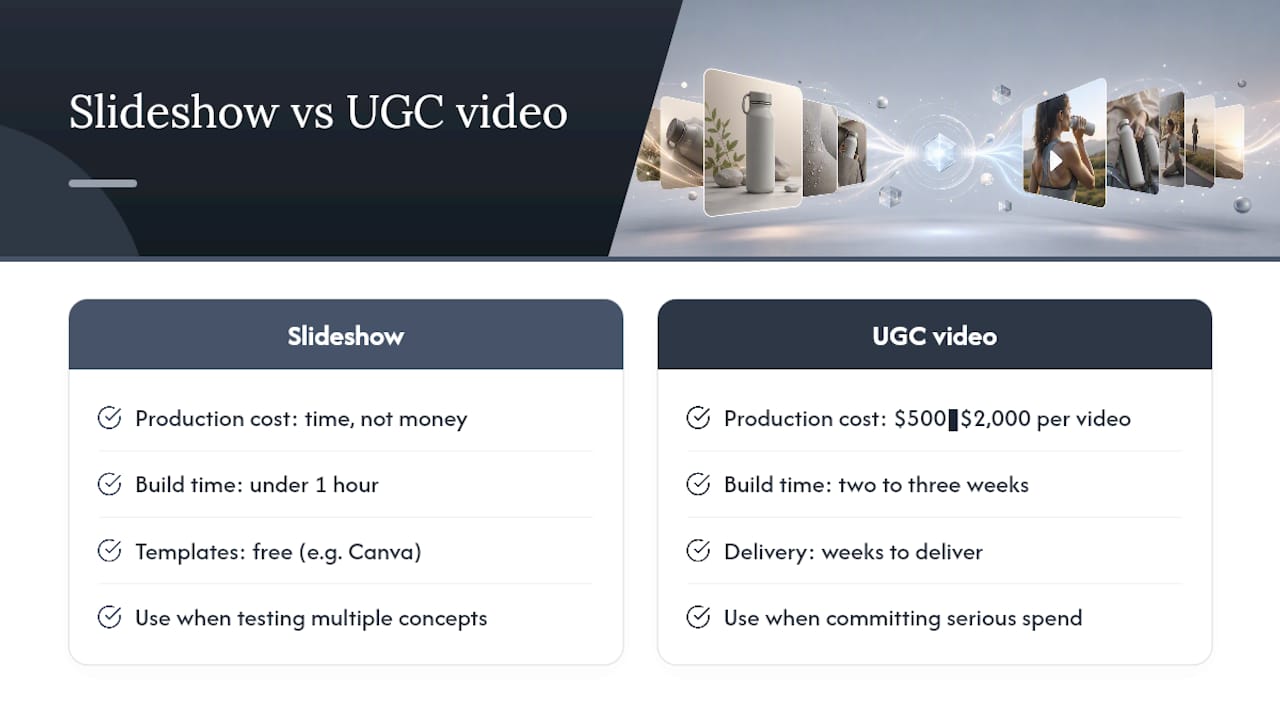
The production cost is the easy part. If you already have product photography, a slideshow costs you time, not money. Software like Canva offers free slideshow ad templates that let you assemble a finished creative in under an hour using stock frames and brand elements you already have. Compare that to a traditionally filmed UGC-style video, which typically runs $500 to $2,000 per video and takes two to three weeks to deliver, and the appeal of a same-day slideshow becomes obvious to anyone testing multiple product concepts at once.
Media spend is where your real budget decisions happen. Because slideshow files are smaller than equivalent video, they tend to deliver efficiently even on modest daily budgets, which makes them a reasonable choice for testing five or six creative concepts before committing serious spend to the winner. A practical rule is to allocate a small test budget per variant, run it for a couple of days, and only scale the frame sequence or CTA that clearly outperforms the others.
Factor in your time cost too. Sourcing images, writing captions, and building the slideshow manually in Ads Manager takes real hours even when the software is free. If your team is producing dozens of creative variants a month, that hourly cost adds up fast, and it’s the main reason many e-commerce teams look at automated options once testing volume increases beyond a handful of concepts per week.
What Legal and Copyright Rules Apply to Slideshow Ad Assets?
Every image and audio clip in your slideshow needs a clear usage right before you upload it, and this is where a lot of otherwise solid campaigns run into trouble.
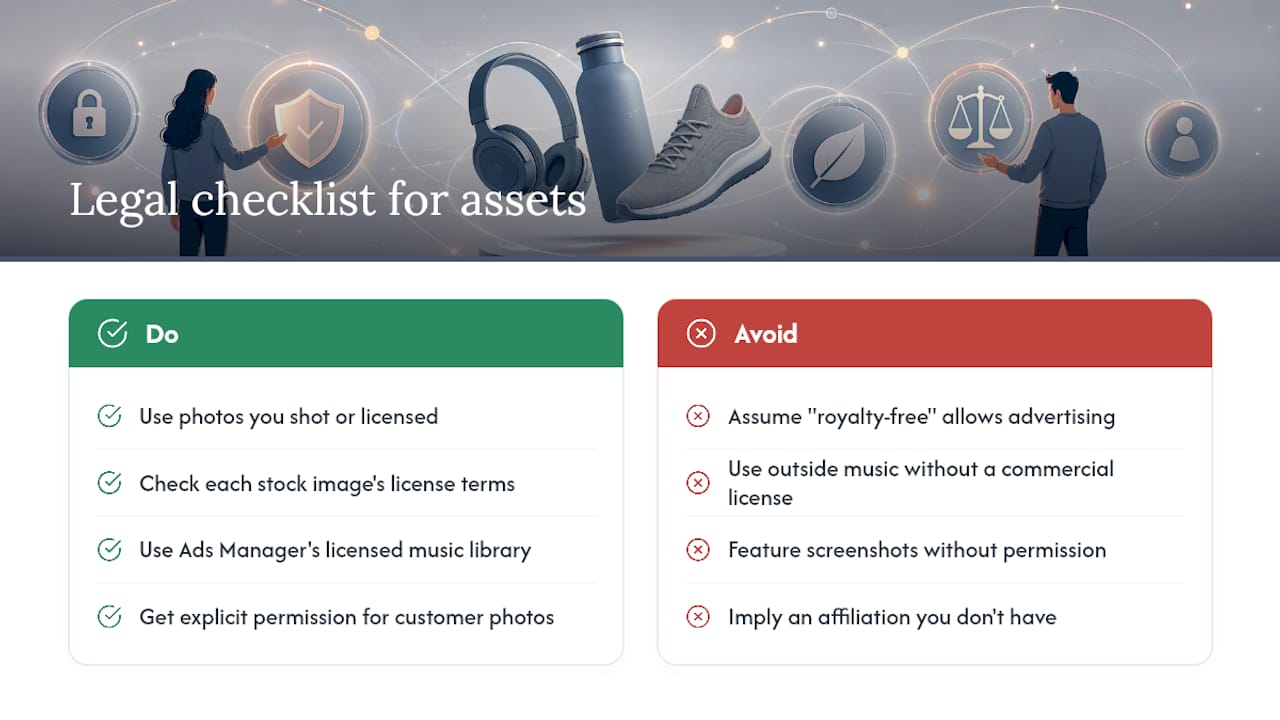
Product photos you shot yourself or licensed directly from a photographer are safe to use. Stock images require checking the specific license attached to each file. Some stock licenses restrict use in paid advertising or cap how many impressions a single license covers, so read the terms rather than assuming “royalty-free” means “unlimited advertising use.”
Background music and audio clips carry their own layer of risk. Meta’s ad platforms typically offer a licensed music library built into Ads Manager, which is the safest source for audio since the platform has already cleared the rights. Pulling a track from outside sources, even a short clip, without a commercial license can get your ad rejected or, worse, trigger a copyright claim after it’s already running.
Customer photos and testimonial content used in a social-proof frame need explicit permission from the person who posted them, not just a screenshot grabbed from a review page. A quick message asking for permission to feature their photo in an ad is a small step that avoids a real liability.
If your slideshow includes another brand’s logo, packaging, or trademark, whether as a comparison or a compatibility claim, confirm you’re not misrepresenting an affiliation you don’t have. When in doubt on any of these points, a quick check with legal counsel before launch costs far less than pulling a live campaign after a complaint.
When Should You Choose Slideshows Over Full-Motion Video?
Slideshows earn their place as the fast, cheap way to test a concept. They work when you need to validate demand, highlight a catalog, or reach audiences on slower connections, and they let you iterate on hooks and CTAs without booking a shoot.
Full-motion video still wins when the product needs demonstration, when you’re building brand storytelling that depends on pacing and sound design, or when the buying decision is complex enough that a moving product in someone’s hands closes the gap a still image can’t.
The smartest workflow treats these formats as sequential, not competing. Validate your strongest concepts with slideshow tests first, since they’re cheap enough to run five or six variants in a week. Once a frame sequence or hook clearly outperforms the rest, invest in turning that winning concept into a full video asset. You’re not guessing at what to film. You already know which angle earned the click.
— Syno
Get Slideshow-Style Video Ads Without the Production Wait
Instant-ugc is the fast alternative to building slideshow frames by hand or waiting weeks on a traditional UGC shoot. Instead of assembling stills in Ads Manager and hoping the timing feels right, you upload a product photo or app screenshot and get a finished, platform-ready video ad in about 90 to 120 seconds, at a fraction of what a manually produced video typically costs.

The platform fits naturally into everything covered above: it handles the frame sequencing, captions, and CTA end screen your slideshow specs require, plus automatic script generation so you’re not writing copy from scratch. If you’re running campaigns across multiple markets, the multilingual video ads workflow covers 17 languages without a separate production pass for each one. And for teams focused specifically on Meta placements, the Facebook AI ads generator is built around the exact specs Ads Manager expects.
Start by uploading a single product photo and generating your first video ad to see how it compares against the slideshow you’d otherwise build by hand.
Sources
- Facebook Slideshow Ads: How They Work & Best Practices
- Facebook Slideshow Ads: Cost-Effective Video Ads For Retail Brands
- Compose Facebook Slideshow Ads | Sprinklr Help Center
- Slideshow ads creative is now available for Sponsored Brands advertisers
