
Collapse Cost to $4–$7: Scale Ad Creatives for Media Buyers and Ecommerce
Operations-first playbook for media buyers and ecommerce teams to scale ad creatives. Cut marginal cost to $4–$7 per video, use 90–120s generation, and...
Scaling ad creatives is not primarily a hiring problem. It’s an infrastructure problem, solved by parallel batch production, automated variant testing, and collapsing the marginal cost of each asset. Teams that hire more designers usually hit the same wall a few months later. Teams that redesign the pipeline to run in parallel, tag every variant, and cut cost per asset toward pennies keep shipping the volume that platforms now demand without burning out or burning budget.
TL;DR:
- Building parallel batch workflows and reducing the cost per asset allows creative teams to produce hundreds of variants weekly without hiring additional staff.
- Tagging assets with specific performance data on hook, style, and channel enables efficient pruning and optimization of creative variation matrices.
- Automating manual tasks like resizing, captioning, and script generation frees human effort for strategy and QA, accelerating production cycles.
- Different platforms require tailored formats and pacing, so variation matrices should include channel-specific adjustments to maximize performance.
- Using AI video platforms like Instant-UGC drastically cuts production costs and time, enabling high-volume testing with minimal budget and effort.
Table of Contents
- What Does It Mean to Scale Ad Creatives?
- The Three Pillars: Collapse Cost, Scale Throughput, Extract Signal
- Production Workflows and Team Roles That Actually Scale
- Turning Variant Volume Into Real Learnings
- Building the Automation Stack Behind Creative Scale
- An 8-Week Playbook to Pilot and Scale Production
- How Instant-UGC Applies This Playbook in Practice
- Cross-Channel Scaling Strategies and Adaptation
- Managing Creative Brand Consistency at Scale
- Monitoring and Optimizing Audience Targeting When Scaling
- Build vs. Partner: What Actually Separates Winners
- Try the Framework With Instant-UGC
- Sources
- FAQ
What Does It Mean to Scale Ad Creatives?
Scaling ad creatives means building a system that produces dozens or hundreds of testable variants weekly, not adding staff until output feels adequate. The distinction matters because most creative teams are structured for serial work: one designer finishes an ad, hands it to a copywriter, who hands it to an editor, who hands it to an ad ops person for upload. Each handoff adds a day. At three or four assets a week, that pace felt fine five years ago. It doesn’t anymore.
Platforms have compressed the shelf life of a good ad. One industry benchmark puts video creative fatigue on Meta at roughly 9.2 days, with TikTok burning through winners even faster. Nearly 78% of top-quartile campaigns now refresh creative weekly, according to the same batch production analysis. A serial workflow that takes a week to produce one ad simply cannot keep pace with a fatigue clock that resets every nine days.
The fix isn’t more hands on the serial line. It’s removing the line entirely.
- Serial production creates a hard ceiling on volume regardless of headcount.
- Parallel batch workflows let multiple variants move through production simultaneously.
- Marginal cost per asset, not total headcount, is the real lever on scale.
- Platform fatigue windows now often outpace many teams’ production cadence.
Reducing the cost of the next asset toward zero is what actually unlocks scale. When one more variant costs almost nothing to produce, testing volume stops being a budget decision and starts being a default behavior.
The Three Pillars: Collapse Cost, Scale Throughput, Extract Signal
Every high-output creative operation, whether it runs on freelancers, in-house teams, or AI tools, rests on the same three pillars. Skip one and the other two stall.
- Collapse marginal cost per asset. Templates, reusable script frameworks, and AI-driven inference remove the repeated manual labor behind each new variant. Instead of paying full production cost for every ad, you pay it once for a template and fractional cost for each derivative. Repurposing a proven winner into new hooks or formats is often cheaper than any original production.
- Scale throughput through parallel batching. Rather than one asset moving through five people sequentially, five assets move through five people at once, each handling a defined role. Batch generation systems built around this structure report very high daily asset outputs from a three or four person stack, a volume no serial workflow reaches without a much larger team.
- Automate signal extraction. Volume is worthless without a system that tells you which variants worked and why. Tagging every asset by hook, visual style, and format turns a pile of ads into a searchable performance dataset, and a pruning heuristic tells you which combinations to run again tomorrow.
The three pillars reinforce each other. Cheaper assets fund more throughput. More throughput generates more signal. Better signal tells you which cheap assets to make more of. Miss the tagging discipline and you’re just producing noise faster.
Production Workflows and Team Roles That Actually Scale
Volume without structure collapses into chaos fast. The teams that sustain high output split work into three specialist roles instead of one generalist doing everything.
The prompt engineer or creative producer owns the brief and generates the raw variants, whether through AI scripting tools or template-driven design systems. The brand QA reviewer checks every batch against voice, compliance, and visual standards before anything ships. The ad ops specialist handles publishing, naming conventions, and platform-specific formatting so nothing gets lost between production and the live campaign. This mirrors the small, cross-functional structure Amazon uses internally to move fast without losing accountability at each step.
The flow itself follows a fixed sequence: brief, template selection, variation matrix, batch run, QA checkpoint, publish. Skipping the QA checkpoint to save time is the single most common reason batch programs fall apart. Rejected assets pile up downstream, and nobody learns why.
- Set a target QA pass rate and track it weekly, not monthly.
- Log every rejection with a specific reason, not just “no.”
- Feed the rejection log back into the next batch’s brief.
- Review cadence should match your fatigue window, not your calendar quarter.
Pro Tip: Build the rejection log before you build the batch process. A one-week batch without a feedback mechanism is just fast production of the same mistakes.
Turning Variant Volume Into Real Learnings
A hundred untagged ads teach you nothing. A hundred tagged ads teach you exactly which hook, visual style, and avatar combination is winning, and that’s the entire point of scaling output in the first place.
A workable tagging schema needs five fields on every asset: template used, hook type, visual archetype, presenter or model, and channel. That’s enough granularity to spot patterns without drowning your team in metadata nobody reviews.
- Template: which base structure or script framework generated the ad.
- Hook: the opening line or visual moment, categorized by type (question, stat, problem, demo).
- Visual archetype: talking head, product demo, testimonial, unboxing, and so on.
- Presenter or avatar: which face or voice delivered the message.
- Channel: where the asset ran, since a Meta winner rarely transfers untouched to TikTok.
Once every asset carries these tags, pruning becomes mechanical. If a hook type underperforms across three consecutive batches, drop it from the next matrix. If a visual archetype wins on one channel but not another, split your batch allocation accordingly instead of running identical creative everywhere.
Creative volume needs vary sharply by platform. Neil Patel’s compiled benchmarks on how many creatives channels typically require to scale profitably show meaningful gaps between platforms, which is exactly why a one-size cadence fails.
Track win rate, CPA or ROAS inside a fixed measurement window, and time-to-fatigue for each asset. Review these weekly. A monthly cadence is too slow when your best assets might only have nine days of life left on the platform where they’re running.
Building the Automation Stack Behind Creative Scale
The tasks worth automating first are the ones that eat the most repetitive hours without requiring creative judgment: script generation, video assembly, resizing for different aspect ratios, captioning, and thumbnail selection. Handle those with automation and your human team spends its time on strategy and QA instead of manual formatting.
Treating AI as an operational layer, not a bolt-on tool, is the distinction that separates teams that scale from teams that stall. Enterprise creative operations increasingly embed AI directly into the design system and marketing ops stack rather than treating it as an occasional shortcut for one-off tasks.
Repurposing is where automation compounds fastest. A single winning ad doesn’t stay a single asset. It becomes a square crop for feed placements, a vertical cut for Stories, a shortened version for pre-roll, and a new thumbnail variant for each. This repurposing flywheel multiplies the value of every proven winner instead of asking your team to originate a new idea for every format.
- Automate script generation and first-draft copy before automating visuals.
- Automate resizing and format adaptation so one asset serves every placement.
- Automate captioning and thumbnail generation to remove manual QA bottlenecks.
- Connect automation outputs directly to your asset library, scheduler, and analytics dashboard so nothing requires manual re-entry.
An 8-Week Playbook to Pilot and Scale Production
Rolling out this framework doesn’t require a quarter-long overhaul. It requires eight weeks of disciplined, incremental change.
- Weeks 1 to 2: Pick one campaign and run a single batch of 20 assets through the full pipeline: brief, template, matrix, QA, publish. Build the rejection log from day one, even if it only has two entries.
- Weeks 3 to 4: Expand the batch process to two or three campaigns. Formalize your tagging schema and lock in a fixed QA cadence, ideally weekly, so review doesn’t slip.
- Weeks 5 to 6: Raise batch size and frequency based on what the rejection log and tagging data show. Start automating the highest-friction manual task, usually resizing or captioning.
- Weeks 7 to 8: Build repurposing into the workflow so winning assets automatically generate format variants. Tune your templates using the performance data collected over the previous six weeks.
By week eight, you should have a repeatable cadence, a tagging dataset large enough to guide the next batch, and a clear read on which templates deserve more budget.
How Instant-UGC Applies This Playbook in Practice
Instant-UGC is built around the exact bottleneck this playbook targets: the time and cost of producing each additional variant. The platform generates finished video ads in roughly 90 to 120 seconds from a product photo or app screenshot, which collapses the marginal cost pillar down to the price of a single generation credit instead of a production day.
- Video output in 9:16 and other formats ready for Meta, TikTok, and App Store placements.
- Support for 17 languages and 10+ customizable AI avatars, useful for testing presenter archetypes across audiences.
- Two dedicated workflows: one built for physical products (Shopify, Amazon FBA, dropshipping) and one for app and SaaS testimonial-style ads.
- Automatic script generation, which removes the slowest manual step in the batch pipeline.
The two-workflow design maps directly onto throughput scaling: physical product brands and app marketers each get a production path tuned to their asset type instead of one generic template forced onto both.
Cross-Channel Scaling Strategies and Adaptation
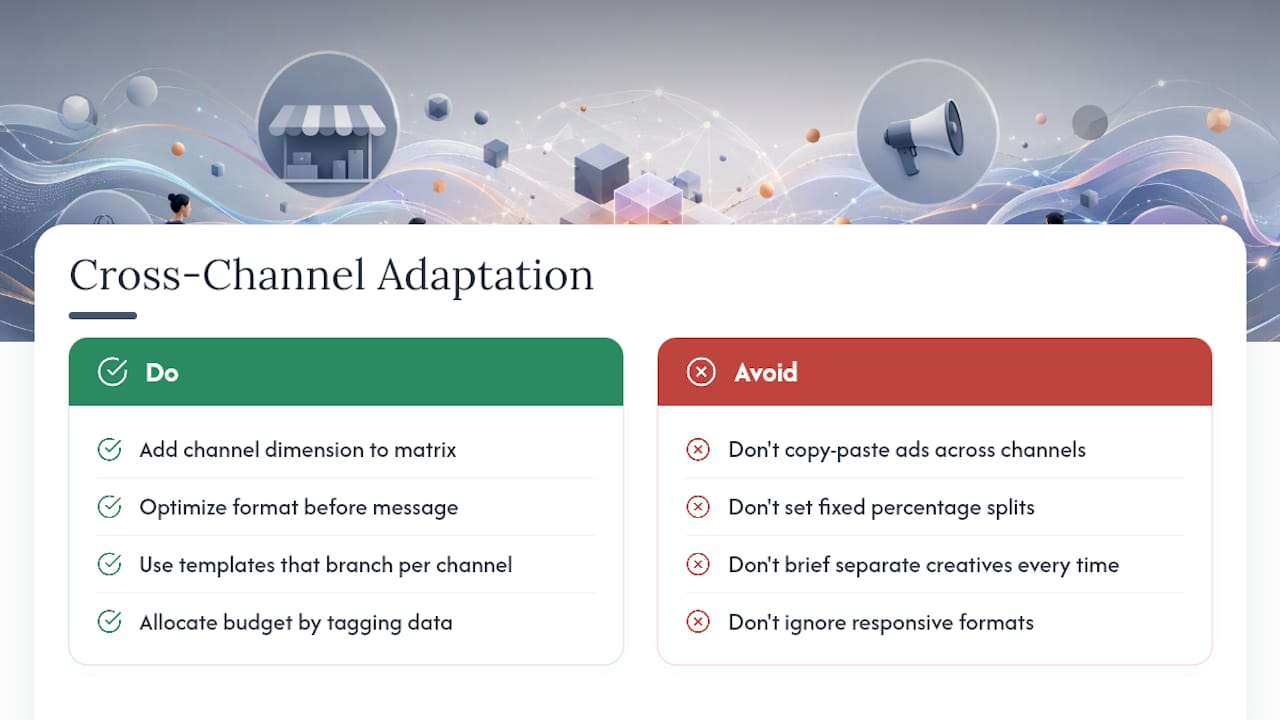
A batch built for Meta rarely performs as well dropped unchanged onto TikTok, and treating every channel as a copy-paste target wastes the volume you just built. Each platform rewards different pacing, aspect ratios, and hook styles, which means your variation matrix needs a channel dimension from the start, not as an afterthought.
Practical adaptation starts with format, not message. A winning 15-second TikTok hook often needs a slower build for Meta feed placements, where viewers scroll with less intent to be entertained immediately. Google Shopping and App Store placements need almost no hook at all since intent is already established. Build your matrix so a single script or template branches into channel-specific cuts automatically, rather than briefing separate creative for every platform from scratch.
Budget allocation across channels should follow the tagging data, not a fixed percentage split decided at the start of the quarter. If TikTok is burning through winners at double the rate of Meta, that channel needs a faster refresh cadence and a larger share of your weekly batch, not just a larger ad spend. Treat channel as a variable in your testing matrix the same way you treat hook type or visual archetype, and prune underperforming channel combinations exactly the way you’d prune a losing hook.
The teams that adapt fastest across channels are usually the ones with format flexibility already built into production, which is why responsive, multi-aspect-ratio output matters more than it sounds.
Managing Creative Brand Consistency at Scale
Volume production has a real risk: a hundred variants that all sound slightly off-brand is worse than ten that are perfectly on-message. This is exactly why the brand QA role from the production workflow isn’t optional overhead. It’s the mechanism that keeps scale from diluting the brand.
Consistency at scale comes from constraints, not from reviewing every asset individually after the fact. Lock your voice, tone, and visual guidelines into the template layer before generation happens, so every variant inherits brand-safe defaults instead of a QA reviewer catching drift after the fact. A well-built template should make it hard to produce an off-brand asset, not just easy to catch one.
Set a small number of non-negotiable brand rules, things like approved color ranges, banned phrases, and required disclosures, and check every batch against that specific checklist rather than a vague “does this feel right” review. Specific rules move faster through QA and catch more real problems than a subjective pass.
Rejection logs double as a brand consistency early warning system. If the same brand violation shows up across multiple batches, that’s a signal your template needs a fix, not that your reviewers need to work harder. Treat brand drift as a production bug to patch at the source, the same way you’d treat a recurring technical error.
Monitoring and Optimizing Audience Targeting When Scaling
Creative volume and audience targeting are tied together more tightly than most teams realize. A winning hook for one audience segment can flop entirely with another, and scaling creative output without re-checking targeting assumptions just multiplies wasted spend faster.
Tag each variant’s performance against the audience segment it ran to, not just the overall campaign number. A hook tagged as a “top performer” across a broad campaign might actually be dragging down performance in one specific segment while overperforming in another. Segment-level tagging catches that nuance before it costs you a full testing cycle.
As you raise batch volume, watch for audience fatigue separately from creative fatigue. A specific segment can tire of your brand’s overall presence even when you’re rotating fresh creative into it constantly. When CPA climbs in a segment even after a creative refresh, that’s usually a targeting problem, not a creative one, and it calls for adjusting audience size or exclusions rather than producing yet another batch of ads.
Review targeting and creative performance on the same cadence, ideally weekly, so the two data streams inform each other instead of getting evaluated in separate meetings on separate schedules.
Build vs. Partner: What Actually Separates Winners
Building bespoke infrastructure makes sense when you need proprietary templates or tight IP control and have the headcount to maintain it. For everyone else, especially teams running fast pilots or working with limited headcount, partnering with an AI-driven production platform gets you to volume faster. Governance and templating discipline, not tooling choice, will separate the brands that scale creative output sustainably from the ones that just produce more noise.
*— Syno
Try the Framework With Instant-UGC
Instant-UGC gives you the fastest route to collapsing marginal cost per asset without hiring a production team or waiting weeks for a freelancer roster. Where traditional UGC creators often take weeks and cost hundreds to thousands of dollars per video, some AI platforms can generate finished, testable variants for just a few dollars each.

That price gap changes the math on every pillar in this playbook. Cheaper assets mean you can run a real variation matrix instead of testing three ideas and hoping. Faster generation, 90 to 120 seconds per video, means your batch cadence can match platform fatigue windows instead of lagging behind them. And with 10+ customizable avatars and support for 17 languages through the multilingual video ad workflow, your tagging matrix gets real variety to test, not just cosmetic tweaks on the same script.
| Framework pillar | Instant-UGC capability |
|---|---|
| Collapse marginal cost | $4 to $7 per video vs. $500 to $2,000 for traditional UGC production |
| Scale throughput | 90 to 120 second generation per asset, two dedicated workflows |
| Automate signal extraction | 9:16 and adaptive formats ready for direct A/B testing |
Start with the Test option at $9 one-off to see a single generation firsthand, or move straight to the Starter plan at $19 per month if you’re ready to build your first batch this week.
Sources
- Versely Batch Generation for Content Teams: Shipping 100 Assets a Day in 2026 | Versely
- How Many Creatives Are Needed To Scale Ads — Neil Patel
- AI Creative Operations: How Enterprise Marketing Teams Scale Production — Demir Digital
- Scaling Content Production with AI — Spaces Blog
- Inside Day 1: How Amazon uses agile team structures and adaptive practices — SHRM
FAQ
What Does It Mean to Scale Ad Creatives?
Scaling ad creatives means building a repeatable system that produces many testable variants on a fixed cadence, rather than occasionally commissioning a handful of new ads. It requires parallel production, a tagging system to track what works, and a low enough cost per asset that testing volume becomes routine rather than a budget event.
How Much Does a 30-Second Ad Cost to Make?
Traditional UGC-style video production typically runs $500 to $2,000 per video and takes two to three weeks to deliver. AI-generated alternatives like Instant-UGC produce comparable testimonial-style videos for $4 to $7 each in under two minutes, which is the cost collapse this playbook depends on.
Is $10 a Day Enough for Google Ads?
A $10 daily budget can run a small Google Ads campaign, but it limits how many creative variants you can test meaningfully within a useful window. Most creative testing frameworks need enough spend behind each variant to reach statistical confidence, so very low budgets often mean testing fewer variants for longer instead of more variants quickly.
How Many Creative Variants Do I Need to Scale Ads?
The right number varies by platform, and benchmarks compiled by Neil Patel show meaningful gaps between channels in how many creatives are typically needed to scale profitably. As a general rule, plan for weekly refreshes given that video creative fatigue on Meta runs around 9.2 days and faster on TikTok.
What Is the Fastest Way to Produce More Ad Creative Without Hiring?
Adopting an AI-driven video generation platform is the fastest way to raise output without expanding headcount. Instant-UGC generates finished video ads in 90 to 120 seconds from a product photo or app screenshot, letting a small team run the parallel-batch workflow this playbook describes without adding production staff.
