
Product Demo Scripts That Convert: A Guide for Sales Teams
Unlock the secrets to high-converting product demo scripts that close sales. Transform buyer engagements with actionable templates today.
A high-converting product demo script proves one buyer outcome, shows the exact click that delivers it, and closes with a single clear next step. That’s the whole job. Everything else is packaging.
Here’s a mini-template you can paste into a doc right now: proof statement (“Here’s how you cut invoice approval from 3 days to 3 hours”), then context (the buyer’s current painful workflow), action (the click or feature you demonstrate live), and result (the on-screen outcome that backs up the proof statement).
Your closing ask should match where the buyer sits in their evaluation:
- Still learning: “Want me to send the recording so your team can review it?”
- Actively evaluating: “Should we set up a 15-minute technical walkthrough with your engineering lead?”
- Ready to buy: “Can we get the contract moving this week?”
Pro Tip: Spend your first 60 seconds on the buyer’s problem, not your product. Name the exact workflow that’s broken today before you touch a single feature.
Key Takeaways
A product demo script converts best when it proves one specific outcome, pairs every claim with visible on-screen action, and closes with one clear next step tied to buyer stage.
| Point | Details |
|---|---|
| Use the five-act structure | Sequence context, hook, problem, action, result, and next step in every script, live or recorded. |
| Write the first 60 seconds word for word | Open with the buyer’s problem, not a company overview, to earn attention early. |
| Pair claims with visible proof | Every spoken benefit needs a matching on-screen click, number, or before/after state. |
| Match CTA to buyer stage | Use different closing language for learning, evaluating, and ready-to-buy prospects. |
| Speed up production with Instant-ugc | Turn a finished script into a 9:16 AI avatar video in minutes instead of a multi-week production cycle. |
Table of Contents
- What Is a Product Demo Script and Why Does It Matter?
- A Five-Act Structure for Every Demo
- How to Write a Product Demo Script From Scratch
- Seven Demo Scripts You Can Adapt Right Now
- Demo Mistakes That Kill Deals, and How to Recover
- Adapting One Script for Video, Ads, and Live Calls
- Why Story-Driven Demos Convert Better Than How-To Clips
- A Practitioner’s Take on Rehearsal and Delivery
- Turning a Script Into a Video Without the Three-Week Wait
- Frequently Asked Questions
- Sources
What Is a Product Demo Script and Why Does It Matter?
A product demo script is a written narrative that sequences what you say, what you click, and what the buyer sees, all built around proving a specific outcome. It’s not a feature list read aloud. It’s a structured argument with visual evidence.
Scripts convert better than improvised walkthroughs because they force three disciplines: repeatable proof (you show the same killer moment every time, refined through practice), a narrative tailored to the buyer sitting in front of you, and a next step that’s decided before the call starts instead of improvised at the end.
Different situations call for different script formats:
- Live sales demo — builds trust through real-time interaction and improves close rate on complex deals.
- Technical deep dive — shortens evaluation by satisfying engineering or security stakeholders directly.
- Champion enablement — arms an internal advocate with soundbites they can repeat to their own leadership.
- On-demand demo video — scales reach for prospects who aren’t ready for a live call yet.
- Ad-driven product demo — drives top-of-funnel awareness and qualifies cold traffic before a rep ever gets involved.
A Five-Act Structure for Every Demo
Most winning demos follow a version of the same skeleton. Gong’s analysis of demo scripts breaks high-performing demos into five acts built around buyer pain and a “hero” workflow, and it holds up whether you’re running a 20-minute sales call or a 90-second recording.
- Context (30 to 60 seconds live, 5 to 10 seconds recorded). Name the buyer’s role and current workaround. “You’re managing approvals across four spreadsheets right now.”
- Hook (15 to 30 seconds). State the proof sentence up front: “By the end of this call, you’ll see exactly how [Company] cut approval time from three days to three hours.”
- Problem (1 to 3 minutes live, 5 to 15 seconds recorded). Make the cost of the status quo concrete. Ask a discovery question here if you’re live: “How many approvals get stuck waiting on someone’s inbox each week?”
- Action (5 to 15 minutes live, 30 to 60 seconds recorded). Click through the exact workflow that solves the named problem. Don’t demo features unrelated to the proof sentence, even if they’re impressive.
- Result (1 to 2 minutes). Hold on the final screen state long enough for the buyer to actually read it. Rekort’s demo template recommends pairing every spoken claim with a verifiable on-screen state, and this is the beat where that pays off.
- Next step (30 seconds). One specific ask, tied to buyer stage, not a vague “any questions?”
Social proof fits naturally right after the result beat, when the buyer has just watched the workflow succeed and a customer name or metric reinforces what they saw. Discovery questions belong in the problem beat, never buried inside the action beat where they interrupt momentum.
Timing shifts by format. A live enterprise demo might spend eight minutes in the action beat alone. A recorded walkthrough compresses the whole five-act arc into 90 seconds because there’s no room for tangents.
How to Write a Product Demo Script From Scratch
Writing a demo script well means making six decisions in order, and skipping any one of them is why most scripts feel generic.
-
Set one objective and one proof sentence. Before you write a word of dialogue, answer: what single outcome does this demo need to prove, and to whom? “This demo proves that a marketing ops manager can launch a segmented campaign in under 10 minutes” is specific enough to build a script around. “Show them the platform” is not.
-
Map the audience by role. An executive buyer cares about ROI and risk reduction. A technical evaluator cares about integration effort and edge cases. A future champion cares about how easy this will be to explain to their own boss. Write a different opening line for each, even if the middle of the script stays similar.
-
Draft the first 60 seconds word for word. This is the highest-leverage real estate in the entire script. Open with the buyer’s problem, not a company overview:
“Before I show you anything, tell me: how are approvals handled today when someone’s out of office?”
That single question does three things: it opens with the buyer’s problem, it surfaces a discovery detail you can reference later, and it signals this won’t be a canned pitch.
-
Build discovery checkpoints into the middle. Every three to four minutes in a live demo, pause and confirm relevance: “Is this the volume of approvals you’re dealing with, or is it higher?” This keeps a monologue from turning into a lecture, and it gives you real-time information to adjust your pacing.
-
Pair every claim with a visible action. This is the shot-list discipline behind good scripts. If you say “this saves your team hours,” the very next thing on screen has to be the click that saves those hours, followed by a number, timestamp, or before/after state that proves it. Karumi treats this pairing as one of five non-negotiable script elements, alongside a strong opening hook and a close with a specific next step.
-
Write delivery notes, not just dialogue. A script isn’t finished until it includes pacing cues (where to slow down), hold frames (how many seconds to leave a result on screen before moving on), caption notes for recorded video, and accessibility considerations like color contrast on shared screens.
Pro Tip: Record yourself running the script once, then watch it back muted. If you can’t tell what happened just from the visuals, your proof isn’t visible enough. Fix the shot before you fix the words.
Before you run the script for real, put it through three quick exercises. Read it aloud in under two minutes to check pacing. Have a colleague play a skeptical buyer and interrupt you mid script. Then cut the script by 20% and see what’s actually load bearing versus filler you added out of habit.
Seven Demo Scripts You Can Adapt Right Now
Each template below follows the five-act skeleton, sized for a specific B2B scenario.
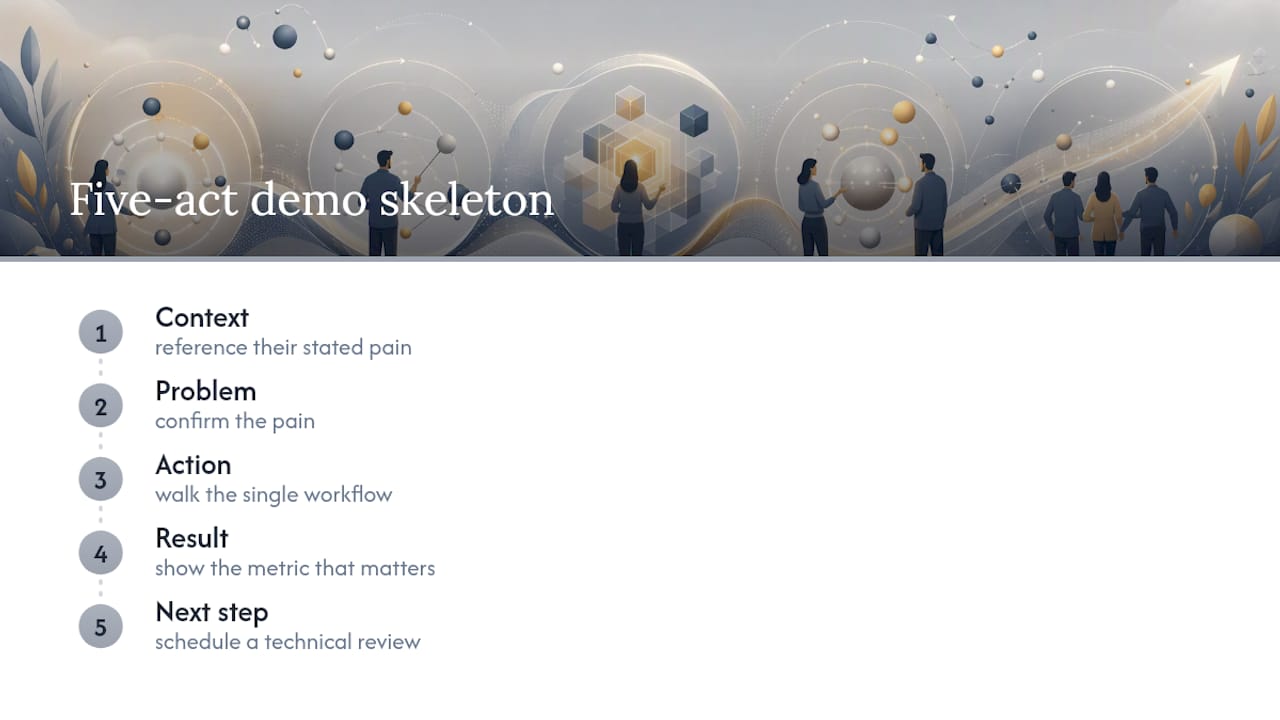
1. Inbound discovery + demo (25 to 30 minutes). Audience: a warm lead who requested a demo. Proof sentence: “You’ll see how [product] solves the exact problem you flagged in your signup form.” Context: reference their stated pain point in the first 30 seconds. Problem: confirm the pain with one discovery question. Action: walk the single workflow tied to their stated need, nothing else. Result: show the metric that matters to them specifically. Next step: “Should we schedule a technical review with your team, or do you want to try this in a sandbox first?”
2. Cold outreach follow-up (10 to 12 minutes). Audience: a prospect who booked after a cold email. Proof sentence: “Here’s the three-click fix for the workflow I mentioned in my note.” Context: restate the specific line from your outreach that got them to book. Problem: ask them to confirm or correct your assumption. Action: demo only the feature referenced in your original message. Result: a before/after screen comparison. Next step: “Want me to send a short recording your manager can watch in five minutes?”
3. Mid-funnel deep dive (35 to 40 minutes). Audience: a buyer who’s seen a first demo and is comparing options. Proof sentence: “Let’s go past the surface and show exactly how this handles your edge cases.” Context: open by listing the two or three concerns they raised last time. Problem: let them describe the concern in their own words again. Action: demo the specific configuration or integration they’re worried about. Result: show logs, error handling, or output that addresses the concern directly. Next step: “Does this resolve the blocker, or is there another scenario you want me to run?”
4. Champion enablement session (20 minutes). Audience: an internal advocate who needs to sell this upward. Proof sentence: “Here’s the exact three-line summary you can use in your internal deck.” Context: ask what objection they expect from leadership. Action: demo the feature that most directly answers that objection. Result: hand them a specific number or quote they can repeat verbatim. Next step: “I’ll send you a one-pager with this same data. When’s your internal meeting?”
5. Technical validation call (45 minutes). Audience: engineering or security stakeholders. Proof sentence: “You’ll see exactly how data flows through the integration, end to end.” Context: skip the pitch entirely, open with the architecture diagram. Problem: let them ask about failure modes before you demo anything. Action: walk the API call or integration path live. Result: show logs, latency numbers, or error handling in real time. Next step: “Do you need a sandbox environment, or is this enough for your security review?”
6. Pre-close onboarding preview (15 minutes). Audience: a buyer near signature who wants to see what week one looks like. Proof sentence: “Here’s exactly what your team does on day one.” Context: reference the contract terms already discussed. Action: click through the actual onboarding flow, not a sales-only sandbox. Result: show the first dashboard or report a new user would see. Next step: “Should we lock in an onboarding date for the week after signing?”
7. Self-serve marketing demo / ad clip (15 to 45 seconds). Audience: cold traffic on paid social or an app store listing. Proof sentence: displayed as on-screen text in the first three seconds: “Approvals in minutes, not days.” Context: skip straight to the problem visually, no talking head intro. Action: show one click, one feature, ten to 30 seconds max. Result: an animated before/after or counter. Next step: a single button overlay, “Try it free,” with no verbal close needed.
Executives respond best to results and risk reduction; keep the action beat short and the result beat longer for that audience. Technical evaluators want the action beat extended with real configuration detail. Champions need soundbites, so write their result beat as a quotable line, not just a screenshot.
Demo Mistakes That Kill Deals, and How to Recover
The best demos are disciplined about what they leave out. The worst ones try to prove everything at once.
Do this:
- Contextualize every click before you make it: “I’m going to click here to show you the reporting view.”
- Show the result and hold on it. Don’t rush past the payoff you just built toward.
- Ask a confirming question before moving to the next act: “Does that match what you were expecting?”
- Lock a specific next step before the call ends, not an open-ended “let me know if you have questions.”
Avoid this:
- Feature-dumping every capability instead of the one your buyer actually asked about.
- Burying your strongest feature in the middle of the demo instead of leading with it after the hook. Meetrep suggests spending roughly 30% of your time on discovery, 30% on the buyer’s current painful workflow, and 40% on your solution, front-loading the strongest proof rather than saving it for the end.
- Closing with a vague, non-actionable question like “so, what do you think?”
If you lose the room mid demo, a simple recovery line works better than pushing forward blind: “Let me pause. Which part of this is most relevant to what you’re solving for right now?” It hands control back to the buyer and usually surfaces the real objection.
Quick fixes for live failures: if a demo environment loads slowly, narrate through it instead of sitting in silence. If you’re staring at the wrong data, say so plainly and pivot to a backup screenshot rather than fumbling live. If an integration breaks mid call, switch to your recorded backup clip and finish the point with that instead.
Adapting One Script for Video, Ads, and Live Calls
The same five-act skeleton stretches or compresses depending on where the buyer encounters it.
Recorded on-demand walkthroughs (3 to 10 minutes): script density drops because there’s no room for real-time discovery, so you compress the problem beat to a single sentence and let the action beat carry most of the runtime. KaBOOM!'s approach to replayable demo scripts shows how saving a demo-ready state and scripting explicit pauses keeps recorded walkthroughs consistent across multiple takes.
Live sales demos (20 to 40 minutes): this is where discovery checkpoints matter most, since you can adjust the script in real time based on buyer reaction.
Ad-driven demo clips (15 to 45 seconds): the product itself becomes the protagonist, with most of the runtime going to a compressed 10 to 30 second action beat and almost no verbal setup.
- Match your call-to-action to the format: “Book a call” for live follow-ups, “Watch the full walkthrough” for recorded video, “Try it free” or “Shop now” for ad clips.
- Adjust aspect ratio and captions by placement: vertical 9:16 for TikTok and Reels-style ad clips, 16:9 for on-demand walkthroughs hosted on a landing page, and always burn in captions since most viewers watch muted.
- Hold on result frames longer in recorded formats, since viewers can’t ask you to slow down the way they could on a live call.
Why Story-Driven Demos Convert Better Than How-To Clips
A demo that’s bolted onto a script as an afterthought performs worse than one built into the narrative from the start.
Kantar’s analysis of product demos in advertising found that ads demonstrating product benefits scored notably higher on persuasion and on communicating that the brand meets the viewer’s needs, compared to non-demo ads. Notably, the creative work that won Kantar’s Creative Effectiveness Awards tended to embed the demo into a story rather than presenting a standalone how-to segment.
The takeaway isn’t “add a demo.” It’s “make the demo the plot,” not a feature-tour interruption bolted onto an unrelated narrative.
Gartner’s research on buyer enablement reinforces this from the sales side: demos work best when they function as buyer-enablement assets that reduce friction and hand the buyer a clear next action, not just a feature showcase performed at them.
The practical move is to A/B test one narrative element at a time. Try running the same script with a story-first opening against a features-first opening, and track which version produces more booked next steps rather than just watch time.
A Practitioner’s Take on Rehearsal and Delivery
Staying conversational while following a script sounds contradictory, but it comes down to memorizing beats, not sentences. Know what has to happen in each act, then let the exact wording flex based on what the buyer says back to you.
A workable rehearsal routine: run the script out loud three times solo, then record yourself on the fourth run and watch it back. Get one colleague to play a skeptical buyer on the fifth run and note where you stumble or over-explain. Revise the script twice based on what you notice, not more, since over-editing tends to strip out the natural phrasing that made it sound conversational in the first place.
Once the script is solid, pull the strongest lines out as standalone soundbites. A champion enablement session that hands someone one quotable sentence and one number does more for your deal than a full recording they’ll never rewatch.
Turning a Script Into a Video Without the Three-Week Wait
Writing the script is half the job. Turning it into a polished video is where most teams lose weeks, since a traditional UGC creator can take two to three weeks and cost between $500 and $2,000 per video. Instant-ugc closes that gap by turning a finished demo script straight into a 9:16 video using AI avatars, cutting production time to two minutes and cost to as little as $4 to $7 per video.

That speed matters most for three of the scenarios covered above. Rapid ad creative testing lets you run three versions of your ad-driven demo clip in a single afternoon instead of waiting on a production schedule. Champion enablement clips can be generated the same day a champion asks for something to share internally. And short 15 to 45 second ad-style proof clips for Facebook and Meta placements go from script to finished asset without booking a videographer.
If you’re testing a new script this way, track engagement-to-conversion first, meaning how many viewers who watch past your hook beat actually complete the CTA, before you optimize anything else. That single metric tells you whether the proof beat is landing before you touch pacing or visuals.
Ready to see how your own script performs on screen? Start with the AI video generator and turn today’s draft into a testable clip before your next call.
Frequently Asked Questions
What is the ideal length for a product demo script? Length depends on format: aim for 15 to 45 seconds for ad clips, 3 to 10 minutes for recorded walkthroughs, and 20 to 40 minutes for live sales demos, with the action beat taking the largest share of runtime in every format.
How do I write a demo script for a technical audience? Skip the pitch, open with architecture or data flow, and extend the action beat to cover integration paths, error handling, and logs, since technical evaluators weigh implementation risk over ROI language.
What should the first line of a demo script say? Open with the buyer’s problem or a discovery question rather than a company overview. A line like “How are approvals handled today when someone’s out of office?” earns attention faster than a feature list.
How many times should I rehearse a demo script before using it live? Run it solo at least three times, record yourself once to catch pacing issues, and get one colleague to role-play a skeptical buyer before you use it on a real prospect.
Can the same demo script work for both video ads and live sales calls? The same five-act skeleton works across formats, but you’ll need to compress the problem beat sharply for ad clips and extend discovery checkpoints for live calls where real-time buyer feedback matters.
Sources
- Buyer enablement — Gartner
- The 5 acts of winning sales demo scripts (plus examples) — Gong
- Product Demo Video Script Template (Copy + Checklist) — Rekort
Recommended
- Runway Gen-3 Alternative for Product Demos | Instant-UGC
- UGC Conversion Optimization: Transform Customer Content Into Sales | Instant-UGC Blog
- UGC Scripts for Beauty Brands: The Ultimate Guide to Authentic Marketing That Converts | Instant-UGC Blog
- Kitchen Appliances UGC Video Ads | AI Video for Home Gadgets | Instant-UGC
