Scale Tests: Photo to Video Ads in 2 Minutes for Performance Marketers
Turn one product photo into a platform-ready, UGC-style video ad in about two minutes. Scale micro-variants to test hooks and find winners fast.
Yes, you can turn a product photo into a platform-ready video ad in under two minutes using modern AI workflows. AI tools animate a single still image into a vertical hook clip, add captions and voiceover, and export it in the exact format your ad platform wants. For marketers, the real payoff isn’t the novelty. It’s volume: you can generate multiple creative variants in the time it used to take to book one photographer.
TL;DR:
- Matching the AI tool to your specific needs is essential: use quick image animations for hooks, storyboard builders for full campaigns, or UGC simulators for testimonial-style videos.
- Creating a compelling photo-driven ad requires a strong, high-resolution image, strategic motion, clear framing, and a fast, engaging start within the first two seconds.
- Exporting in platform-specific aspect ratios and durations is crucial: 9:16 for TikTok and Reels, 1:1 or 4:5 for Meta feeds, and 16:9 for YouTube, with 6 to 15 seconds being the optimal length for most platforms.
- AI-powered tools drastically cut content creation costs from hundreds or thousands of dollars to a fraction, enabling rapid testing of multiple creative variants to improve campaign performance.
Table of Contents
- What Photo to Video Ad Tools Actually Do
- How Do You Turn a Photo Into a Video Ad?
- What Makes a Photo-Driven Video Ad Convert?
- Which Aspect Ratio and Length Should You Export?
- Why AI Changes the Economics of Ad Creative
- How Instant-Ugc Puts This Into Practice
- When Should You Use AI Instead of Human Creators?
- Start Your First Photo to Video Ad Test
- Sources
What Photo to Video Ad Tools Actually Do
Photo to video ad tools fall into three loose categories, and knowing which one you need saves you from paying for features you won’t use.
- Image-to-video generators animate a still with motion (zoom, pan, orbit) and add text or voiceover, producing a short hook clip in seconds.
- AI ad generators go further, building a full storyboard with scripts, avatars, and subtitles you can edit after generation, similar to what Kapwing’s ad generator offers for teams moving from idea to publish-ready creative in minutes.
- UGC simulators turn a product photo into a testimonial-style video, mimicking the handheld, unpolished feel of a creator holding your product.
Match the tool to the job. Rapid SKU testing calls for fast, cheap hook clips. Listing enrichment on Amazon or Shopify benefits from 360-degree product spins. Campaign refreshes often need UGC-style variety to keep ad fatigue at bay. One caveat worth flagging: check commercial usage rights before you scale any output across paid campaigns, and make sure the avatar or voice style actually fits your brand’s tone, not just the platform trend.
How Do You Turn a Photo Into a Video Ad?
The workflow is shorter than most marketers expect, but skipping steps is where most weak ads come from.
- Choose your strongest image. Pick a photo with a clear focal point, strong contrast against the background, and enough resolution to show product detail up close.
- Set your objective and format. Decide if this is a top-of-funnel awareness hook or a consideration-stage demo, then pick 9:16, 1:1, or 16:9 to match.
- Choose motion and tone. A slow zoom or orbit reads as premium and studio-polished; a handheld shake-and-pan simulates UGC authenticity.
- Generate or write your script. Let the tool auto-generate captions and voiceover from the product description, or paste in your own ad copy for more control.
- Export platform variants and test. Render multiple aspect ratios from the same source image, then run a small budget across each to see which format and hook perform best.
For the cleanest motion from a still image, use a high-resolution source (2K or higher when possible) and separate the product from its background with a sharp edge. Short, specific motion prompts, like “slow orbit, reveal close-up at 1.2 seconds,” give frame-aware AI tools enough direction to produce coherent parallax instead of a warped, floaty animation.
Pro Tip: Keep the first 1 to 2 seconds of every variant identical across formats. It preserves your hook while letting the rest of the frame adjust for platform cropping.
What Makes a Photo-Driven Video Ad Convert?
Most of the ads that flop don’t fail because the AI rendering looked bad. They fail because the creative ignored how people actually watch social video: fast, muted, and unforgiving of a slow start.
- Open with a visual hook in the first 1 to 2 seconds; if the product isn’t recognizable by then, you’ve lost the scroll.
- Keep text large enough to read at arm’s length, since most viewing happens on a phone with the sound off.
- Let motion emphasize a real benefit, like a zoom that reveals a texture or feature, rather than movement for its own sake.
- Caption everything for silent autoplay, but pair it with a short, conversational voiceover when you want the ad to feel more trustworthy.
The biggest lever most advertisers underuse is variant volume. AI tools that can produce multiple creative angles from one image make it realistic to A/B test hooks, not just headlines, which tends to lift click-through rate and bring cost per acquisition down compared to running a single static image. Ship five or six micro-variants per SKU, kill the losers within a few days, and reinvest the saved spend into whichever hook is actually working. A structured testing framework helps keep that iteration disciplined instead of random.
Which Aspect Ratio and Length Should You Export?
Every platform has a preferred shape and a sweet spot for duration, and exporting the wrong one is the fastest way to get your ad cropped or throttled by the algorithm.
- 9:16 vertical for TikTok and Instagram/Facebook Reels, where full-screen immersion drives engagement.
- 1:1 and 4:5 for Meta feed placements, which still see meaningful traffic outside of Stories and Reels.
- 16:9 horizontal for YouTube pre-roll and in-stream placements.
On duration, platform guidance generally favors 6 to 15 seconds for pure awareness hooks and 15 to 30 seconds when you’re demonstrating a product feature or building consideration. Burn in your captions rather than relying solely on platform auto-captioning, keep an SRT file as backup, and frame your product safely inside the center of the shot so nothing critical gets clipped when a platform reformats the crop.
Why AI Changes the Economics of Ad Creative
Traditional UGC production runs on a slow clock: booking a creator, shipping product, waiting on edits. That process typically takes two to three weeks and costs $500 to $2,000 or more per finished video. AI-driven photo-to-video tools compress that into a preview in under 30 seconds and a final render in roughly 90 to 120 seconds, depending on the toolkit.
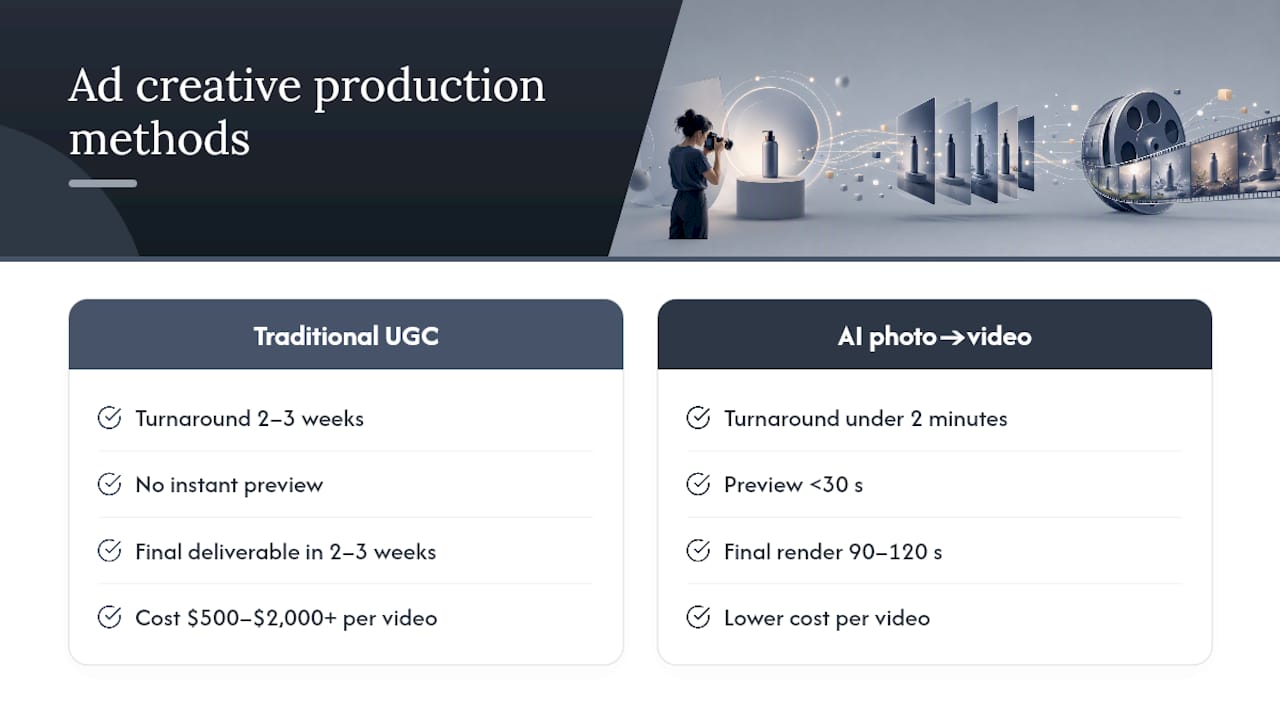
That speed changes more than your production calendar. When testing ten creative variants costs what one traditional video used to cost, you get a sharper read on which hooks actually work, faster, which improves your overall media efficiency instead of just your production line.
How Instant-Ugc Puts This Into Practice
Instant-ugc’s own workflow reflects exactly this trade: it converts a product photo or app screenshot into a finished 9:16 video ad in about 90 to 120 seconds, with two dedicated paths depending on what you’re selling.
- A physical products workflow built for Shopify, Amazon FBA, and dropshipping sellers.
- An app and SaaS workflow that produces App Store-optimized, testimonial-style videos for mobile and software brands.
- Support for multiple languages and customizable AI avatars, which lets a single script scale into localized UGC-style ads without rebooking creators for every market.
| Metric | Traditional UGC | Instant-ugc |
|---|---|---|
| Turnaround | 2 to 3 weeks | about two minutes |
| Cost per video | $500 to $2,000+ | lower cost than traditional production |
| Reported ROAS impact | Varies by creator/agency | increased ROAS reported by users |
A practical starting pilot: generate several variants for a single SKU, using different avatars, hooks, or languages, then run a short test to see which one your audience actually responds to before scaling spend behind the winner.
When Should You Use AI Instead of Human Creators?
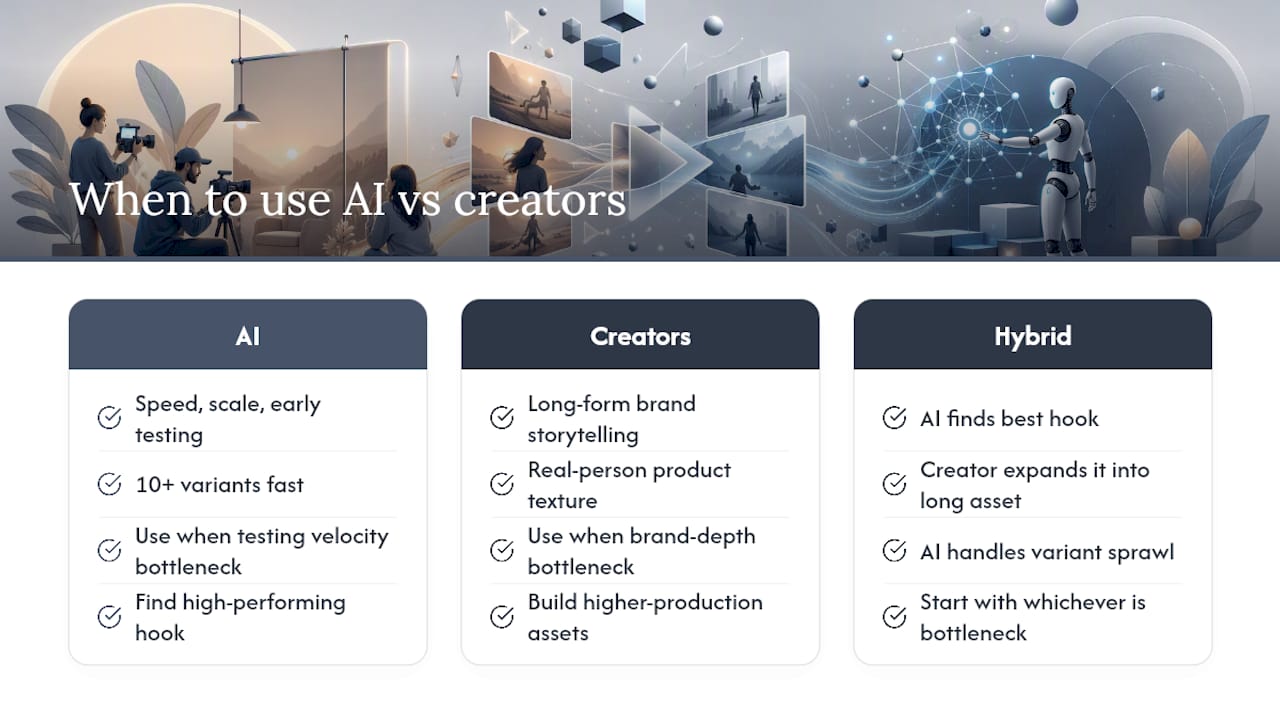
AI wins on speed, scale, and early-stage testing, when you need ten or more variants fast and can’t wait weeks to learn what resonates. Human creators still win on long-form brand storytelling and the kind of texture that comes from a real person using your product over time.
The smartest workflow isn’t either/or. Use AI to find your highest-performing hook cheaply, then hand that winning angle to a creator to build a longer, higher-production asset around it. If your bottleneck is testing velocity, start with AI. If your bottleneck is brand depth, start with a creator and let AI handle the variant sprawl around it.
— Syno
Start Your First Photo to Video Ad Test
Instant-ugc gets you from product photo to finished ad without the two-week wait or the $500 to $2,000 price tag that traditional UGC production carries. You upload one image, pick an avatar and language from 17 options, and get a 9:16 video back in about two minutes, ready to run on Meta or TikTok the same day you made it.

A good first test costs almost nothing to run: generate five variants for one SKU, split test them over two weeks, and put your budget behind whichever hook actually moves people. If you’re running creative across multiple markets, the multilingual video ads workflow lets you localize that same pilot without re-shooting anything. Head to the AI video generator to upload your first product photo and see the finished ad before your coffee gets cold.
