
Mobile App Video Ads: A Practical Guide for App Marketers
Unlock the power of mobile app video ads with our practical guide! Learn strategies to boost app installs and increase engagement.
For most app teams, short vertical video in 9:16 format, running 6–15 seconds on Reels, Shorts, and TikTok, and 15–30 seconds for in-stream placements, delivers the best combination of reach, cost efficiency, and install volume. Start here:
- Pick one placement (TikTok or Meta Reels for discovery; Google App campaigns for intent).
- Produce two vertical 9:16 cuts: one 6–10s hook-first version and one 15–20s benefit-led version.
- Add burned-in captions and a deep link to your App Store or Google Play listing.
- Deploy both with a $50–$100 daily budget for seven days.
- Watch hook rate (percentage of viewers who watch past the 3-second mark) and CTR in the first 72 hours. A hook rate above 30% and a CTR above 1.5% signal a creative worth scaling.
Key Takeaways
Short vertical video in 9:16 format, paired with MMP attribution and systematic creative testing, is the most reliable path to scalable, profitable mobile app video ad campaigns.
| Point | Details |
|---|---|
| Start with two vertical cuts | Produce a 6–10s hook version and a 15–20s benefit version in 9:16 before testing any other format. |
| Wire attribution before spending | Integrate AppsFlyer or another MMP and map five in-app events before your first campaign goes live. |
| Test angle before hook | Change the creative angle (problem-led vs. feature-led) first; it produces the largest CPA swings. |
| Measure Day 7 retention, not installs | High install counts with low Day 7 retention means the creative is attracting the wrong users. |
| Instant-ugc for fast variant volume | AI-generated 9:16 UGC-style videos at $4–$7 each let teams test multiple angles without agency timelines. |
Table of Contents
- What mobile app video ads are and why they outperform static
- Formats, aspect ratios, and specs you need before you export anything
- Where to run your app video ads and what each platform requires
- Creative best practices that actually move installs
- Step-by-step production workflow from brief to platform-ready assets
- Measuring what matters: attribution, key metrics, and A/B testing
- Tooling options and realistic production costs by team size
- How Instant-ugc speeds up UGC-style variant production for app teams
- What running app campaigns actually teaches you
- Instant-ugc produces app video ad variants in minutes, not weeks
- Sources
What mobile app video ads are and why they outperform static
A mobile app video ad is a short video asset served inside a mobile app, social feed, or streaming surface with the explicit goal of driving a measurable app-related action: a new install, a re-engagement click from a lapsed user, or a post-install conversion like a purchase or subscription. The term covers everything from a six-second bumper on YouTube to a full-screen rewarded video inside a game.
The three core campaign goals map cleanly to format choices:
- Installs: Short, punchy vertical video on discovery channels (TikTok, Reels, Shorts). Show the app’s core value in the first three seconds.
- Re-engagement: In-app interstitials or in-feed retargeting cuts aimed at users who installed but went dormant. These can run slightly longer (15–30s) because the audience already knows the product.
- Retention and monetization: Rewarded video inside your own app or partner apps, where users opt in for an in-app benefit. Completion rates are high because the user chose to watch.
Video outperforms static creative on discovery channels, creative-driven surfaces, and any feature that needs demonstration. If your app’s value proposition is hard to explain in a screenshot, video is not optional. Static images and screenshots still hold their own in search-intent placements like Apple Search Ads on the App Store, where the user is already looking for your category and needs confirmation, not persuasion.
Pro Tip: Match the format to the user’s mindset. A user scrolling TikTok needs to be surprised into stopping. A user searching “budget tracker app” on the App Store just needs to see your UI and ratings. Don’t run the same creative in both places.
Formats, aspect ratios, and specs you need before you export anything
Get these specs wrong and platforms either reject your assets or serve them in a cropped, letterboxed state that kills performance. Recommended video lengths for mobile placements cluster around 6–15 seconds for Reels, TikTok, and Shorts, and 15–30 seconds for in-feed or skippable in-stream inventory.
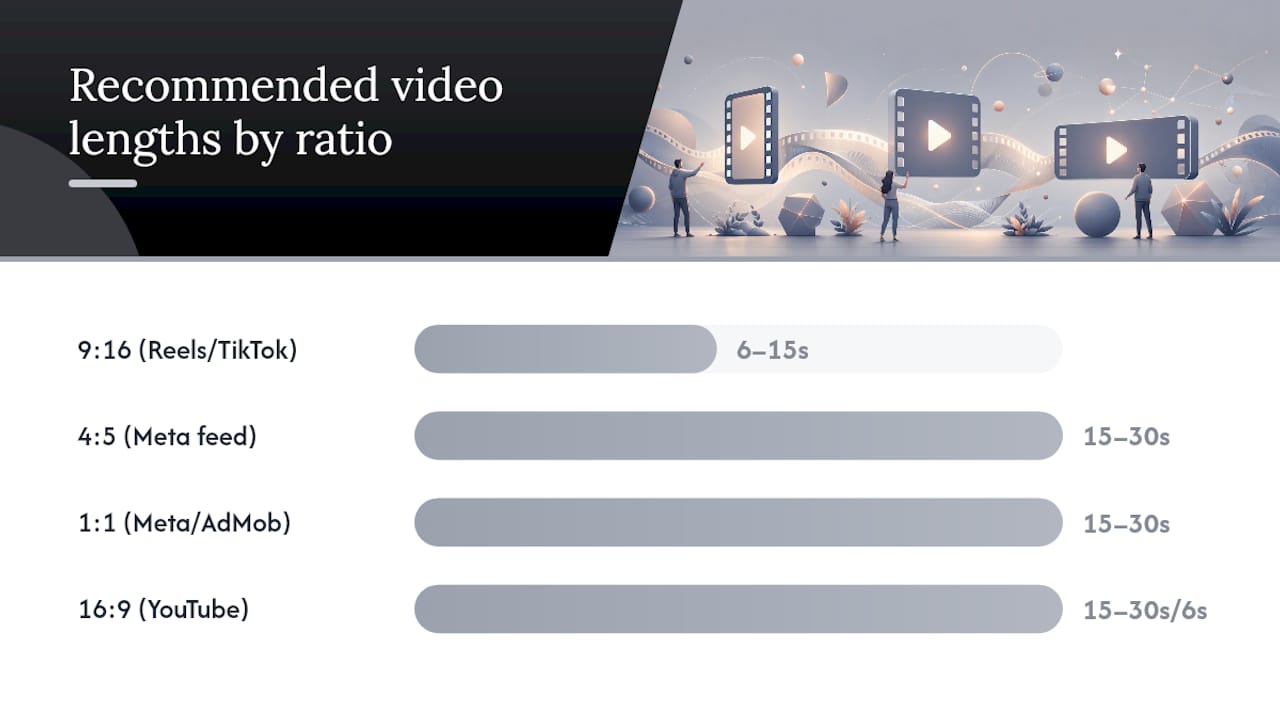
| Aspect Ratio | Best Placement | Recommended Length | Hook Timing |
|---|---|---|---|
| 9:16 | TikTok, Reels, Shorts, Stories | 6–15s (discovery); up to 30s (re-engagement) | First 1–3s |
| 4:5 | Meta Feed, Google App campaigns feed | 15–30s | First 3s |
| 1:1 | Meta Feed, AdMob in-feed | 15–30s | First 3s |
| 16:9 | YouTube in-stream, AdMob interstitial | 15–30s; 6s bumper for awareness | First 5s |
A few platform behaviors worth knowing before you export:
- Autoplay and muted starts: Most placements autoplay with sound off. Burned-in captions are not optional; they are the difference between a watchable ad and a silent video nobody understands.
- Orientation lock: Some in-app placements force landscape on tablet inventory. Supply both 9:16 and 16:9 versions to avoid automatic cropping.
- Native video in apps requires correct SDK and player integration per Google Ad Manager’s native video specs, including hosting limits and container rendering behavior.
Deliverables checklist for a basic campaign launch:
- 9:16 short cut (6–15s) with captions
- 9:16 longer cut (15–30s) with captions
- 4:5 feed cut (15–30s) with captions
- 16:9 in-stream version (15–30s)
- 6s bumper (16:9 or 1:1) for awareness
- End card with CTA and app store badge
- Thumbnail/static fallback for each ratio
- Caption file (.srt or burned-in) for each cut
Where to run your app video ads and what each platform requires
The four core placement types appear across every major platform, but their behavior and buying mechanics differ enough to matter.
Placement types defined:
- Rewarded video: Full-screen, opt-in. Users watch in exchange for an in-app reward (extra lives, coins, premium content). AppsFlyer frames this as a value exchange: completion rates are high because the user chose to watch, but over-monetization and poorly timed interstitials are top drivers of churn.
- Interstitial: Full-screen, auto-triggered at transition points (level end, onboarding break). Adjust recommends placing these at natural break points and using frequency capping to protect retention.
- In-feed / native: Appears inside a social or content feed, styled to match surrounding content. Requires correct SDK integration for in-app native video.
- In-stream / pre-roll: Plays before or during video content on YouTube or streaming surfaces. Skippable after 5 seconds for most formats.
Platform quick tips:
- Google App campaigns / YouTube: Supply up to 20 assets of each type (images, videos, HTML5) and let automation assemble combinations across Search, Play, YouTube, and Display. Square and vertical videos are recommended for mobile reach. The more vertical assets you supply, the more short-form inventory Google can access.
- Apple Ads (Apple Search Ads + App Store): Search-intent placements favor screenshots and short preview clips. For App Store product page optimization, work with an App Store ad specialist to align your video preview with your top search keywords.
- AdMob / Google Mobile Ads SDK: In-app inventory for rewarded and interstitial placements. Mediation through AdMob lets you access multiple demand sources from one SDK integration.
- Meta (Facebook and Instagram): Reels and Feed placements both accept 9:16 and 4:5. UGC-style creative for Meta placements consistently outperforms polished production on cost-per-install metrics. Use the Advantage+ App campaigns buying type for automated placement optimization.
- TikTok Ads: Native-feeling vertical video is the baseline expectation. Anything that looks like a TV commercial gets scrolled past. TikTok UGC creative tactics include on-screen text overlays, trending audio, and a hook that starts mid-action rather than with a logo.
- Snapchat: Full-screen vertical only. Six-second non-skippable commercials work for awareness; longer swipe-up formats work for installs. Snap’s audience skews younger, so creative tone matters more than on most platforms.
SplitMetrics recommends wiring your tracking and MMP before enabling any campaign spend, not after. Launching without attribution in place means your first week of data is unrecoverable.
Creative best practices that actually move installs
The creative is the targeting now. In a privacy-constrained environment where IDFA signals are limited, better creative qualifies users before they click, lowering CPA more reliably than marginal bidding adjustments. The formula that works across platforms:
Hook (0–3s) → Core benefit (3–8s) → Proof (8–20s) → CTA (final 3s)
Three short examples:
- Discovery channel (TikTok/Reels): Open mid-action (“I tracked every dollar I spent for 30 days and here’s what happened”), show the app UI for 5 seconds, cut to a result screen, end with “Download free — link in bio.”
- Intent channel (Google App campaigns): Open with the problem statement (“Tired of forgetting your workouts?”), show the scheduling feature in 8 seconds, end with a clear App Store CTA.
- Re-engagement (in-feed retargeting): Open with a feature the user hasn’t tried (“You haven’t used the budget report yet”), show it in 10 seconds, CTA to deep link directly into that feature.
UGC and testimonial technique: The camera should feel handheld, not studio-lit. Show the app UI on a real phone screen, not a mockup. Authenticity cues include natural speech patterns, slight background noise, and on-screen text that matches how the creator actually talks. UGC video marketing consistently outperforms polished TV-style ads on TikTok and Reels when the creative matches the surface norms of the feed.
Localization and accessibility rules:
- Burned-in captions in the primary language of each market, minimum 28pt font, high contrast
- On-screen text must be readable on a 5-inch screen at arm’s length
- Run language variants for your top three markets before scaling globally
Common creative mistakes:
- Logo in the first three seconds (kills hook rate)
- CTA without a deep link (sends users to the App Store homepage instead of your listing)
- No captions on a muted-autoplay placement
- Running the same creative for more than four weeks without a refresh
Pro Tip: Test creative angle first, then hook, then proof element, and CTA last. This order isolates the variable that actually lowers CPA. Changing the angle (problem-led vs. feature-led vs. social proof) produces the largest performance swings.
Step-by-step production workflow from brief to platform-ready assets
A repeatable workflow cuts revision cycles and gets you from concept to live assets in days rather than weeks.
- Brief: Define the goal (install, re-engagement, retention), the target placement (9:16 TikTok vs. 16:9 YouTube), and the single message the ad must land.
- Script: Write to timing markers. A 15-second script has roughly 37 words. Mark the hook (0–3s), benefit (3–10s), proof (10–13s), and CTA (13–15s). Keep sentences short enough to read aloud in one breath.
- Screen capture: Use a device running the actual app. Record at 1080p minimum. Capture the three or four screens that show the core value, not the onboarding flow.
- Edit: Cut to the script timing. Add captions first, then music (low volume, royalty-free), then motion graphics for on-screen text. Export a master at the highest resolution.
- Create variants: From the master, crop to 9:16, 4:5, and 1:1. Change the opening frame for each variant (different hook angle). Create an audio-off version with captions only and an audio-on version.
- QA checklist before upload:
- Captions display correctly on a real phone screen
- Deep link resolves to the correct App Store listing
- Aspect ratio matches the platform spec
- No logo in the first three seconds
- File size within platform limits (typically under 500MB; TikTok caps at 287.6MB for most formats)
Google App campaigns accept up to 20 video assets per campaign, so producing multiple variants is not just good practice — it directly expands the inventory Google can bid on.
Pro Tip: Record your screen capture at 60fps even if you export at 30fps. The extra frames give you smoother slow-motion cuts and more flexibility in the edit without a second recording session.
Measuring what matters: attribution, key metrics, and A/B testing
Vanity metrics (views, impressions) tell you reach. Business metrics tell you whether the creative is working. Set up measurement before you spend a dollar.
Key metrics by funnel stage:
- Hook rate: Percentage of viewers who watch past the 3-second mark. Below 25% means the opening is not stopping the scroll.
- View-through rate / completion rate: Percentage who watch to the end. Low completion on a 15s ad usually means the middle section lost them.
- CTR: Click-through rate to the App Store or deep link. Benchmark varies by platform; anything above 1% on TikTok is competitive.
- Install rate: Installs divided by clicks. A low install rate after a high CTR usually means the App Store listing (screenshots, description) is the weak link.
- Post-install events: First purchase, subscription start, Day 1 session, Day 7 return. These are the events that determine ROAS.
- Day 7 and Day 30 retention: The real quality signal for a creative. High-install creatives that produce low Day 7 retention are attracting the wrong users.
- ARPDAU and LTV: Average revenue per daily active user and lifetime value. These take longer to measure but determine whether a creative is profitable at scale.
- ROAS: Return on ad spend. Adjust recommends optimizing for Day 7/30 ROAS rather than installs alone, because install-optimized campaigns routinely attract users who never monetize.
Attribution setup checklist:
- Integrate an MMP (AppsFlyer is widely used) before launching any campaign. MMP setup and event mapping must be complete before spend begins.
- Map at least five in-app events: install, registration, first core action, first purchase, and Day 7 return.
- Configure SKAdNetwork postbacks for iOS campaigns. Without this, iOS attribution is blind.
- Set up A/B creative tests with a single variable per test and a minimum of 1,000 impressions per variant before drawing conclusions.
Pro Tip: Use Day 7 cohort data to judge creative quality, not raw install counts. The cohort view in AppsFlyer makes this comparison straightforward.
Tooling options and realistic production costs by team size
Production costs vary widely depending on whether you build in-house, use templates, hire an agency, or use an AI video generator. Here is a realistic breakdown:
When to choose each path:
- Build in-house when your team has an editor and you need fewer than five variants per month. The cost is time, not money.
- Use AI tools when you need 10+ variants quickly, want to test multiple angles without a full production cycle, or need localized versions in several languages. AI vs. human UGC creator cost comparison shows AI-generated video at a fraction of traditional creator costs.
- Hire a freelance creator when authenticity and on-camera personality are central to the creative strategy and you have two weeks of lead time.
- Use an agency for brand-level campaigns where production quality and strategic oversight justify the cost and timeline.
For tooling categories to evaluate: screen capture (built-in iOS/Android recorder, or dedicated tools), video editors (CapCut, Adobe Premiere, DaVinci Resolve), template-based makers, AI video generators, MMPs (AppsFlyer, Adjust), and mediation platforms (AdMob, ironSource).
How Instant-ugc speeds up UGC-style variant production for app teams
The workflow that takes a traditional UGC creator two to three weeks and $500–$2,000 per video can run in under two minutes with Instant-ugc’s AI video generator. The process for app teams looks like this:
- Input: Upload app screenshots or screen recordings. Add a brief description of the feature or benefit you want to highlight.
- Script generation: Instant-ugc auto-generates a testimonial-style script in the brand voice. You can edit it or accept it as-is.
- Avatar selection: Choose from 10+ AI avatars and select the language (17 supported) for the voiceover.
- Output: A 9:16 video delivered in 90–120 seconds, ready for TikTok, Reels, or the App Store.
A single session can produce multiple angle variants (problem-led, feature-led, social proof) without additional recording or editing time. That volume is what makes systematic creative testing practical for teams without a dedicated video production budget.
Client-reported results (Instant-ugc brand data): App teams using the platform have reported ROAS improvements from 2.1x to 4.8x after switching from static-only creative to AI-generated UGC-style video variants.
Pro Tip: Run AI-generated cuts through a one-person human QA pass before publishing. Check that the avatar’s script accurately reflects your app’s actual features, that the deep link resolves correctly, and that the on-screen UI shown matches the current version of your app. Thirty minutes of QA protects the authenticity that makes UGC-style creative work.
What running app campaigns actually teaches you
The most consistent lesson from running mobile app video ad campaigns is that creative quality beats targeting precision in most scenarios. When IDFA signals are limited and algorithmic targeting is increasingly automated, the creative itself does the audience qualification. An ad that shows the right problem in the first two seconds self-selects the right viewer. One that opens with a logo or a generic lifestyle shot does not.
The second lesson is that test order matters more than test volume. Teams that run 20 simultaneous creative variants learn almost nothing because they cannot isolate the variable that moved performance. Teams that test angle first, then hook, then proof element, then CTA, build a knowledge base they can apply to every future campaign.
A few high-leverage tactics that rarely appear in public guides:
- Refresh creatives every three to four weeks, not when performance drops. Waiting for the drop means you have already lost two weeks of efficient spend.
- Use retargeting cuts with deep links to specific in-app features, not just the App Store listing. Users who installed but never used a key feature respond to “you haven’t tried this yet” framing.
- Track UGC ad performance metrics at the cohort level, not the campaign level. Campaign-level ROAS hides the creative-level signal.
- Contextual targeting sidesteps privacy restrictions while keeping relevance high. Placing a fitness app ad inside a health and wellness game reaches a qualified audience without relying on behavioral data.
Instant-ugc produces app video ad variants in minutes, not weeks
Traditional UGC production costs $500–$2,000 per video and takes two to three weeks. For app teams that need to test multiple creative angles across TikTok, Reels, and Google App campaigns simultaneously, that timeline kills momentum.
Instant-ugc’s AI video generator turns app screenshots into testimonial-style 9:16 video ads in 90–120 seconds. You get automatic script generation, 10+ AI avatars, and support for 17 languages, so a single production session can yield localized variants for your top markets before your next standup.

Client-reported results indicate improved ROAS after adding AI-generated UGC-style video to their creative mix. At $4–$7 per video, the cost of testing five creative angles is less than a single hour of agency time.
Start generating your first app video ad variants at Instant-ugc and have platform-ready assets ready before the end of the day.
Sources
The sources below are the primary references for implementing the specs, attribution setup, and platform requirements covered in this guide.
- AppsFlyer blog: in-app advertising insights
- Native video ads — Google Ad Manager Help
- Your complete guide to mobile video ads in gaming apps | Adjust
- How to use App campaigns — Google Ads Help
- Guide to mobile app advertising — SplitMetrics
Recommended
- Video Ad Creator AI: The Ultimate Guide to Creating Mobile-Optimized Ads in 2026 | Instant-UGC Blog
- AI Video Generator for Advertising | Instant-UGC
- AI Facebook Ads Video Generator | Instant-UGC
- Dropshipping Video Ads AI: The Ultimate Guide to Cheap Ad Creation for Testing Products in 2024 | Instant-UGC Blog
