
Facebook Testimonial Ads That Build Trust and Convert
Discover how Facebook testimonial ads enhance trust and drive conversions with authentic customer voices and engaging content.
A Facebook testimonial ad is a paid placement that features a real customer’s words, voice, or face as the primary creative element, letting peer validation do the persuasion work your brand copy cannot. The fastest path to a high-converting version: record a 15-second UGC-style Reels clip, add burned-in captions, and run it against a warm retargeting audience in Meta Ads Manager. UGC-style ads on Meta consistently deliver higher engagement and improved ROAS compared to polished brand-produced creative, precisely because users read peer language into them.
Before you touch a camera or ad account, take this one action right now:
- Find one verified review you already own (Google, Shopify, email).
- Send the customer a one-sentence consent request: “May we use your review in a paid Facebook ad? We’ll credit you by first name and city only.”
- Log the date, their reply, and the platform you plan to run it on. That record satisfies both FTC endorsement guidance and Meta’s content requirements from day one.
The sections below give you every format, script, compliance rule, and testing framework you need to go from that first consent email to a live, optimized social proof advertising campaign.
Key Takeaways
Effective Facebook testimonial ads combine a real customer’s specific words, a compliant disclosure, and a format matched to the buyer’s funnel stage.
| Point | Details |
|---|---|
| Start with one verified review | Get written consent before any production; log the date, platform, and any incentive offered. |
| Match format to funnel stage | Use 15–30s UGC video for TOFU Reels; carousel reviews for BOFU retargeting. |
| Disclose every material connection | Add “Paid testimonial” or “#ad” conspicuously in the first frame or caption per FTC rules. |
| Test with a clear hypothesis | Run one variable per A/B test for 7–14 days; rotate creatives when frequency exceeds 3.0. |
| Instant-ugc reduces production cost | Brands report ROAS improvements using AI-generated testimonial videos at $4–$7 per video. |
Table of Contents
- What formats work best for Facebook testimonial ads?
- How do you create a high-converting testimonial ad step by step?
- What are the FTC and Meta rules you must follow?
- Where should you run testimonial ads, and what should you spend?
- How do you A/B test testimonial creatives and scale what works?
- Ready-to-use swipe files: scripts, captions, and disclosure lines
- How Instant-ugc fits into a compliant testimonial video workflow
- Why authenticity still beats polish in Meta’s creative stack
- Instant-ugc cuts your testimonial video production time to minutes
- Sources
What formats work best for Facebook testimonial ads?
Not every testimonial format fits every funnel stage.
UGC video / Reels (15–30 seconds)
This is your highest-ROI format for top-of-funnel (TOFU) and mid-funnel (MOFU) work. A real person on camera, speaking in plain language, triggers the peer-trust response that polished studio ads cannot replicate. Hook in the first three seconds with the result (“I lost 12 pounds in six weeks”), then let the story carry to a single CTA. Shoot vertical (9:16), burn in captions, and keep it under 30 seconds for Reels placements.

Static quote card
A clean graphic with a pull-quote, star rating, and “First Name, City — Verified Purchase” attribution. Low production cost, fast to test. Best for feed placements at the consideration stage. Copy pattern: Hook (the quote itself) → Proof (star rating or platform badge) → CTA (“Shop now — 30-day guarantee”).
Review screenshot
A cropped, legible screenshot of a real platform review (Google, Trustpilot, App Store) with your logo in the corner. Authenticity is the point; the imperfect formatting signals it is real. Works well as a MOFU carousel slide or a Stories ad.
Carousel with multiple reviews
Stack three to five short quotes across carousel cards, each addressing a different objection (price, results, shipping speed). Effective at the bottom of the funnel (BOFU) when a prospect needs one final nudge. End the last card with a product image and a direct offer.
Partnership testimonial card
Meta’s partnership ad format lets a creator or business partner post a testimonial that runs as a paid ad from your account. Meta Business Help documents how partnership ads can include partner testimonials and notes that partners are notified when their content is used. Use this format when you have a verified creator relationship and want the credibility of a third-party voice with the targeting control of a paid placement.
Placement and spec reference
Practitioner format guidance consistently points to these specs for Meta placements:
How do you create a high-converting testimonial ad step by step?
Production quality matters less than authenticity and compliance. Follow this sequence every time.
- Collect. Mine your existing reviews on Google, Shopify, email, and the App Store. Flag reviews that mention a specific result, a before/after, or a named problem solved.
- Verify. Confirm the reviewer is a real customer. Cross-reference the order ID or account record. Never use a review you cannot tie to a real transaction.
- Get consent. Send a written request specifying: the platform (Facebook/Instagram), the ad type (paid), whether you will edit the content, and any incentive offered. Log the reply with a timestamp.
- Script. Use one of the three templates below. Keep the customer’s own words as the core; write around them, not over them.
- Shoot. Natural light, eye-level framing, phone held vertically. The first three seconds must show a face or state the result — not a logo or a product shot.
- Edit. Trim to the tightest version. Add burned-in captions (85% of Facebook videos are watched without sound). Keep the aspect ratio at 9:16 for Reels/Stories, 4:5 for feed.
- Caption. Write ad copy that mirrors the testimonial’s language. Add the FTC disclosure line (see Section 4).
- Upload. Use Meta Ads Manager, not Boost. Set your placement, audience, and budget before you go live.
- Test. Run two creative variants against the same audience for 7–14 days before drawing conclusions.
Three script templates
15-second hook-driven (TOFU)
- 0–3s: Customer on camera states the result. “I doubled my email open rate in two weeks.”
- 3–12s: One sentence of context. “I’d tried three other tools. This one actually worked.”
- 12–15s: CTA overlay. “Try it free — link in bio.”
30-second story + result (MOFU)
- 0–3s: Problem statement. “I was spending $800 a month on video production.”
- 3–20s: Journey and turning point. “Then I found a tool that generates the same quality in minutes.”
- 20–28s: Specific result. “My cost per video dropped to under $10.”
- 28–30s: CTA. “See how — tap below.”
15-second product demo + quote (BOFU)
- 0–3s: Screen recording or product close-up with quote overlay.
- 3–12s: Voice-over reading the review verbatim.
- 12–15s: Star rating graphic + CTA button.
Pro Tip: Batch-produce testimonial videos by sending every willing customer the same two-question brief: “What was your situation before?” and “What changed after?” You get consistent story arcs that edit into multiple formats from a single shoot session.
What are the FTC and Meta rules you must follow?
Compliance is not optional, and enforcement is active. The FTC’s Endorsement Guides set the federal floor; Meta’s platform policies sit on top.
FTC endorsement requirements
- Honest endorsements only. The testimonial must reflect the endorser’s genuine experience. You cannot edit a review to change its meaning.
- Disclose material connections. If you gave the customer a discount, free product, or any incentive in exchange for the review, that connection must be disclosed conspicuously in the ad. “Paid partnership” or “#ad” buried in a caption does not meet the conspicuity standard.
- No fabricated results. Testimonials that describe outcomes not typical for most customers require a clear qualifier (“Results not typical” or a description of what typical results look like).
- Record-keeping. Keep written consent records, the original unedited review, any incentive documentation, and the date of use. The FTC has increased enforcement scrutiny since 2024.
- Re-consent on edits. If you trim, translate, or reformat a testimonial, get fresh written consent before running the edited version.
Meta partnership and testimonial ad rules
Meta’s Business Help explains that when you run a testimonial through the partnership ad format, the partner (the person whose testimonial you are using) receives a notification. You must have their prior agreement. Running a testimonial without that agreement violates Meta’s policies and can result in ad rejection or account restriction.
Practical disclosure language
For video ads, add a text overlay in the first three seconds: “Paid testimonial.” For static and carousel ads, include it in the primary text: “[Name] is a real customer. We provided [discount/free product] in exchange for their honest review.” For organic-style UGC repurposed as paid, add “#ad” or “Sponsored” at the start of the caption, not the end.
Keeping your audit trail
- Store consent emails in a dedicated folder labeled by customer name and campaign.
- Screenshot the original review source (URL, date, star rating) before editing.
- Recent reporting on Meta’s ad review system shows that platform moderation has real gaps, particularly for AI-generated and UGC content. Brand-side pre-flight checks are your first line of defense, not Meta’s automated review.
Pro Tip: Use a compliance checklist tool like Valiz to audit your ad placements and flag policy conflicts before you spend a dollar.
Where should you run testimonial ads, and what should you spend?
Placement and audience selection determine whether your social proof advertising reaches people ready to believe it.
Placement by funnel stage
- TOFU (awareness): Reels and Stories. Short, vertical, autoplay. Reach cold audiences who have never heard of your brand. The peer-voice format earns attention faster than a brand announcement.
- MOFU (consideration): Feed placements, both mobile and desktop. Longer formats (30s video, carousel) work here because the viewer is already curious and willing to spend a few seconds.
- BOFU (conversion): Dynamic retargeting with review carousels or a single strong quote card. Target people who visited your product page or added to cart but did not convert.
Audience tiers
- Warm retargeting: Website visitors (30-day window), video viewers (50%+ watch time), Instagram engagers. These audiences already have brand familiarity; a testimonial closes the trust gap.
- Lookalike audiences: Build a 1–2% lookalike from your purchaser list or your highest-value retargeting segment. Testimonial creative performs well here because the lookalike shares behavioral traits with people who already converted.
- Exclusion lists: Always exclude current customers from acquisition campaigns. Suppress recent purchasers (30 days) to avoid wasting budget on people who already converted.
Sample budget distribution
Marketing practitioners recommend a funnel-weighted budget split for initial testimonial ad tests:
| Funnel Stage | Budget Share | Small Advertiser ($50/day) | Medium Advertiser ($200/day) |
|---|---|---|---|
| TOFU | 60% | $30/day | $120/day |
| MOFU | 30% | $15/day | $5/day BOFU budget |
| BOFU | 10% | $5/day | $20/day |
Run each test for 7–14 days before making optimization decisions. Use “Maximize conversions” bidding for BOFU campaigns where you have enough conversion data (50+ events in 7 days). For cold TOFU tests with limited data, “Lowest cost” bidding gives the algorithm more flexibility.
Pro Tip: A $5/day BOFU budget will starve Meta’s learning algorithm. If your BOFU segment is small, consolidate it into one ad set rather than splitting across multiple creatives. One well-funded ad set learns faster than three underfunded ones.
How do you A/B test testimonial creatives and scale what works?
Testing without a clear hypothesis is just spending money. Structure every test before you launch it.
- Write the hypothesis. “A 15-second hook-driven video will outperform a static quote card for cold Reels audiences because video triggers autoplay engagement.” One variable, one prediction.
- Set up variants. Change one element per test: format (video vs. static), hook line, customer voice, or CTA. Use Meta’s A/B test tool in Ads Manager to ensure audience parity.
- Define your measurement window. Seven days for CTR and cost-per-click signals. Fourteen days for cost-per-result and ROAS. Do not pause or adjust campaigns before the window closes.
- Read early signals correctly. A high CTR with low conversion rate usually means the testimonial sets an expectation the landing page does not meet. Fix the post-click experience, not just the ad.
- Optimize at day 7. Kill creatives with CTR below your account baseline. Increase budget on the top performer by 20% increments, not doubles, to avoid resetting the learning phase.
- Rotate at day 14. Even winning creatives fatigue. Watch for frequency above 3.0 on retargeting audiences; that is the signal to introduce a new testimonial. A/B testing UGC ads requires consistent rotation cadence to maintain performance.
- Tie creative to landing page. If your ad features a specific customer quote, mirror that quote on the landing page in a “wall of love” section. Post-click reassurance from the same voice reduces bounce rate and lifts conversion.
KPIs by funnel stage:
- TOFU: video view rate (target 25%+), thumb-stop rate, CPM
- MOFU: CTR (link), cost per landing page view, engagement rate
- BOFU: cost per purchase, ROAS, add-to-cart rate
Ready-to-use swipe files: scripts, captions, and disclosure lines
Copy these directly into your production briefs or ad manager.
Video script snippets
Script A — 15s hook (TOFU) Opening shot: customer face, natural background
“I was skeptical. Three weeks later, I’m a convert.” [pause] “This actually works — and I’ve tried everything.” [CTA overlay: “See why — link below.”] Caption: Paid testimonial. [Name], [City]. Results may vary.
Script B — 30s story (MOFU) Opening shot: customer at desk or in kitchen
“Before [product], I was [specific problem]. I almost gave up. Then a friend recommended this, and within [timeframe], [specific result].” [CTA: “Try it risk-free.”] Caption: [Name] is a real customer. We provided a discount in exchange for their honest review. #ad
Script C — 15s demo + quote (BOFU) Opening shot: product in use or screen recording
[Voice-over reading the review verbatim] + star rating graphic Caption: Verified purchase — [Name], [City]. Paid partnership.
Static quote card copy
“[Direct quote — 10–20 words max, the most specific result]” ★★★★★ — [First Name], [City] | Verified Purchase [Brand logo] | [Short CTA: “Shop now”]
Caption + disclosure examples
- Short variant: “Real customer. Paid partnership. Results may vary.”
- Full variant: “[Name] is a verified customer. We offered a [10% discount / free sample] in exchange for their honest review. #ad”
Creative naming convention
Name files as: [Format]_[Audience]_[Hook]_[Date]
Example: Video15s_Retarget_DoubledRevenue_20260601_A
This naming keeps your Facebook UGC ad library organized and makes A/B variant tracking straightforward in Ads Manager.
How Instant-ugc fits into a compliant testimonial video workflow
Sourcing, scripting, filming, and editing a single testimonial video the traditional way takes two to three weeks and can cost $500–$2,000. Instant-ugc compresses that to minutes.
Here is the practical workflow:
- Upload your asset. Drop in a product photo (for physical goods) or an app screenshot (for SaaS/mobile). No video shoot required.
- Auto-generate the script. Instant-ugc’s AI script generator produces a testimonial-style hook, story, and CTA from your product details. Edit the output to match your best real customer quote.
- Choose an avatar. Select from 10+ customizable AI avatars. Match the avatar’s demographic to your target audience for maximum peer-trust effect.
- Set placement presets. The Facebook AI Ads Generator outputs 9:16 video with burned-in captions, sized for Reels and Stories out of the box.
- Review and export. Videos generate in 90–120 seconds. Download in Meta-ready format and upload directly to Ads Manager.
Instant-ugc supports 17 languages, which matters for brands running multilingual campaigns or testing creative across different U.S. regional markets. Per-video cost drops to $4–$7, compared to hundreds or thousands with a traditional UGC creator.
One compliance note: Instant-ugc’s AI-generated avatars are synthetic, not real customers. Label them accurately in your ad disclosures. The FTC’s guidance on AI-generated content is evolving; the FTC compliance guide for AI UGC covers current disclosure expectations for synthetic testimonial-style creative.
Why authenticity still beats polish in Meta’s creative stack
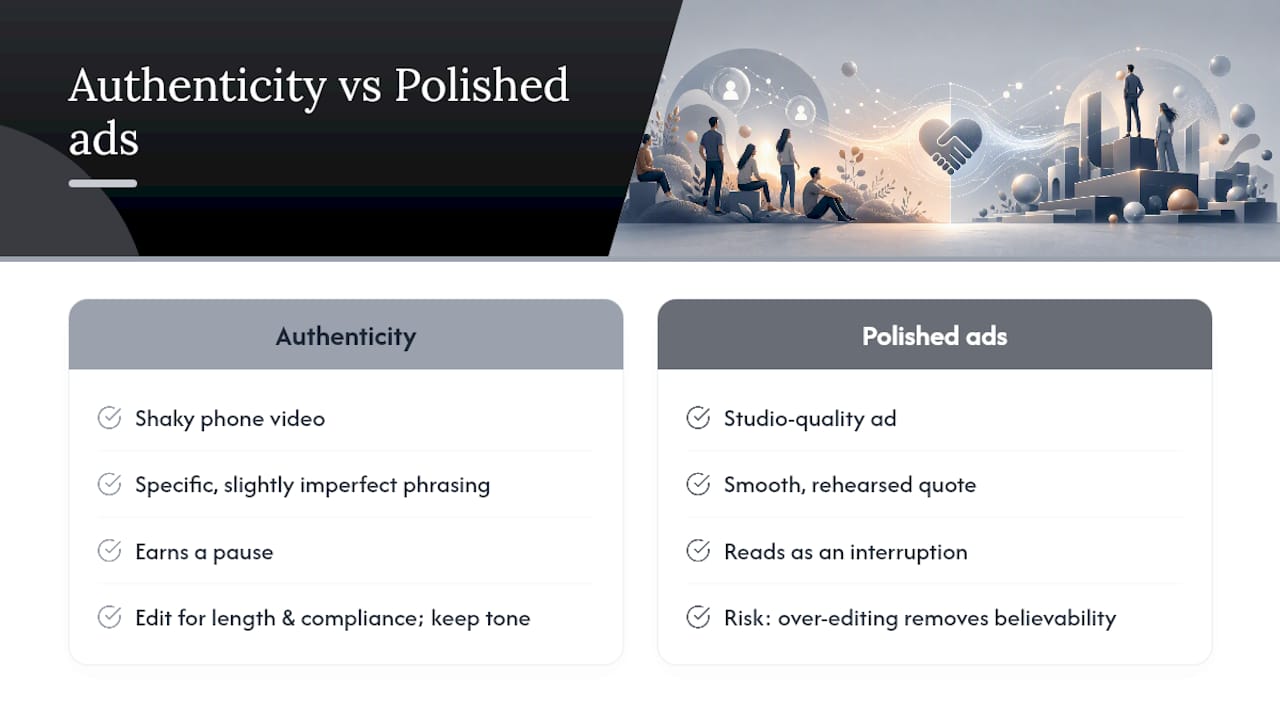
The conventional wisdom in paid social is that production quality signals brand credibility. That logic made sense when Facebook feeds were full of amateur content and a polished ad stood out. The feed has inverted. Users now scroll past studio-quality ads because they read as interruptions, while a shaky phone video with a real person’s voice earns a pause.
The practical implication is not “shoot everything on a phone.” It is that the language of the testimonial matters more than the production value. Specific, slightly imperfect phrasing (“I was honestly about to return it”) outperforms a smooth, rehearsed quote every time. The risk is that marketers over-edit testimonials to sound polished, stripping out exactly the friction that made them believable.
My recommendation: edit for length and compliance, never for tone. Keep the customer’s exact words wherever the FTC and Meta rules allow. And when you use AI-generated testimonial video, invest the time you saved into sourcing a sharper, more specific real quote to anchor the script. The technology handles production; your job is still to find the truth in the customer’s experience.
Instant-ugc cuts your testimonial video production time to minutes
Traditional UGC production bottlenecks kill campaign momentum. By the time a creator delivers, edits, and clears rights, your test window has closed. Instant-ugc solves that directly.

- Speed: Generate a Meta-ready testimonial video in 90–120 seconds from a single product photo or screenshot.
- Cost: Per-video cost of $4–$7 versus $500–$2,000 with a traditional creator.
- Placement presets: 9:16 output with burned-in captions, built for Reels, Stories, and feed placements.
- Scale: Run 10 creative variants in the time it used to take to brief one creator. Test faster, find winners faster.
- Language support: 17 languages for multilingual campaigns or international market tests.
Ready to generate your first testimonial video? Try the Facebook AI Ads Generator and have a Meta-ready creative in under two minutes.
Sources
- About testimonials in partnership ads | Meta Business Help
- Ftc
- Praising
- Meta’s Chinese partner behind deluge of nudify ads | Tech Transparency Project
