The Right Facebook Reels Size Is 1080×1920px (9:16)
Learn the ideal Facebook Reels size of 1080×1920px for maximum reach. Follow these export guidelines to enhance your video visibility.
The recommended Facebook Reels size is 1080×1920px at a 9:16 aspect ratio. Export it as an MP4 with H.264 video and AAC audio, and you’re covered for nearly every use case.
Meta’s 2025 update merged standard video posts into the Reels format, so almost everything you upload gets treated as a Reel now. That shift didn’t change the math, though. Vertical 9:16 still wins the most screen space on mobile and remains Meta’s documented recommendation for reach.
- Canvas: 1080×1920px, 9:16 vertical
- Container: MP4 (MOV also accepted)
- Codec: H.264 video, AAC audio
Key Takeaways
Facebook Reels perform best at 1080×1920px in 9:16, exported as H.264 MP4 with AAC audio, with no strict duration cap since Meta’s 2025 update.
| Point | Details |
|---|---|
| Default canvas | Export at 1080×1920px, 9:16 aspect ratio, for both fullscreen and grid compatibility. |
| Safe zone discipline | Keep key visuals in the center 60 to 75% of frame to survive grid cropping to roughly 3:4. |
| Encoder settings | Use H.264, 30fps fixed, sRGB color, AAC audio at 128kbps or higher. |
| Length flexibility | No strict duration cap exists since Meta’s 2025 update, but 15 to 60 seconds usually retains attention best. |
| Scale with automation | Tools like Instant-UGC generate spec-correct 9:16 videos in 90 to 120 seconds for faster testing. |
Table of Contents
- Facebook Reels Dimensions and Export Presets at a Glance
- Where Do the Reels Grid and Viewer Crop Your Video?
- What Encoder Settings Cut Recompression and Speed Up Processing?
- Does Facebook Still Limit Reels Length?
- How Do You Optimize a Reel for Maximum Reach?
- Do Facebook and Instagram Reels Share the Same Specs?
- How Instant-UGC Builds Spec-Correct Reels at Scale
- Where These Specs Come From
- What Actually Matters When You Size a Reel
- Frequently Asked Questions
- Sources
Facebook Reels Dimensions and Export Presets at a Glance
Save this as your default export preset, and you’ll rarely have to think about Facebook video size specs again.
| Setting | Recommended Value |
|---|---|
| Canvas size | 1080×1920px (minimum 720×1280px) |
| Aspect ratio | 9:16 (feed alternate: 4:5) |
| File format | MP4 or MOV |
| Video codec | H.264 |
| Frame rate | 30 fps |
| Audio codec | AAC, 128kbps+ |
| Max file size | 4 GB (practical target: under 1 GB) |
Meta’s Business Help documentation lists H.264 and H.265 as supported codecs and recommends a 1080p target, which lines up with what Postfa and Moda both confirm in their 2026 spec breakdowns. If you’re producing for both Reels and standard feed placements, keep a 4:5 version on hand. It crops less aggressively in feed and avoids the letterboxing that makes vertical video look amateurish outside the Reels player.
Bitrate matters more than most editors realize. A 1080×1920 file encoded too high inflates upload time and risks a stalled processing job on mobile connections. Target a variable bitrate in the 8 to 12 Mbps range for 1080p at 30 fps, and you’ll get clean playback without a file that chokes on upload.
Where Do the Reels Grid and Viewer Crop Your Video?
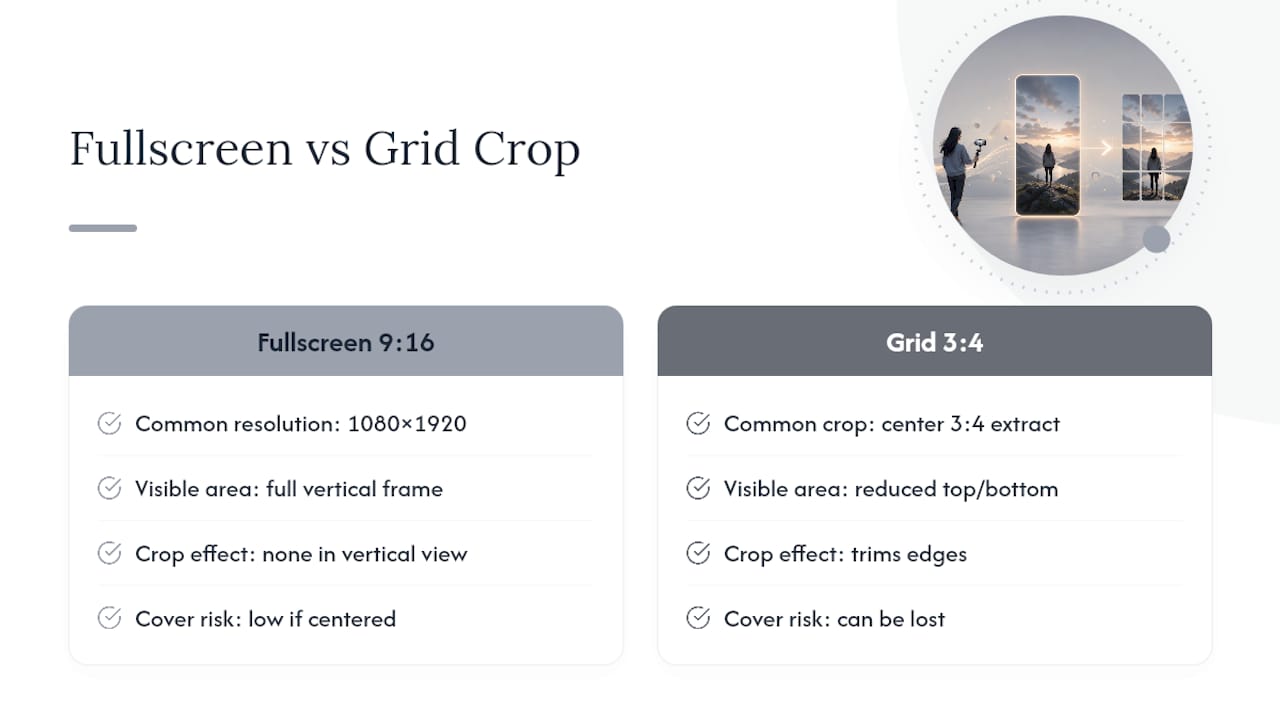
Your Reel gets viewed in two very different frames, and that distinction trips up more editors than any resolution question. The fullscreen player shows the complete 9:16 canvas. The profile grid and discovery surfaces crop that same file down to roughly 3:4, showing a center slice around 1080×1440px, according to Moda’s cropping breakdown.
That means anything sitting in the top or bottom quarters of your frame in fullscreen mode simply disappears in grid view. A logo pinned to the very top or a call-to-action stamped along the bottom edge might look intentional in the player and vanish entirely when someone is scrolling a profile.
- Keep primary visuals within the center 60 to 75% of the vertical frame.
- Leave the bottom 10 to 15% clear of critical text, since UI overlays like captions and the follow button sit there.
- Reserve roughly 60 to 100px along the right edge for like, comment, and share icons.
- Center logos and CTAs rather than anchoring them to a corner.
Pro Tip: Export a preview frame at the 3 second mark and check how it looks cropped to 3:4. If your product or face is still recognizable in that tighter frame, your safe zone is solid.
What Encoder Settings Cut Recompression and Speed Up Processing?
Getting the container right matters less than getting the encoder settings right, and this is where most exported Reels lose quality they never needed to lose.
- Export MP4 with H.264 video, 4:2:0 chroma subsampling, and square pixels (no anamorphic scaling).
- Use progressive scan, never interlaced.
- Lock your frame rate at a fixed 30fps rather than variable, which prevents Meta’s servers from re-encoding your motion inconsistently.
- Keep GOP (group of pictures) length short, around 1 to 2 seconds, for smoother scrubbing and faster server processing.
- Set color to sRGB.
- Audio: AAC at 128kbps or higher, sample rate 44.1 to 48kHz.
For 1080×1920 at 30fps, a variable bitrate between 8 and 12 Mbps hits the quality-to-file-size balance most editors are after. Ad placement specs from Meta occasionally list higher-resolution options like 1440×2560 for archival masters, but 1080×1920 remains the practical delivery target for nearly every creator and brand account.
Does Facebook Still Limit Reels Length?
Not the way it used to. Meta’s 2025 platform update folded standard video uploads into the Reels format, and the current documentation doesn’t list a strict duration ceiling the way older guides claimed.
That doesn’t mean length stops mattering. Shorter Reels, in the 15 to 30 second range, still tend to hold attention and finish-rate better than longer ones. Explainer-style content often works well between 30 and 60 seconds, and narrative or tutorial formats can stretch past 90 seconds without losing viewers, provided the pacing earns it.
- File size: Meta’s practical ceiling sits around 4GB, though keeping files well under that reduces upload failures.
- Lower your bitrate and shorten your GOP length if uploads are timing out on longer files.
- Test upload speed on the actual connection you’ll be publishing from, not just your editing workstation.
How Do You Optimize a Reel for Maximum Reach?
Nailing the technical spec gets your video accepted. These moves get it watched.
- Hook viewers in the first 3 seconds. Lead with the product, the transformation, or the boldest claim, not a slow build.
- Add captions on every Reel, either burned in or via SRT file. Most viewers watch on mute, and Zawa’s production research ties captions directly to better silent-autoplay retention.
- Keep on-screen text large, centered, and inside your safe zone, since small corner text disappears on mobile screens.
- Use platform-native audio or trending sound clips when the format fits your brand.
- Export a 4:5 variant for feed placements if your campaign runs across both surfaces.
- A/B test two or three short variants and watch retention curves, not just view counts, to see which cut actually holds attention. A breakdown of high-performing hooks is a useful reference if you’re stuck on opening lines.
Pro Tip: Watch your retention graph, not your total views. A steep drop at the 3 second mark means your hook is the problem, not your production quality.
Do Facebook and Instagram Reels Share the Same Specs?
Largely, yes. Meta runs both platforms on shared backend infrastructure for Reels, so a file built to 1080×1920 with H.264 and AAC audio typically works across both without re-exporting. Instagram’s own guidance confirms 9:16 as its full-screen standard too, with accepted ratios ranging as wide as 1.91:1.
Where things diverge is thumbnails. The fullscreen player shows your complete vertical frame, but the grid view on both platforms crops to a roughly 3:4 visible area, close to 1080×1440px. If your cover image or opening frame relies on elements near the top or bottom edge, export a custom cover cropped specifically for that grid space rather than letting the platform auto-select a frame.
- One 9:16 master usually covers both platforms.
- Export a separate 4:5 or custom-cropped cover only when your CTA or branding sits near the frame edges.
How Instant-UGC Builds Spec-Correct Reels at Scale
Getting every export right by hand works fine for one video. It falls apart at 20 videos a week. Instant-UGC generates 9:16-optimized video ads straight from product photos or app screenshots in 90 to 120 seconds, with the aspect ratio, resolution, and codec settings already locked to platform requirements.
- Upload a product photo or app screenshot, choose a script direction, and get a finished 9:16 video without touching an export panel.
- Generate several variants at once for A/B testing hooks, avatars, or scripts without re-editing from scratch.
- Support for 17 languages and 10+ AI avatars means one product image can produce localized creative for multiple markets in the same session.
Brands running this workflow for Facebook video ad campaigns have reported ROAS climbing from 2.1x to 4.8x, a jump that reflects both faster iteration and creative that’s already spec-compliant on the first export.
Traditional UGC production runs $500 to $2,000 per video and takes two to three weeks to turn around. That timeline makes rapid testing nearly impossible for smaller teams.
Pro Tip: Generate three script variants from the same product photo, run them as separate ad sets, and let retention data pick your winner instead of guessing which hook feels stronger.
If your team also needs help managing the media buying side once creative is ready, a dedicated Facebook ad scaling service can handle placement strategy while your creative pipeline stays automated.
Where These Specs Come From
These specifications come from Meta Business Help, Instagram’s help documentation, and sizing guides at Postfa.st, Moda, and Zawa. Recheck Meta’s official docs before committing a large ad budget, since platform policy shifts fast.
What Actually Matters When You Size a Reel
Most guides treat Facebook Reels sizing as a solved problem: pick 1080×1920, done. That’s not wrong, but it misses where creators actually lose performance, which is the gap between fullscreen and grid cropping. I’d argue the safe zone question deserves more attention than the resolution question, because nearly every creator already knows 9:16. Few actually check how their cover frame survives a 3:4 crop.
The bigger shift is Meta’s 2025 unification. Treating every upload as a Reel removes the old duration anxiety, but it also means the platform stopped giving creators an easy excuse for sloppy pacing. A 90 second video with no strict cap still needs to earn every one of those seconds.
If you’re optimizing production for volume rather than a single hero video, the constraint worth solving first isn’t dimensions. It’s how fast you can produce spec-correct variants to test hooks against real retention data, which is exactly where automated workflows earn their keep over manual export queues.
Frequently Asked Questions
What is the ideal size for Facebook Reels? The ideal Facebook Reels size is 1080×1920px at a 9:16 aspect ratio, exported as MP4 with H.264 video and AAC audio.
What is the minimum resolution Facebook accepts for Reels? Facebook’s guidance allows a minimum of roughly 720×1280px, though 1080×1920px delivers noticeably sharper playback on modern devices.
Is there still a maximum length for Facebook Reels? No strict duration cap exists in current platform documentation following Meta’s 2025 update, though shorter videos in the 15 to 60 second range typically retain viewers better.
What file size limit should I plan for? Plan for a practical ceiling around 4GB, but keeping files well under that limit through efficient bitrate settings reduces upload failures.
Should I use 9:16 or 4:5 for Facebook video? Use 9:16 as your primary Reels format since it fills the fullscreen player; keep a 4:5 variant on hand for feed placements that crop less aggressively.
Why does my Reel look cropped differently on my profile grid? The Reels grid displays a roughly 3:4 center crop of your 9:16 video, close to 1080×1440px visible area, so anything near the top or bottom edge gets cut off.
Do Instagram and Facebook Reels use the same dimensions? Yes, both platforms share backend infrastructure for Reels and recommend 9:16, so one properly exported master typically works across both.
What codec should I use to avoid recompression issues? Use H.264 with 4:2:0 chroma subsampling and square pixels; H.265 is an optional alternative for smaller file sizes at similar quality.
How can I speed up production of multiple Reel variants? Platforms like Instant-UGC generate spec-correct 9:16 videos from product photos in 90 to 120 seconds, letting you test several hooks without re-editing each version manually.
What frame rate should I export at? Export at a fixed 30fps rather than a variable frame rate, which keeps playback smooth and avoids inconsistent server-side re-encoding.
Sources
- Requirements for Facebook Reels | Meta Business Help
- Facebook Reels Size: 1080×1920 (9:16) Updated April 2026
- Facebook Reel Size — 1080×1920px (2026 Guide) | Moda
Recommended
- The Ultimate Instagram Reels Strategy for Eco-Friendly Product Brands (With UGC, AI Ads & AI Video) | Instant-UGC Blog
- Viral Fitness Hooks for Instagram Reels: The Complete Guide to Stopping the Scroll, Growing Fast, and Scaling with AI | Instant-UGC Blog
- The Ultimate Instagram Reels Strategy for Jewelry Brands: AI Tools, UGC Tips & More | Instant-UGC Blog
- Viral Subscription Boxes Hooks for Instagram Reels: 100+ Proven Openers to Skyrocket Your Subscribers in 2026 | Instant-UGC Blog
