
Avoid Landing Page Rejections: Facebook Ad Policies for Advertisers
Practical playbook for advertisers on Facebook ad policies: why landing page parity matters, a preflight checklist, testing advice, and Instant-UGC use cases.
Meta’s Advertising Standards govern every ad running on Facebook, Instagram, Messenger, and the Meta Audience Network, and they cover far more than banned words. Review examines your creative, your targeting choices, and your landing page as one connected package. Most rejections come from a small set of repeat offenders: targeting language that implies personal attributes, landing pages that don’t match the ad’s promise, and health or financial claims made without the required permissions. Automated review usually clears ads within 24 hours, but restricted categories can take longer.
TL;DR:
- Most ad rejections stem from targeting language implying personal attributes, landing pages that do not match ad promises, and unpermitted health or financial claims.
- Prohibited categories include illegal drugs, unlicensed medical claims, weapons, adult content, hate speech, and deceptive practices like countdown timers.
- Restricted categories such as CBD, alcohol, gambling, and political ads require region-specific permissions and careful targeting to avoid violations.
- Campaigns must comply with targeting restrictions, especially for sensitive categories in the US and Europe, and declare special categories when necessary.
- Automated review typically takes 24 hours but can be longer for restricted or sensitive content, emphasizing the importance of pre-launch checks and landing page consistency.
Table of Contents
- Understanding Facebook Ad Policies: Scope and Structure
- Prohibited Content Categories You Can’t Run Under Any Condition
- Restricted Categories: Conditions, Permissions, and Regional Limits
- Facebook Ad Targeting Policies and Special Ad Categories
- How Facebook’s Ad Review Process Actually Works
- Landing Page Requirements: Avoiding Mismatch Rejections
- Account Penalties, Escalations, and How to Appeal
- Your Preflight Checklist for Facebook Ad Policy Compliance
- Where Instant-UGC Fits Into a Compliant Creative Workflow
- A Conservative Approach to Long-Term Account Health
- Scale Compliant Video Creative Without Slowing Down
- Bookmark These Official Policy Pages
- Sources
Understanding Facebook Ad Policies: Scope and Structure
Meta built its Advertising Standards to cover Facebook, Instagram, Messenger, and the Meta Audience Network as a single rulebook, not four separate policy sets. That matters practically: an ad you build once and expect to run identically across placements has to satisfy the strictest applicable rule, not the most lenient one.
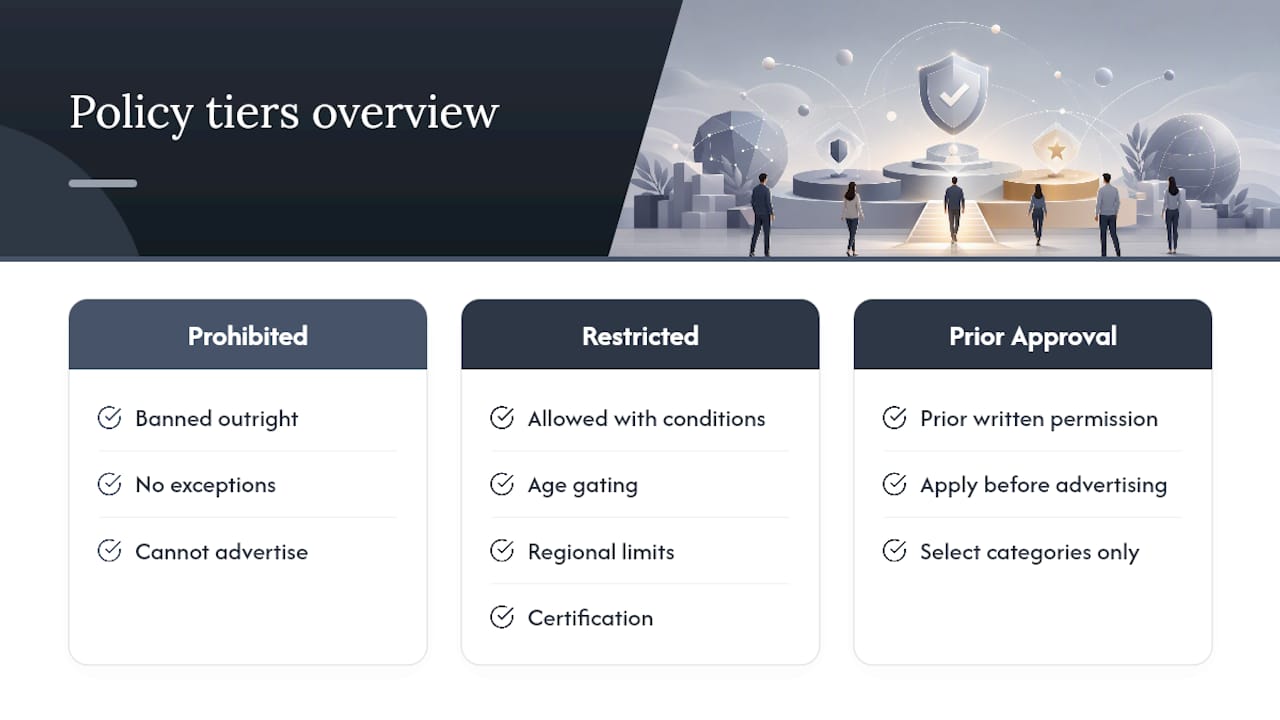
The standards sort content into three tiers. Prohibited content is banned outright, no exceptions, no permissions. Restricted content can run, but only with conditions attached, such as age gating, regional limits, or certification. A smaller category requires prior written permission from Meta before you can advertise at all, which applies to things like certain financial services and some social issue campaigns.
Your obligations as an advertiser go beyond the creative itself. Meta expects you to comply with the laws of the countries where your ads run, which means a supplement claim that’s fine in one country can get an ad pulled in another. You’re also on the hook for how you and your service providers handle Meta advertising data. The Transparency Center is explicit that this data cannot be transferred to outside ad networks, exchanges, or data brokers without authorization, and that obligation extends to any agency or freelancer running campaigns on your behalf.
If you outsource creative production or media buying, put that data restriction in writing with your vendors. A well-meaning contractor who exports audience data into a third-party tool can trigger a policy violation tied to your account, even if you never touched the data yourself.
Meta updates these standards regularly, and the changes aren’t always announced with fanfare. The Transparency Center and Meta Business Help Center are the two places policy changes actually get published first, before they show up in third-party newsletters or agency blog posts. If you manage recurring campaigns, checking these pages quarterly is a cheap insurance policy against a policy shift catching you mid-campaign.
Prohibited Content Categories You Can’t Run Under Any Condition
Some categories aren’t negotiable, and no amount of clever copywriting gets around them. Understanding common Facebook ad violations in this tier saves you the wasted effort of building creative that was never going to clear review.
The hard bans include:
- Illegal drugs and unlicensed cannabis or THC products. Even ads that reference drug paraphernalia indirectly, through slang or symbolic imagery, get flagged.
- Unlicensed pharmaceuticals and unsubstantiated medical claims. Claiming a product “cures,” “eliminates,” or “reverses” a medical condition without regulatory backing is an automatic rejection trigger.
- Weapons, ammunition, and explosives sales. This covers direct sales as well as ads that link to third-party marketplaces selling these items.
- Adult content and explicit sexual material. This includes implied nudity in thumbnails, not just explicit video content.
- Hate speech and content that attacks people based on protected characteristics. This extends to imagery and coded language, not only overt slurs.
- Fraudulent or deceptive business practices. Get-rich-quick schemes, fake countdown timers, and manufactured scarcity claims fall here.
Concrete examples make this less abstract. A skincare ad claiming a serum “eliminates wrinkles permanently in 48 hours” reads as an unsubstantiated medical claim, even though skincare itself is a perfectly advertisable category. A supplement ad showing a dramatic before-and-after body transformation without disclaimers often gets flagged for implying an unrealistic or unsafe outcome. A dropshipping ad using a countdown timer that resets every time a visitor reloads the page is a textbook deceptive practice, and Meta’s systems are trained to catch it.
The rationale behind rejecting borderline creative isn’t arbitrary strictness. Meta’s own Advertising Standards note that the full ad ecosystem gets reviewed together, which means even a technically legal claim can get bounced if the surrounding context, imagery, or targeting makes it look like it’s baiting a vulnerable audience. A weight-loss ad targeting people who recently searched for eating disorder content, for instance, is going to draw scrutiny regardless of what the copy says.
Pro Tip: Before you submit new creative, read it out loud as if you’re the person seeing it cold, with zero context about your brand. If a claim sounds too good to be true out loud, Meta’s reviewers will likely flag it the same way.
Restricted Categories: Conditions, Permissions, and Regional Limits
Restricted content sits in a gray zone that trips up more advertisers than outright bans do, mostly because the rules change depending on where the ad runs. Several categories, including CBD, political advertising, and housing, carry region-specific requirements and sometimes need prior written permission or third-party certification before Meta will approve delivery at all.
The categories that show up most often in this tier:
- Alcohol. Requires age targeting that excludes minors and compliance with the legal drinking age in every country where the ad delivers.
- CBD and supplements. CBD ads face country-by-country restrictions, and supplement ads must avoid implying a product treats or prevents disease.
- Gambling and real-money gaming. Requires prior written permission in most markets, plus strict age and geographic targeting.
- Health and weight-loss claims. Before-and-after imagery, specific numeric results, and language implying guaranteed outcomes all draw extra scrutiny.
- Political and social issue ads. Require advertiser authorization and disclaimers in many countries, with some regions banning them entirely during election periods.
The practical trap here is cross-border delivery. An advertiser might correctly configure a CBD campaign for a market where it’s permitted, then unknowingly leave broader audience targeting settings that let the ad deliver into a country with tighter restrictions. Meta’s system doesn’t always catch this before it becomes a rejection or a compliance flag on your account.
Checking regional allowances before launch means going category by category rather than assuming a blanket policy. A supplement ad legal to run without restriction in one country might require a specific disclaimer in another and be banned outright in a third. If you’re running the same creative across multiple markets, build your targeting to exclude regions where you haven’t confirmed compliance, rather than relying on Meta’s review to catch the mismatch for you.
Facebook Ad Targeting Policies and Special Ad Categories
Targeting rules exist because Meta doesn’t want advertisers using its granular targeting tools to imply something personal about the person seeing the ad. This is one of the most misunderstood parts of Facebook advertising rules, because the violation often isn’t in what you’re selling, it’s in how the ad copy talks to the viewer.
You cannot write ad copy or design creative that implies knowledge of someone’s:
- Race, ethnicity, or national origin — “As a fellow [ethnicity], you’ll love this” is a direct violation.
- Religious beliefs — Referencing someone’s specific faith practice in the second person crosses the line.
- Sexual orientation or gender identity — Ads that assume or call out orientation directly get flagged even when the product itself is unrelated.
- Disability or medical condition — “Struggling with your diabetes?” implies personal knowledge Meta doesn’t allow advertisers to claim.
- Financial status — “You’re broke and need this loan” is a personal-attribute violation, even in a financial services ad that’s otherwise compliant.
Beyond individual ad copy, certain industries require you to self-identify under a Special Ad Category before you can launch at all. Advertisers running campaigns related to housing, employment, or credit and financial services in the US, Canada, and parts of Europe must declare this at the campaign level. Once declared, Meta strips out certain granular targeting options, including age, gender, and zip code radius targeting in some cases, specifically to prevent discriminatory ad delivery.
This limitation frustrates advertisers who built their funnel around narrow demographic targeting, but the workaround isn’t to avoid declaring the category. That’s a fast track to account suspension. Instead, shift toward broader interest-based and lookalike audiences, and lean on creative testing rather than granular demographic slicing to find your best-performing segments.
Pro Tip: If you’re not sure whether your campaign falls under a Special Ad Category, ask yourself whether a rejected applicant could sue over discriminatory targeting for that product category. If the answer is plausibly yes, declare it before Meta flags it for you.
How Facebook’s Ad Review Process Actually Works
Meta’s ad review process is predominantly automated and typically completes within 24 hours for standard campaigns. That number is a median, not a guarantee, and campaigns touching restricted categories, sensitive claims, or Special Ad Categories routinely take longer because they get pulled into manual review.
Review doesn’t just scan your headline for banned words. It looks at the creative assets (images, video, text overlays), the ad copy itself, your targeting configuration, the landing page your link points to, and in some cases your advertiser identity and account history. A perfectly compliant ad linked to a landing page that makes a claim your ad copy doesn’t can still get rejected, because the full ad ecosystem gets reviewed together.
The most common rejection triggers, in order of frequency based on what shows up in advertiser support forums and Meta’s own guidance:
- Landing-page mismatch. The ad promises one thing, the landing page delivers something else, or the page is broken, slow, or missing on mobile.
- Personal-attribute language. Copy that speaks directly to a protected characteristic, even implicitly.
- Misleading or exaggerated claims. “Guaranteed results,” unrealistic before-and-afters, or manufactured urgency.
- Low-quality or disruptive creative. Flashing content, fake buttons, or clickbait imagery designed to trick rather than inform.
- Insufficient information for restricted categories. Missing age disclaimers, missing required certifications, or missing disclosure text.
If you’re running campaigns with any restricted-category component, build a review buffer into your launch timeline. Assuming instant approval and launching a time-sensitive promotion the same day you submit creative is a common, avoidable planning mistake.
Landing Page Requirements: Avoiding Mismatch Rejections
Your landing page isn’t a passive destination. It’s part of what gets reviewed, and a mismatch between what your ad promises and what your page delivers is one of the most frequent, most avoidable causes of rejection, particularly for advertisers running automated or AI-generated creative at volume.
The core requirements are straightforward on paper:
- The landing page must accurately reflect the claims made in the ad, down to specific pricing, availability, and product descriptions.
- The page must function properly on mobile, since the overwhelming majority of Meta traffic arrives on a phone.
- The page cannot introduce content that would itself violate the Advertising Standards, even if the ad that led there was fully compliant.
- Data collection on the landing page must stay within what users would reasonably expect from the ad, avoiding surprise data grabs disguised as a “free quiz” or “instant discount.”
Bait-and-switch is the classic failure mode here: an ad advertises a specific discount or product, and the landing page shows a different price, a sold-out item, or an unrelated upsell funnel. Even when unintentional, this reads as deceptive to Meta’s review systems and to the human reviewers who handle escalations.
If you’re running multiple creative variants, especially through dynamic or AI-generated production workflows, keep an explicit mapping between each creative version and its exact landing page URL. A spreadsheet with creative ID, launch date, and destination URL takes ten minutes to set up and saves hours of guesswork when a rejection notice arrives and you need to trace which page a specific ad variant actually pointed to.
Pro Tip: Treat your landing page like a second reviewer. Before submitting any ad, open the destination URL cold, on a phone, and ask whether it says the same thing the ad just told you. If there’s daylight between the two, fix the page before you fix the ad copy.
Account Penalties, Escalations, and How to Appeal
A single rejected ad and an account-level restriction are two very different problems, and advertisers often don’t realize how quickly one turns into the other. One rejected ad is a creative-level issue: fix it, resubmit, move on. A pattern of rejections, especially clustered around the same violation type, escalates into account-level review, and repeated flags can restrict your entire Business Account, not just the offending campaign.
Recovery from an account-level restriction is harder than fixing a single ad, and it’s not always fast. Here’s the practical sequence to follow:
- Read the specific violation notice carefully. Meta typically tells you which policy was triggered, and vague guesses at the cause waste your appeal window.
- Fix the root cause before resubmitting anything. If the issue was a landing-page claim, fix the page itself, not just the ad copy pointing to it.
- Request a review through the Ads Manager interface rather than generic customer support channels, since policy appeals route through a dedicated process.
- Gather supporting evidence. Screenshots of your landing page, documentation of any required certifications, and a clear explanation of what changed since the rejection all strengthen an appeal.
- Wait for the review outcome before making further changes to the same ad or account settings, since repeated edits during an open appeal can complicate the review.
If you know you’re testing something genuinely borderline, whether that’s an aggressive health claim or an unconventional targeting approach, run it on a secondary, low-spend ad account rather than your primary business account. That isolates any policy signal to a smaller account you can afford to lose, instead of risking the account your entire ad operation depends on.
Your Preflight Checklist for Facebook Ad Policy Compliance
A practical checklist beats a mental list every time, especially when you’re launching multiple campaigns a week and reviewing each one from scratch isn’t realistic. Meta’s own Advertising Policy Basics Checklist covers the fundamentals, and building your own version around it catches the failure points specific to your account history.
Before you launch, confirm:
- Creative doesn’t include exaggerated claims, misleading before-and-afters, or disruptive visual tricks.
- Ad copy avoids any language implying personal attributes about the viewer.
- Targeting is checked against Special Ad Category triggers if you’re in housing, employment, or credit/financial services.
- Landing page matches the ad’s claims exactly and loads correctly on mobile.
- Data handling with any third-party vendor or agency complies with Meta’s advertising data restrictions.
- Permissions and certifications are current for any restricted category, including CBD, gambling, or alcohol.
Manual review can add real time to your launch calendar. Meta’s own guidance notes that restricted or sensitive campaigns often take longer than the standard automated window, so building a buffer of a few extra days into your media plan for anything touching a restricted category isn’t overcautious, it’s realistic scheduling.
For anything genuinely new or higher-risk, run a low-spend pilot first, ideally on a secondary account, before committing your full budget or your primary account’s standing. Keep a version log tying each creative asset to its landing page URL and launch date, borrowed straight from the dynamic creative testing playbook that agencies use to trace rejections back to their source fast.
Pro Tip: When a rejection notice arrives, resist the urge to immediately resubmit the exact same ad hoping for a different outcome. Automated systems often flag the same pattern twice. Fix the specific element named in the notice first.
Where Instant-UGC Fits Into a Compliant Creative Workflow
Compliance starts with the policy decisions covered above, but production speed determines whether you can actually test and iterate fast enough to stay ahead of rejections. The platform can generate video ads formatted to Meta’s 9:16 feed and story specs directly from product photos or app screenshots, which helps reduce formatting errors that sometimes lead to disruptive or oddly cropped creative getting flagged.
Script generation runs across 17 languages, and because scripts are generated from structured product input rather than freeform copywriting, they’re less likely to drift into the exaggerated or personal-attribute language that trips up manual ad copy. That doesn’t replace your own review of every script before launch, but it narrows the starting point.
Brands using Instant-UGC report ROAS improvements from roughly 2.1x to 4.8x, alongside video production costs as low as $4 to $7 per video compared to the $500 to $2,000 traditional UGC creators typically charge. Faster, cheaper production means more room to run compliant, low-spend tests before committing real budget, which is exactly the discipline that keeps accounts in good standing.
A Conservative Approach to Long-Term Account Health
Most advertisers treat policy compliance as a per-ad checkbox instead of an account-level discipline, and that’s backwards. The ads you run today shape how Meta’s systems and human reviewers weigh your next campaign. A cleaner history buys you faster reviews and more benefit of the doubt on borderline creative later.
The single highest-leverage habit is strict ad-to-landing-page mapping with version logs. Most rejections I’d flag as “avoidable” trace back to a page that drifted from the claim in the ad, not a genuinely bad-faith violation. The second habit is resisting the pull toward sensational transformation claims and language that edges into personal-attribute territory, even when a competitor is clearly getting away with it. Getting away with it once isn’t a policy, it’s a delay before enforcement catches up.
When you do want to test something genuinely risky, isolate it. A secondary account with a small budget tells you what you need to know without putting your main ad operation on the line.
— Syno
Scale Compliant Video Creative Without Slowing Down
This platform offers a faster route to platform-ready creative compared to traditional UGC production timelines, which often take two to three weeks per video. Videos generate directly in Meta’s 9:16 format, helping to avoid resizing and cropping errors that can trigger disruptive-creative flags during review.

Script generation can occur automatically from product photos or app screenshots, with multi-language support for localized campaigns across markets, reducing the risk of claim drift from manual copy rewriting. The AI Facebook ads video generator is built specifically for this workflow, producing ready-to-launch video ads in under two minutes from a single product image.
None of this replaces your own policy review. Compliance still lives with you, the advertiser, and every video should get checked against the Special Ad Category and landing-page requirements covered above before it goes live. What Instant-ugc changes is how fast you can produce and test compliant variants, so a rejected ad costs you minutes to replace, not weeks. If you’re ready to see how quickly a compliant, formatted video comes together, start with the AI video generator and turn your next product photo into a testable ad today.
Bookmark These Official Policy Pages
Keep these pages saved, since policy language shifts without much fanfare. Meta’s About Advertising Standards page is the baseline reference for what’s prohibited and restricted, while the Transparency Center’s Advertising Standards hub tracks updates and regional variations as they’re published.
For process questions, the How Ad Review Works help page covers timelines and what gets checked, and the Advertising Policy Basics Checklist is the fastest preflight reference before you launch. For a comparison of how another major platform handles a specific vertical, Growth Reach Marketing’s breakdown of Google’s healthcare ads policy is a useful cross-check if you’re running the same health-related campaign on multiple ad platforms.
Sources
- Introduction to the Advertising Standards — Transparency Center
- About Meta Advertising Standards — Meta Business Help
