
3–5 Creatives Per Ad Set: Budget Rules and No Editor Scaling
Match creatives per ad set to your budget—2–3, 3–5, or 10–20+. Learn when to test and how AI makes videos in 90 to 120 seconds so you can scale without...
Most mid-market accounts perform best running 3 to 5 active creatives per ad set, but that number is not fixed. The right count depends on your daily budget, how mature your account is, and how fast you can produce quality variants. Small budgets should stay closer to 2 or 3, while well-funded accounts built for broad testing can push into the 10 to 20+ range. Everything below explains how to find your number and manage it once you have it.
TL;DR:
- Small budgets below $50 per day should run no more than three creatives to ensure enough conversions for meaningful testing.
- Higher budgets of $300 or more per day allow testing 6 to 8 creatives, as they generate sufficient conversion volume to judge each variant effectively.
- Using AI-generated videos reduces production time to around 90–120 seconds per creative, enabling a larger number of variants without extra staffing or delays.
- Judging creatives too early risks false positives and dilutes data, so testing should last at least 3 to 5 days with enough conversion volume before declaring winners.
- Creatives should be meaningfully different in messaging, visuals, or CTA to provide valuable signals to the algorithm, avoiding near-duplicate variations that offer little learning.
Table of Contents
- Creatives Per Ad Set: Matching the Range to Your Budget
- How to Choose the Right Number of Creatives for an Ad Set
- Testing Rules That Keep You From Chasing False Winners
- What to Actually Change Between Creative Variants
- Solving the Production Bottleneck Behind Creative Volume
- Why More Creatives Isn’t Automatically Better
- Test More Creatives Without the Production Slowdown
- Sources
- FAQ
Creatives Per Ad Set: Matching the Range to Your Budget
The idea that there’s one correct answer to “how many creatives per ad set” is the first myth to drop. What actually works clusters into three practical bands, and your daily spend tells you which one you’re in.
- 2 to 3 creatives: Testing floor for small daily budgets, typically under $30 to $50 per ad set. You need enough spend behind each variant to generate a real signal, and splitting a tiny budget five ways just produces noise.
- 3 to 5 creatives: The sweet spot for most mid-market accounts spending roughly $50 to $150 per day per ad set. This is where Facebook’s own guidance lands for the majority of advertisers.
- 10 to 20+ creatives: Reserved for well-funded accounts running broad, algorithm-driven testing, usually $300 or more per day per ad set, where there’s enough conversion volume to feed every variant.
Meta technically allows up to 50 ads in a single ad set, but that ceiling is almost never practical. At that volume, you’re relying entirely on the algorithm to sort winners from losers, and unless your budget is large enough to give each creative a fair shot, you’re just diluting your own data.
How to Choose the Right Number of Creatives for an Ad Set
Picking a number isn’t guesswork if you work through it in order. Follow these three steps before you launch anything.
- Confirm your daily budget and campaign goal. A testing campaign built to find winning concepts behaves differently from a scaling campaign built to spend efficiently against a proven creative. Testing tolerates more variants; scaling wants fewer, stronger ones.
- Estimate the conversion volume you need. Meta’s delivery system generally needs an ad set to generate around 50 conversions per week to exit the learning phase reliably. Divide that number by your creative count to see whether each variant can realistically collect enough data.
- Set your initial count and a review cadence. Decide upfront when you’ll add a new variant, pause a loser, or promote a winner into its own ad set. Waiting until performance data is unambiguous beats reacting to day-two panic.
Pro Tip: Run the math backward. If your ad set needs 50 weekly conversions to exit learning and each conversion costs $20, you need $1,000 a week, or about $143 a day, just to feed one creative properly. Multiply that by your creative count before you commit to a number.
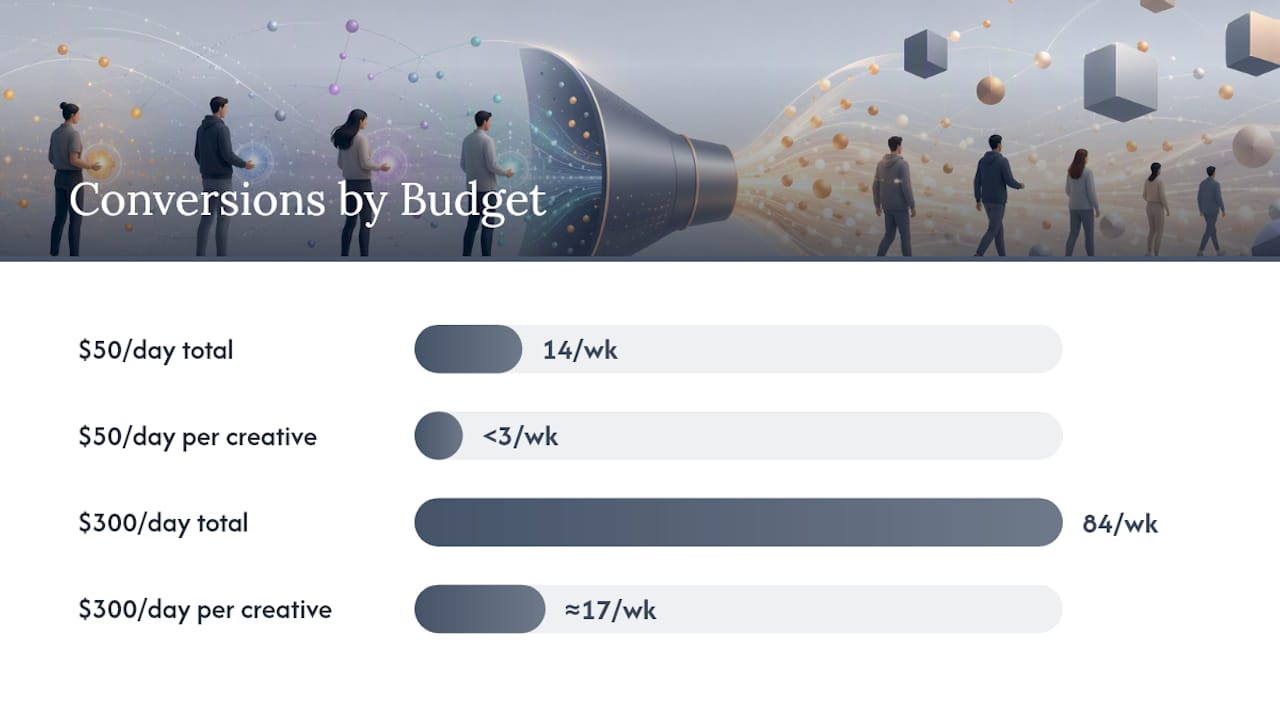
Here’s how that plays out at two different budgets. A $50/day ad set generating one conversion every $25 nets roughly 14 conversions a week. Split across 5 creatives, that’s under 3 conversions each. That’s too thin to judge anything. This account should run 2 to 3 creatives at most. A $300/day ad set at the same cost per conversion generates about 84 conversions a week. Split five ways, each creative gets roughly 17, enough to start forming a real opinion, and enough runway to justify testing 6 to 8 concepts instead of 3.
Testing Rules That Keep You From Chasing False Winners
Judging a creative before it has enough data is the single most common mistake in ad testing, and it gets worse as creative counts climb. A 12 design rules resource on creative testing recommends running tests for a minimum of 3 to 5 days and waiting for meaningful conversion volume per variant before declaring anything a winner.
The math is unforgiving: every creative you add divides your available budget and conversions among more competitors. Five creatives sharing a $50 daily budget each get a fraction of the signal one creative would get alone. That’s exactly why the budget-per-creative ratio matters more than the raw count.
A few rules keep testing honest:
- Don’t call a winner or loser before each variant has collected enough spend to be statistically meaningful, not just a day or two of thin data.
- Use Ad Strength in Google Ads and asset reporting in Meta Ads Manager to see which specific elements (headline, image, video) are pulling weight, rather than judging the ad as one indivisible unit, a practice Google explicitly recommends.
- Use campaign drafts and experiments where the platform offers them, so you can A/B test structural changes without disrupting a live, performing ad set.
- Retire a creative when its cost per result trends meaningfully worse than the ad set average over a sustained window, not after one bad day.
- Iterate on winners with small variants (new hook, new CTA) rather than replacing them outright. A winning concept usually has more life left in it.
What to Actually Change Between Creative Variants
Adding more creatives only helps if each one is meaningfully different. Five versions of the same video with a slightly different color grade give the algorithm almost nothing new to learn from. The variables that actually matter:
- Hook and messaging angle: A pain-point hook, a social-proof hook, and a curiosity hook are three different tests, even using the same footage.
- Visual composition: Static product shots, lifestyle context, and talking-head formats each trigger different attention patterns.
- CTA copy: “Shop Now” versus “See Why Customers Switched” can shift click-through rate on its own.
- Aspect ratio and length: A 9:16 vertical clip built for Reels behaves differently than a 1:1 square built for feed placement, even with identical messaging.
- First frame and thumbnail: The first half second decides whether anyone watches the rest, especially on mobile.
Keep every ad set themed tightly around one offer or one audience angle so your variants combine consistently. Google’s own creative guidance recommends supplying multiple headlines, images, and video assets so its AI-driven combination systems have real material to work with, not five near-duplicates.
Pro Tip: If two creatives only differ in a font color or a five-second edit, they’re not two tests. They’re one test wearing two outfits. Change something the viewer would actually notice.
Solving the Production Bottleneck Behind Creative Volume
Here’s the part most creative-count advice skips: the number isn’t really limited by strategy, it’s limited by production. Every creative you add multiplies the work: new footage or assets, resizing for each aspect ratio, versioning for different hooks, and repeating all of it in every language you advertise in. That bottleneck is why so many accounts settle for 3 creatives when the budget could support 10.

Traditional workflows solve this with templates and batch exports, creator marketplaces, or hiring more editors, all of which add cost and lead time. AI-driven video generation removes that ceiling more directly. Instant-UGC generates a finished UGC-style video ad from a product photo or app screenshot in about 90 to 120 seconds, with 10+ customizable AI avatars and support for 17 languages, at a fraction of what a traditional creator charges per video.
That combination changes the math from the sections above. When production stops being the constraint, the decision about how many creatives to run per ad set goes back to your budget and conversion volume, exactly where it belongs, instead of how many editors you have on staff this week.
- Output lands in 9:16 format, ready for Reels, Stories, and TikTok placements without a separate resizing pass.
- Automatic script generation removes the bottleneck of writing five distinct hooks by hand.
Why More Creatives Isn’t Automatically Better
Platforms are nudging advertisers toward more creative inputs, and for well-funded accounts with enough conversion volume, that trend genuinely helps, more variety gives the algorithm more to learn from. But the same advice applied to a thin budget just spreads your data too thin to draw conclusions.
If your budget can’t support a wide test, don’t force it. Split your structure across a couple of tightly themed ad sets instead of cramming ten creatives into one that can’t feed them.
— Syno
Test More Creatives Without the Production Slowdown
Some AI-based services remove the biggest constraint discussed above: production capacity. Instead of waiting weeks and paying several hundred to thousands of dollars per traditional UGC video, you can generate a finished variant in 90 to 120 seconds for a low cost, which means your creative count can finally match your budget instead of your editing bandwidth.

That speed changes what “testing enough creatives” means in practice. With AI-generated video ads built from product photos or app screenshots, you can produce enough distinct hooks, visuals, and CTAs to properly test a $300/day ad set without hiring an extra editor or waiting on a creator’s turnaround. The platform supports 17 languages and 10+ AI avatars, so a media buyer running 50+ video variants across markets can do it from one workflow instead of five separate vendor relationships.
Start with the $9 one-off test to see a finished video before committing to a plan, or move straight into the Starter tier at $19 per month if you already know you need ongoing volume.
Sources
For deeper platform-level guidance, see Meta’s ad set creative limits, Google’s creative best practices, and a data-backed 2026 breakdown of how the recommended range shifts with budget. For a broader look at how AI is changing agency production economics, this analysis of AI’s ROI impact is worth a read.
- Facebook Business Help
- Build better creative for your performance marketing (Think with Google)
- Creative performance best practices - Google Ads Help
- How Many Creatives Per Ad Set in 2026 (Data-Backed) | uplads
FAQ
What’s the minimum number of creatives per ad set?
Two to three creatives is a reasonable floor, even for small budgets, since a single creative gives you no comparison point. Below that, you’re not testing, you’re just running an ad.
How many creatives should a $50 per day ad set run?
At $50 per day, stick to 2 to 3 creatives so each one collects enough conversions to judge fairly. Spreading that budget across 5 or more variants usually leaves every one of them under-tested.
How often should I rotate or refresh ad set creatives?
Watch for creative fatigue signals like rising frequency and falling click-through rate, and refresh once you see a sustained decline rather than a single bad day. Most accounts find a natural refresh cycle every few weeks, though high-spend accounts may need it sooner.
Does running more creatives always improve results?
No. More creatives only help when your budget generates enough conversions to give each variant a fair test, a dynamic backed by Meta’s own guidance on account-stage testing. Below that threshold, adding creatives just dilutes your data and slows down learning.
How does Instant-UGC help with creative testing at scale?
Instant-UGC generates finished video ads in about 90 to 120 seconds, letting you produce enough distinct variants to properly test a well-funded ad set. Plans start at 19 USD per month, with a 9 USD one-off option to test the platform first, both listed on the Instant-UGC site.
