
Test AI Ad Scripts Fast: Generate 3 Variants and Scale Winners
Generate AI ad scripts, spin three rapid variants, run quick A/B tests, and scale winners into 9:16 videos in 90–120 seconds.
AI ad scripts turn a short brief or product URL into ready-to-test hooks, captions, and timed video beats in minutes instead of days. The smartest way to use them is to generate three variants right away, run a quick A/B test, and scale whichever wins. Skip the single-perfect-script mindset. Speed and volume are the actual advantage.
TL;DR:
- Using AI ad scripts for rapid testing allows generating multiple variations quickly to identify the most effective one without relying on perfect, single scripts.
- Feeding specific, clear inputs such as a strong benefit, target audience, and platform constraints significantly improves the quality and relevance of AI-generated ad copy.
- Producing five to ten script variants per brief and testing them with controlled metrics helps determine winning creative elements for scaling.
- Generating scripts from product images or screenshots enables automated creation of multi-format videos in just a couple of minutes, supporting international and multilingual campaigns.
- Human oversight remains essential to ensure compliance with disclosure rules and to verify factual accuracy, especially for regulated or sensitive messaging.
Table of Contents
- What Are AI Ad Scripts and When Should You Use Them?
- What Inputs Improve AI Ad Script Quality?
- How to Generate an Effective AI Ad Script
- Ready-to-Use Ad Script Templates You Can Copy Today
- How Do You Test and Scale AI-Generated Scripts?
- What Do Real Results Look Like?
- Balancing Speed With Brand Oversight
- Instant-ugc: From Script to Formatted Video in Minutes
- Sources
- FAQ
What Are AI Ad Scripts and When Should You Use Them?
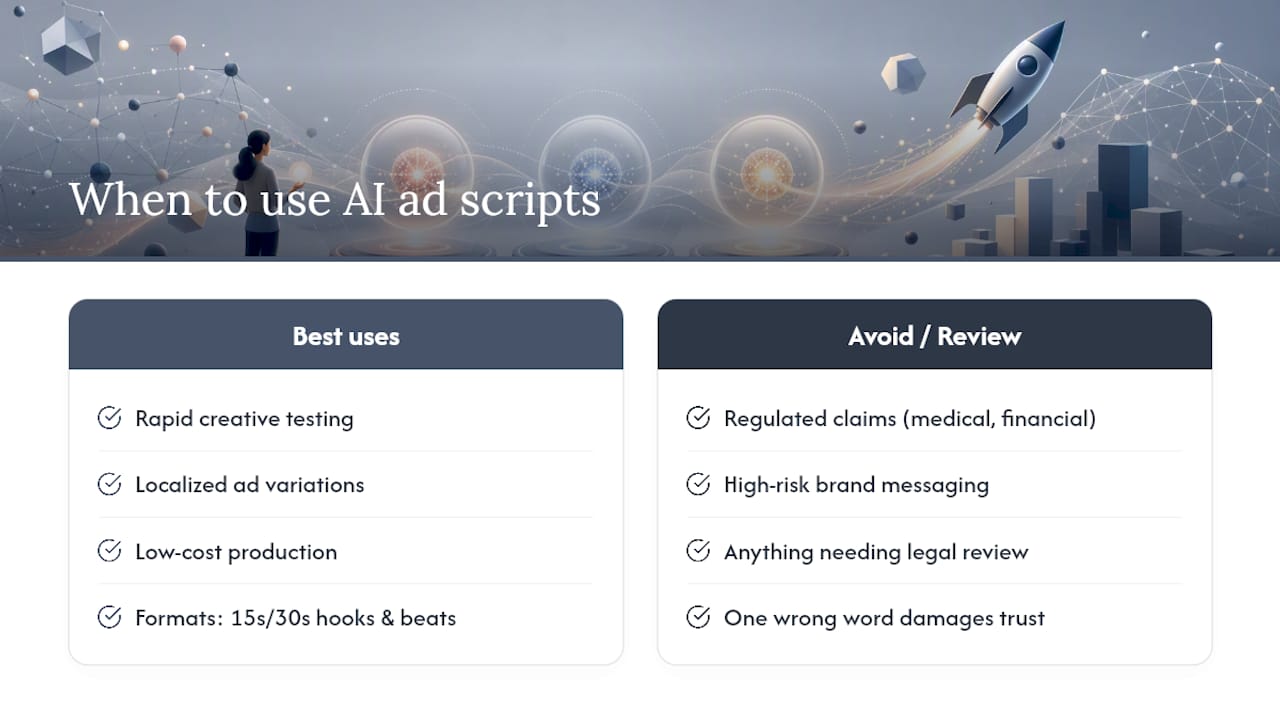
AI ad scripts are text outputs generated by AI models that mimic what a human copywriter or video scriptwriter would produce: a scroll-stopping hook, a benefit-driven middle, a call to action, and sometimes timed beats for a 15 or 30-second video. Feed the model a product description, a target audience, and a format, and it returns copy structured for that specific placement.
They work best for rapid creative testing, localized variations of a winning ad, and low-cost production when you don’t have a video team on staff. A recent controlled study found LLM-generated ads achieved a 59.1% preference rate versus 40.9% for human-written ads, with the biggest gap showing up in ads that used authority and consensus appeals.
Don’t rely on AI alone for anything touching regulated claims, medical or financial messaging, or campaigns where one wrong word damages brand trust. Human review still matters there.
What Inputs Improve AI Ad Script Quality?
The output only gets as good as what you feed in. A vague prompt returns generic copy nobody clicks; specific inputs return scripts you can publish with minor edits.
- A one-line product or app description, written the way you’d explain it to a friend
- The single strongest benefit, not a list of five features
- Your target audience in plain terms (age, pain point, or use case)
- A clear call to action and desired length (15s, 30s, static caption)
- Examples of past ads that performed well, since models trained on strong exemplars and a style guide produce more brand-aligned copy than ad-hoc prompting alone
- Platform constraints up front: 9:16 aspect ratio for TikTok and Reels, caption needs, and safe zones so on-screen text doesn’t get clipped by app interface elements
Feed in a product photo or app screenshot too. Visual context helps the script match what viewers will actually see.
How to Generate an Effective AI Ad Script
Treat script generation as a workflow, not a one-shot request. Five steps take you from blank prompt to a tested, scalable winner.
- Prepare the brief. Write a one-line product description, the single most important benefit, your CTA, and a real customer quote if you have one. This brief is the foundation everything else builds on.
- Pick your format first. Decide if you’re writing a 15-second hook, a 30-second demo, or a UGC-style testimonial before you generate anything. Format shapes structure, so lock it in early.
- Generate 5 to 10 variants. Use structured prompts that specify tone, persuasion angle (authority, social proof, urgency), and length. Adjust the creativity setting if your tool offers one. More variants at this stage cost nothing but time.
- Refine the strongest 2 to 3. Check facts, tighten brand voice, and confirm you’re following platform disclosure rules. Google now labels ads created or edited with its generative AI tools, and Meta has a comparable “AI info” tag, so build disclosure into your process rather than treating it as an afterthought.
- Run a rapid A/B test. Set up control versus variant with clear metric targets, then promote the winner into a scaled production run across formats and audiences.
Pro Tip: Don’t test more than one variable per script pair. If you change the hook and the CTA at the same time, you won’t know which change actually moved the needle.
Ready-to-Use Ad Script Templates You Can Copy Today
Templates save you from staring at a blank prompt box. Adapt each one to your product before you generate variations.
- 15-second hook: “Still dealing with [problem]? [Product] fixes it in [timeframe]. [CTA].”
- 30-second demo: “Meet [product]. [Visual cue: product in use]. It solves [benefit] without [common pain point]. [Social proof]. [CTA].”
- 30-second UGC testimonial: “I tried [product] because [reason]. Honestly? [benefit]. [Social proof, e.g. star rating or review count]. If you’re on the fence, just try it. [CTA].”
- App-install testimonial: “I downloaded [app] to [use case]. Now I [result]. [Visual cue: screen recording]. [CTA: download link].”
- Static poster headline + caption: Headline: “[Benefit] in [timeframe].” Caption: “[Product] helps you [outcome]. [CTA].”
Here’s one filled in: “Still tired of dry, dull skin? [product: GlowBalm] fixes it in one week. [visual cue: before/after close-up]. Rated 4.8 stars by over 2,000 customers. [CTA: shop now, link in bio].” Static posters and UGC-style video remain the two dominant AI-generated ad formats as we approach 2026, so building templates around both covers most placements you’ll actually run. If you want a deeper library of formats to pull from, Instant-ugc’s guide to automated video production breaks down more structures by platform.
How Do You Test and Scale AI-Generated Scripts?
Generating scripts is the easy part. Knowing which ones actually work takes discipline.
Watch click-through rate, view-through rate, conversion rate, cost per acquisition, and incremental ROAS rather than vanity metrics like impressions. Design tests around a single variable at a time: same audience, same budget, only the hook or CTA changes between the control and the variant. Keep the sample size and test window tight, just long enough to hit statistical relevance for your ad spend level.
Once a script wins, scale it methodically:
- Translate the winning hook into new formats (static poster, 15s, 30s) instead of writing from scratch
- Automate variant generation for new audiences using the same winning structure
- Localize headlines and CTAs for new regions or languages before scaling internationally
For a full framework on structuring these tests, Instant-ugc’s guide to data-driven creative testing walks through sample sizing and holdout design in more detail. Platform-native tools like Google’s AI Max also generate and refresh ad assets based on your landing page content, which pairs well with a third-party script generator rather than replacing it.
What Do Real Results Look Like?
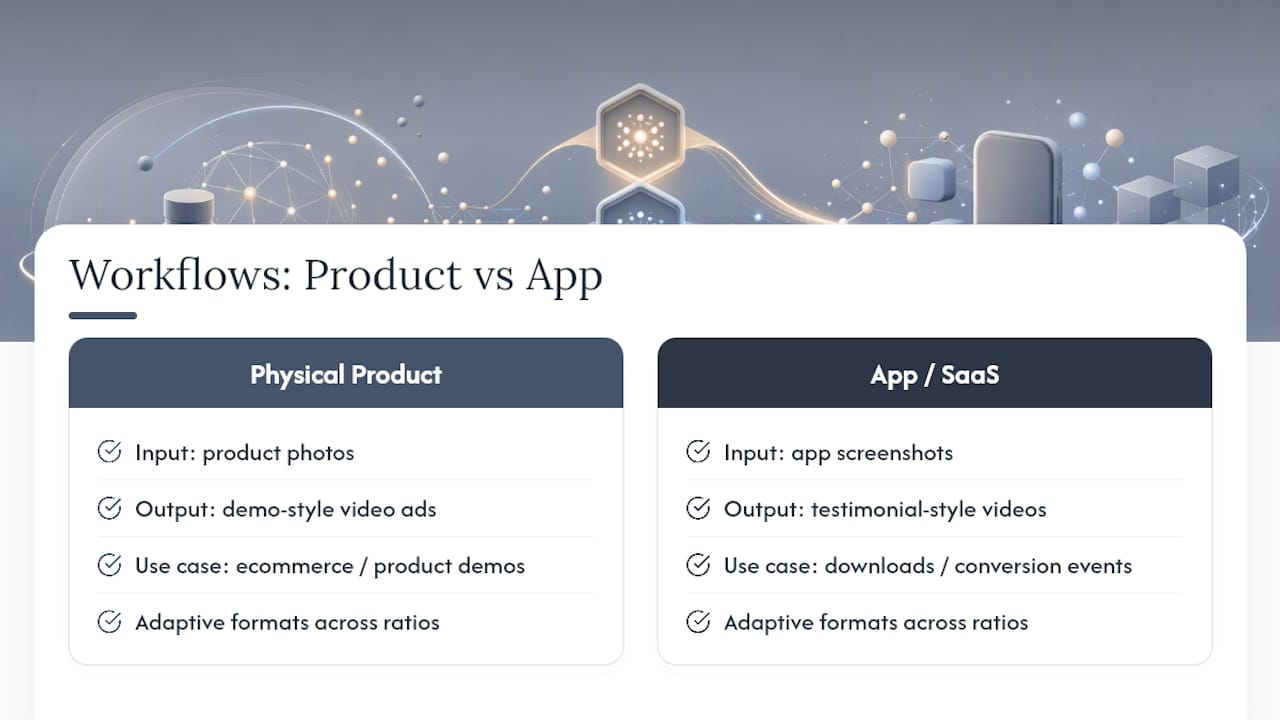
The platform generates scripts automatically and turns them into finished 9:16 video ads in 90 to 120 seconds, supporting multiple languages and customizable AI avatars. That range is illustrative, not a guarantee for every campaign.
Two dedicated workflows handle different needs. One workflow supports physical products turning product photos into demo-style ads. Another workflow builds App Store-optimized testimonial videos from screenshots, suitable for conversion events like downloads. Adaptive video formats let you push the same core script across multiple aspect ratios without rebuilding it from scratch.
Balancing Speed With Brand Oversight
Speed doesn’t excuse skipping disclosure. If a platform requires an AI label, use it. Framing AI’s role transparently tends to build more trust than hiding it. Keep humans in the loop for political, sensitive, or high-stakes messaging. Before publishing anything: check facts, confirm disclosure, match brand voice, and verify accessibility.
— Syno
Instant-ugc: From Script to Formatted Video in Minutes
Instant-ugc is the faster route from a rough idea to a published ad, skipping the gap between writing a script and actually producing the video around it. The platform generates the script and renders a finished 9:16 video from a product photo or app screenshot in the same pass, so you’re not handing a script off to a separate editor or waiting on a shoot.

That means lower cost per video, support across 17 languages for teams testing multiple markets, and 10+ avatars so you can run several creative variants without booking a single actor. For teams running the testing workflow described above, generating five new variants takes minutes, not another production cycle. Explore the AI video generator for advertising to see script and avatar options, or check multilingual video ads if you’re localizing campaigns across regions. Start a project today and have a testable variant ready before your next meeting.
Sources
- LLM-Generated Ads: From Personalization Parity to Persuasion Superiority
- Google will now tell you if an ad was made with AI | The Verge
- AI-Generated Ads in 2026: Real Brand Examples and Rules
- google-marketing-solutions/copycat
FAQ
What Are Some Good Scripts for Ads?
The strongest scripts pair a specific pain point with a fast payoff: a 15-second hook stating the problem, a benefit line, and a direct CTA outperforms vague, feature-heavy copy. UGC-style testimonial scripts tend to perform especially well because they read as authentic rather than scripted.
What Are Examples of AI Ads?
Common examples include AI-generated UGC-style testimonial videos, static poster ads with AI-written headlines, and app-install ads built from screenshots paired with a voiced script. Instant-ugc produces both product testimonial videos and app-focused ads from a single photo or screenshot.
Can You Give Me an Example of an AI Script?
A typical 15-second AI-generated script reads: “Still tired of [problem]? [Product] fixes it in [timeframe]. [Social proof]. [CTA].” The model fills in the brackets based on the product brief and target audience you provide.
Is AI Advertising Illegal?
No, AI-generated advertising is not illegal, but platforms increasingly require disclosure. Google labels ads created or edited with its generative AI tools, and Meta applies a similar “AI info” tag, so check each platform’s current labeling rules before publishing.
