
Ad Creative Brief for Marketers: Templates That Cut Revisions
Discover how a concise ad creative brief can streamline your marketing process, reduce revisions, and enhance your campaign effectiveness.
The most effective ad creative brief fits on one page, names a single measurable objective, and gives creatives exactly one key message to execute. That constraint is not a limitation — it is the brief’s entire value. Teams that use a structured, one-page format consistently see fewer revision rounds and faster first-pass approvals, according to Conversion.
Copy this mini-template into a Google Doc right now and fill it before your next ad build:
- Project name: [Campaign or ad name + version]
- Objective: [One measurable goal, e.g., “Drive app installs at a target cost per acquisition”]
- Audience + mindset: [Who they are + what they believe right now]
- Single key message: [One sentence the ad must land]
- Support/proof: [One stat, testimonial, or demo that backs the message]
- CTA + destination: [Button text + landing page URL]
- Deliverable specs: [Format, dimensions, runtime, file type]
- Deadline + revision cap: [Date + max 2 rounds]
- Success metric: [Primary KPI and target]
Pro Tip: Use this mini-template for a single ad or a quick test. For a batch of 5+ variants sharing one strategic bet, expand to the full nine-section format covered in the templates section below.
Key Takeaways
A one-page ad creative brief with a single objective, a named angle hypothesis, and a revision cap consistently produces faster approvals and more testable creative than longer, open-ended documents.
| Point | Details |
|---|---|
| One page, one objective | Keep every brief to one page; a second page usually signals unresolved strategy, not more information. |
| Research before writing | Collect 3–5 reference ads and write one angle hypothesis before filling any brief field. |
| Name the proof point | Specify the exact testimonial, stat, or demo — not a category like “social proof.” |
| Cap revisions at two rounds | State the revision limit in the brief itself; a third round signals a strategic disagreement, not a creative problem. |
| Instant-ugc for rapid variants | Use Instant-ugc to generate UGC-style video variants at $4–$7 each, turning a tight brief into a live A/B test in minutes. |
Table of Contents
- What is an ad creative brief and when should you use one?
- Key components every ad creative brief must include
- How to write an ad creative brief: a step-by-step process
- Ready templates and short copy-paste examples for different ad types
- Best practices and the most common pitfalls to avoid
- Ad-specific briefing notes: Google Ads, Meta/TikTok Reels, and paid channels
- Briefing UGC-style video ads: a practical checklist
- One-page format and length checklist: file specs, naming, and versioning
- How to measure success and iterate on your briefs
- How to align the creative brief with your overall marketing strategy
- How to gather stakeholder inputs and run the brief process efficiently
- Adapting the creative brief for social media, print, and out-of-home ads
- Why research-first briefs consistently outperform template-filling
- Instant-ugc cuts the gap between brief and live ad
- Sources
What is an ad creative brief and when should you use one?
A creative brief is a short strategic document that aligns everyone working on an ad — strategist, designer, copywriter, and client — before a single asset is built. It answers four questions in writing: what the ad must accomplish, who it is speaking to, what it must say, and what it must look like. The industry term you will see in agency settings is “creative brief,” though “ad creative brief” and “advertising brief” are used interchangeably for performance-focused work.
Use a brief in any of these situations:
- Single ad: A standalone paid social or search asset where misalignment would waste production time.
- Batch testing: A set of 3–10 variants sharing one strategic hypothesis, each with a different hook or CTA.
- UGC creator brief: A creator-facing document that gives a human or AI-generated avatar the angle, script direction, and visual references needed to film or generate a compliant asset.
- Agency client kickoff: A document the account team fills before briefing the creative team, ensuring the client’s goals survive the handoff.
Authoritative template sources — including the AMA Creative Brief Template, HubSpot’s free creative brief templates, Miro’s collaborative brief template, and Celtra’s guidance on creative briefs for effective ad campaigns — each structure these same core use cases slightly differently. The AMA leans toward brand campaigns; HubSpot covers campaign, video, and client variants; Miro emphasizes collaborative real-time editing; Celtra focuses on digital ad production specs. Knowing which format fits your use case saves you from over-engineering a brief for a simple single-ad job.
Key components every ad creative brief must include
A complete brief has twelve fields. Each one removes a decision the creative team would otherwise have to make on their own.
- Project overview: Campaign name, brand, product or feature being advertised, and the channel(s) where the ad will run.
- Objective: One measurable goal. Example prompt: “What is the single number this ad must move, and by how much?”
- Audience + mindset: Demographics plus the belief or pain the ad is interrupting. Example: “Women 28–40, Shopify store owners, currently paying $800/month for a video agency and doubting the ROI.”
- Single key message: The one sentence the viewer must remember. Example: “You can get UGC-quality video ads in under two minutes.”
- Support/proof points: The evidence that makes the key message credible. Example: “ROAS case study, before/after creative comparison, or a 15-second product demo.”
- Desired action (CTA + destination): Button copy and the exact URL. Never leave this vague.
- Tone and style: Three adjectives plus a visual reference. Example: “Confident, direct, lo-fi — reference: [link to example ad].”
- Deliverable specs: Platform, format, dimensions, runtime, and file type. See the specs snippet below.
- Mandatories: Legal disclaimers, logo placement rules, colors that cannot be changed, and any copy that must appear verbatim.
- Timeline and approval: Draft-due date, review-due date, and the names of the two or three people who must sign off.
- Budget: Production budget for this asset or batch.
- Success metric: Primary KPI (e.g., CPA, ROAS, CTR) and the secondary signal you will watch (e.g., hook rate, view-through rate).
The AMA’s fillable template covers all twelve fields and is a reliable starting point for brand and agency work.
Platform specs snippet
Paste this table directly into your brief’s deliverable specs field and delete the rows that do not apply.
How to write an ad creative brief: a step-by-step process
The brief itself takes 30–60 minutes to write well. The research that makes it useful takes 15 minutes before you open the template.
- Run a 15-minute reference workflow. Pull 3–5 in-market ads that are already working in your category. Note what hook angle each one uses, what proof point it leads with, and what CTA it closes on. This reference set, recommended by Adlibrary’s research-first template, anchors your angle hypothesis and prevents guessing.
- Fill the brief fields in order. Start with objective and audience, because every other field flows from those two. Write the single key message last — it should feel obvious once the audience mindset and proof points are clear.
- Run a 15-minute walk-through with the creative team. Read the brief aloud together. Any field that prompts a question from a designer or copywriter is a field that needs more specificity. Fix it in the room.
- Route for approvals. A typical RACI for a performance ad brief: strategy owns the brief, creative reviews it for feasibility, legal approves mandatories, and the client or brand lead signs off on objective and message. Cap approvals at two rounds — a third round usually signals an unresolved strategic disagreement, not a brief problem.
- Version and store. Save the approved brief as
[ProjectName]_Brief_v1_APPROVED.pdfand place it in the shared campaign folder alongside the reference ads. Every subsequent revision gets a new version number.
Pro Tip: If a stakeholder cannot summarize the brief’s single key message after reading it once, the message is not single enough. Run the “stranger test”: hand the brief to someone outside the project and ask them to say back the one thing the ad must communicate.
Connecting briefs to your digital asset management (DAM) system or content operations workflow, as Bynder recommends, keeps them actionable rather than filed and forgotten.
Ready templates and short copy-paste examples for different ad types
Three brief formats cover most ad production scenarios. Choose by scope, not by preference.
Single-ad quick brief (one page)
Best for a standalone paid social asset or a single Google Display creative. Fill the nine mini-template fields from the opening section. The entire document should fit on one printed page. HubSpot’s campaign brief template is a clean starting point for this format.
Filled sample — static feed ad: Objective: 40 purchases at a target cost per acquisition. Audience: Shopify store owners, 25–45, currently spending $500+ on video production. Specs: 1:1 MP4, 15s, 4 GB max. Deadline: Friday. Revisions: 2 rounds max.
Batch/test brief (multi-ad)
Use this when you are generating 5–10 variants to test a single strategic hypothesis. Add one field to the standard template: “Shared bet” — the one claim all variants test. Then list each variant’s hook angle as a sub-row. This structure keeps the batch coherent and makes post-test analysis straightforward.
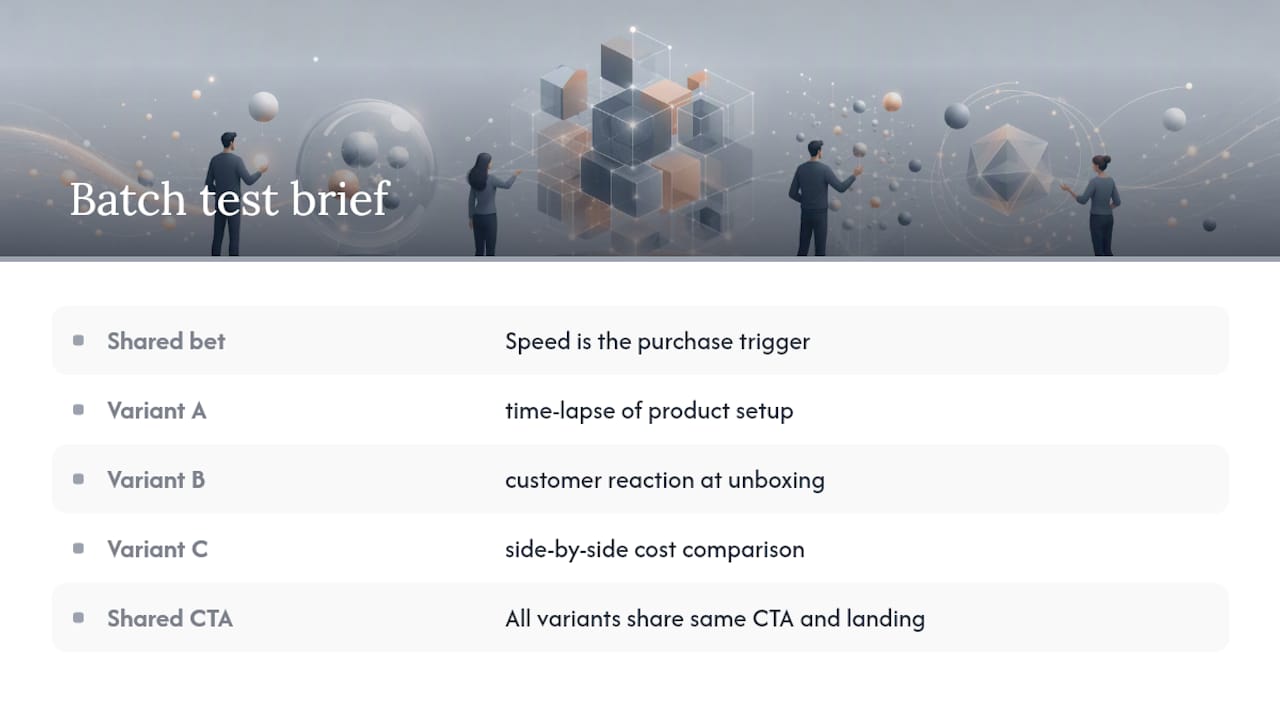
Filled sample — 15-second Reel batch: Shared bet: “Speed is the purchase trigger for this audience.” Variant A hook: time-lapse of product setup. Variant B hook: customer reaction at unboxing. Variant C hook: side-by-side cost comparison. All variants share the same CTA and landing page.
UGC creator brief
This format is written for a human creator or an AI avatar workflow. Replace “tone and style” with “wardrobe, setting, and pacing notes.” Add a “Script direction” field that gives the opening line verbatim and the emotional arc (problem → solution → proof → CTA). For guidance on creator-facing brief fields, the Instant-ugc guide to briefing UGC creators covers the specific language and structure that gets compliant, on-brand takes.
Miro’s two-page template works well for UGC briefs because the collaborative canvas lets you embed reference video links directly alongside the fields.
Best practices and the most common pitfalls to avoid
The single-page constraint is not a style preference — it is a quality signal. Miro’s guidance states that briefs longer than two pages risk scope creep, and multiple template providers note that a brief exceeding two pages usually means the strategy is not resolved yet. If you cannot fit the brief on one page, you have not made enough decisions.
Do:
- Write one objective. If two stakeholders each want a different primary KPI, resolve that conflict before the brief is written, not inside it.
- Name the proof point you will actually use — not “social proof” but “the specific testimonial from [customer name] about [specific result].”
- Attach 3–5 reference ads to every brief. References communicate tone and pacing faster than any adjective.
- Set a revision cap in the brief itself. Two rounds is the professional standard.
Don’t:
- Write a vague audience description (“women who like fitness”). Name the mindset: what does this person believe right now that the ad must shift?
- Leave deliverable specs blank. Missing specs are the single most common cause of last-minute rework.
- Use the brief to document every possible creative direction. One direction per brief. Variations belong in a batch brief with a shared bet.
- Let the brief grow into a strategy document. If a field needs more than two sentences, it belongs in a separate strategy deck.
Pro Tip: Adverdly’s one-page brief format recommends opening every paid-ad brief with “the one job” — a single sentence that names what the ad must make the viewer do or believe. Write that sentence first, before any other field, and let it filter every decision that follows.
Ad-specific briefing notes: Google Ads, Meta/TikTok Reels, and paid channels
Channel constraints are not afterthoughts — they shape the creative strategy. A brief that ignores platform mechanics produces assets that technically run but underperform.
Channel specs and creative constraints
For short-form video and Reels, the brief must specify the a clear indication of the critical opening moment, total runtime limits, captions usage, and sound expectations — per Adlibrary’s research-first brief structure.
A/B test planning in the brief
When a brief covers a test batch, name exactly one variable per variant. Valid test variables:
- Hook angle: Problem-led vs. benefit-led vs. social proof opening.
- CTA copy: “Start free trial” vs. “See how it works” vs. “Get yours today.”
- Thumbnail or first frame: Face-to-camera vs. product close-up vs. text card.
Never change hook and CTA in the same variant — you will not know which variable drove the result.
Google Ads specifics
For responsive search ads, the brief should list the top three headline themes and flag which one carries the primary key message. For Google Display, specify whether the creative is static or animated (HTML5 vs.
Briefing UGC-style video ads: a practical checklist
UGC-style video briefs differ from standard production briefs in one important way: the creator (human or AI) needs enough direction to feel authentic, but not so much that the output sounds scripted. The brief must give the angle, not the performance.
Use this checklist for every UGC-style video brief:
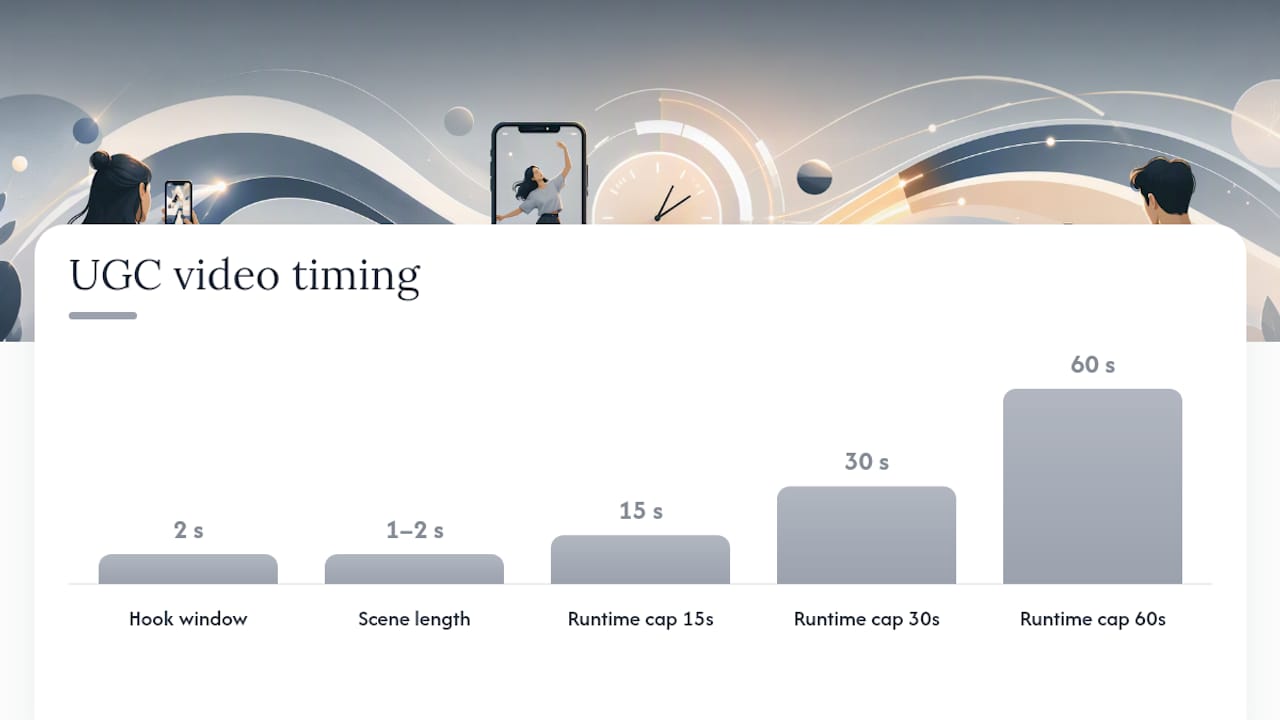
- Hook angle: Name the specific problem or emotion the first 2 seconds must trigger. Example: “Open with visible frustration at a slow checkout process.”
- Opening line (verbatim or near-verbatim): Give the first sentence. Creators who improvise the opening usually bury the hook.
- Reference UGC examples: Link 2–3 existing ads with the right pacing and energy. Pacing is nearly impossible to describe in words.
- Wardrobe and setting notes: Casual home setting vs. office vs. outdoor. Specify what to avoid (branded clothing, cluttered backgrounds).
- Pacing: Fast-cut (1–2s per scene) vs. single-take talking head. State this explicitly.
- Captions: Required or optional, and whether they should be auto-styled or match brand fonts.
- Runtime cap: 15s, 30s, or 60s. State the hard cap, not a range.
- CTA delivery: Spoken, on-screen text, or both.
- Revision cap: Two rounds maximum for UGC-style assets.
When to use UGC-style briefs vs. agency-produced assets: UGC briefs are the right call when you need 5+ variants for A/B testing, when the brand voice is conversational, or when production speed matters more than production polish. Agency-produced assets make sense for brand campaigns, broadcast placements, or any context where legal review of every frame is required. For rapid creative testing on Meta Ads, UGC-style briefs paired with fast generation workflows consistently outperform polished single-asset approaches on cost per result.
Pro Tip: Before writing the UGC brief, spend 10 minutes in the ad library for your category and collect 3–5 top-performing UGC ads. Write one sentence per ad describing the angle hypothesis it is testing. That sentence becomes the “angle hypothesis” field in your brief — the single bet the creative is designed to prove or disprove.
One-page format and length checklist: file specs, naming, and versioning
A brief that arrives without file specs or a naming convention creates a second round of back-and-forth that the brief was supposed to prevent.
- Confirm dimensions and codec before writing the brief. Pull the current platform spec sheet (Meta, TikTok, Google) and paste the relevant row into the deliverable specs field.
- Set a max file size for every deliverable. Add it to the brief so the editor knows the compression target before they start.
- Name the brief file using this pattern:
[Brand]_[Campaign]_Brief_v[#]_[Status].pdf. Example:AcmeCo_SummerLaunch_Brief_v1_DRAFT.pdf→AcmeCo_SummerLaunch_Brief_v1_APPROVED.pdf. - Name deliverable files using:
[Brand]_[AdName]_[Format]_[Dimensions]_v[#].mp4. Example:AcmeCo_HookA_Reel_1080x1920_v2.mp4. - Store briefs and assets together in a shared folder structure:
/Campaigns/[CampaignName]/Brief/and/Campaigns/[CampaignName]/Assets/Final/. - Cap revisions at two rounds. State this in the brief. A third revision round is a signal to revisit the brief, not the creative.
File naming conventions matter most in batch testing, where 10+ variants can become indistinguishable without a clear system. Agency-ready brief templates with structured metadata fields, like those recommended by Getsagely, also allow AI tools to parse brief fields automatically — useful if you are feeding briefs into an AI video generation workflow.
Recommended brief length: One page for single ads and UGC creator briefs. Two pages maximum for batch campaigns or briefs that include a full reference set. Anything longer is a strategy document.
How to measure success and iterate on your briefs
Setting KPIs in the brief is not optional. A brief without a success metric is a production order, not a strategic document.
Primary vs. secondary KPIs
| KPI type | Examples | When to use |
|---|---|---|
| Primary | CPA, ROAS, CTR | The single number that determines if the ad worked |
| Secondary | Hook rate, view-through rate (VTR), thumb-stop ratio | Diagnostic signals that explain why the primary KPI moved |
Set one primary KPI per brief. Secondary KPIs help you understand the mechanism — a low hook rate with a high CTR tells you the ad is working for the small audience that stays, but the opening is losing most viewers.
Testing plan and iteration loop
- Set a minimum sample size before calling a test. For most paid social campaigns, 500–1,000 impressions per variant is a reasonable floor for directional signal, though statistical significance requires more.
- Run one variable per test. Change the hook, or the CTA, or the thumbnail — not all three.
- Score each variant against the primary KPI at the end of the test window.
- Update the brief with the winning angle hypothesis before the next batch. The brief is a living document, not a one-time artifact.
The iteration loop looks like this: brief → build → score → ship → analyze → update brief. Each cycle tightens the angle hypothesis and improves the next brief’s first-pass acceptance rate. Pairing this loop with AI-driven creative testing workflows accelerates the cycle significantly, because variant generation no longer bottlenecks on production time.
How to align the creative brief with your overall marketing strategy
A brief that contradicts the brand’s quarterly goals creates exactly the kind of misalignment it was designed to prevent. Alignment happens at two levels: strategic and executional.
At the strategic level, the brief’s objective field must trace directly to a campaign goal, which must trace to a business goal. If the business goal is customer acquisition and the campaign goal is app installs, the brief’s objective should name a CPA target for app installs — not brand awareness metrics. This chain of logic should be visible in the brief itself, even if it is just a one-line “campaign context” field at the top.
At the executional level, the brief’s tone, message, and visual references must be consistent with the brand’s current positioning. A brief that introduces a new claim the brand has never made elsewhere creates legal and brand risk. The mandatories field is where you enforce this: list the claims the brand has approved, the claims it has not, and any regulatory language required.
One practical alignment check: before finalizing the brief, confirm that the single key message could appear verbatim in the brand’s current paid media without sounding off-brand. If it could not, the message needs revision before the brief is approved.
How to gather stakeholder inputs and run the brief process efficiently
The brief process fails most often not in the writing, but in the input-gathering stage. Stakeholders who are not consulted before the brief is written will surface their requirements during creative review — which is the most expensive place to make strategic changes.
Run a 30-minute input session before writing the brief. The agenda has three questions: What must this ad accomplish? Who is it for, and what do they currently believe? What proof do we have that our claim is true? Those three answers give you the objective, audience mindset, and proof point — the three fields that drive every other decision in the brief.
For larger campaigns, use an async input form (a shared Google Doc or Notion template) that stakeholders fill before the session. This surfaces disagreements in writing, where they are easier to resolve, rather than in a live meeting where social dynamics can suppress dissent.
Limit the approval chain to three people maximum. Every additional approver adds a round of revisions. Name the approvers in the brief itself, with their specific scope: legal approves mandatories, the brand lead approves message, the media buyer approves specs. No one approves everything.
Adapting the creative brief for social media, print, and out-of-home ads
The core brief structure stays the same across channels. What changes is the deliverable specs field and the constraints that shape the creative direction.
Social media (organic and paid): The brief needs a platform field that specifies feed vs. Stories vs. Reels, because the creative constraints differ even within one platform. Instagram feed tolerates longer captions; Stories requires the key message in the first frame. For paid social, add the audience targeting parameters as a reference field — knowing the targeting helps the creative team write to the right awareness level.
Print: Print briefs need bleed dimensions, color mode (CMYK, not RGB), and the print vendor’s file specifications. The “deliverable specs” field should include resolution (300 DPI minimum for most print), trim size, and safe zone margins. Print also requires a longer mandatories section, because legal copy, trademark symbols, and regulatory statements are harder to update after a print run than in a digital asset.
Out-of-home (OOH): OOH briefs have one constraint that overrides all others: the five-second rule. A billboard or transit ad must communicate its single key message in five seconds or less, because most viewers are moving. The brief’s “single key message” field should be tested against this constraint before the brief is approved — if the message requires more than seven words to land, it needs to be simplified. OOH briefs also need location context (highway vs. urban transit vs. airport) because viewing distance and dwell time vary significantly.
For SaaS and app products, the channel adaptation that matters most is the shift from feature-led messaging (common in print and display) to outcome-led messaging (required in short-form video and social). The brief’s key message field should reflect this: “Automates your reporting” works in a display ad; “See your results in 90 seconds” works in a Reel.
Why research-first briefs consistently outperform template-filling
Most teams treat the brief as a form to fill after the strategy is set. The teams that produce better creative consistently treat the brief as the place where strategy gets made — and they start with research, not with fields.
The difference shows up in the angle hypothesis field. A brief that names a specific, testable angle (“this ad bets that speed is the purchase trigger for this audience”) gives the creative team a hypothesis to prove or disprove. A brief that says “highlight our key features” gives them a production order. The first brief produces a creative asset that teaches you something. The second produces an asset that may or may not work, and you will not know why either way.
The 15-minute reference workflow described in the how-to section is the fastest way to get to a real angle hypothesis. Pull 3–5 ads that are already working in your category, note the angle each one is testing, and ask which angle your brand has not yet tried. That gap is your brief’s starting point. Try the mini-template from the opening of this article on your next live ad, and run the reference workflow before you fill a single field.
Instant-ugc cuts the gap between brief and live ad
Writing a tight brief is only half the work. The other half is generating enough variants to actually test the angle hypothesis — and that is where production speed becomes a real constraint. Traditional UGC video production runs $500–$2,000 per video and takes 2–3 weeks. For a five-variant A/B test, that timeline kills the brief’s value before the test even runs.

Instant-ugc solves the production bottleneck directly. Upload a product photo or app screenshot, select from 10+ customizable AI avatars, and the platform generates a UGC-style video ad in 90–120 seconds, with automatic script generation built in. Videos are delivered in 9:16 format, ready for Meta, TikTok, and the App Store, across 17 languages. At $4–$7 per video, you can generate a full five-variant test batch for less than the cost of a single traditionally produced asset. Brands using the platform have reported notable ROAS improvements when pairing tight briefs with rapid creative cycles. If your brief is ready and your angle hypothesis is named, generate your first AI video ad and get the test running today.
Sources
The sources below are vetted for structure, authority, and practical usability. Each one serves a slightly different scenario.
- AMA Creative Brief Template - American Marketing Association
- Free Creative Brief Templates | HubSpot
- FREE Creative Brief Template | Miro
- Ad Creative Brief Template: Copy-Paste Template & Guide (2026)
- Creative Brief 2026: The Research-First Template
- How to write a creative brief that gets you ads worth running | Adverdly
Which template to pick:
Recommended
- AI Ad Creative Testing | Fast A/B Testing | Instant-UGC
- How to Brief UGC Creators: The Complete Guide for Brand Success | Instant-UGC Blog
- Reducing Content Costs for Baby Products with AI: A Practical Playbook for Marketers | Instant-UGC Blog
- Renderforest Alternative for UGC Videos | E-commerce Focused | Instant-UGC
